
Announcement

Collapse
No announcement yet.

Partner 728x90

Collapse

Identifying Stops and Targets across multiple ATM entries

Collapse
X
 
  • Filter
  • Time
  • Show
Clear All
new posts

    Identifying Stops and Targets across multiple ATM entries

    Hi,

    I want to track my targets/stops to their actual entry, I'm entering via ATMs. It seems like there's no way to do this other than within an individual ATM?

    I know with an ATM placed entry, I can right click and see stop 1 target 1 and so on, and thus know what's what.

    However once I place another order via ATM there's not really anything to distinguish these stops and targets from the first ATM entry. They are likewise labeled relative to the their own ATM, i.e. stop 1 target 1 etc.

    Is there anyway to do this or any other suggestions? Basically what I want to do is scale in, then scale out in by getting rid of the oldest entries before the newer ones.

    thanks!

    #2
    Hello ntcoder256,

    Thanks for your post.

    To clarify, are you manually submitting orders with ATM Strategy templates?

    Or, are you using a custom NinjaScript strategy that uses Atm Strategy Methods to place an entry order that control protective orders using an ATM Strategy template?

    ATM Strategy templates will always submit stops and targets using names such as Stop 1, Target 1, etc. and there would not be means available for giving the stops/targets unique names to distinguish which ATM Strategy they are from.

    If you want to give stops/targets unique names, you could consider using Set methods or Exit methods in a custom NinjaScript for placing/handling stops and targets instead of using ATM Strategy templates.

    Note that all of the NinjaTrader order entry interfaces preserve FIFO (First In First Out) status with the exchanges when possible.

    FIFO: https://ninjatrader.com/support/help...timization.htm

    This reference sample can help with scaling in and out of a strategy that does not use Atm Strategy Methods.
    https://ninjatrader.com/support/helpGuides/nt8/en-us/scaling_out_of_a_position.htm

    This sample can assist further with managing multiple exit/entry signals:
    https://ninjatrader.com/support/helpGuides/nt8/en-us/using_multiple_entry_exit_sign.htm
    <span class="name">Brandon H.</span><span class="title">NinjaTrader Customer Service</span><iframe name="sig" id="sigFrame" src="/support/forum/core/clientscript/Signature/signature.php" frameborder="0" border="0" cellspacing="0" style="border-style: none;width: 100%; height: 120px;"></iframe>

    Comment


      #3
      Originally posted by NinjaTrader_BrandonH View Post
      Hello ntcoder256,

      Thanks for your post.

      To clarify, are you manually submitting orders with ATM Strategy templates?
      ;
      Yes, manually. So as you answered that already thanks. Sounds like maybe I'll need to give the ninja script method a look thank you for that and related links

      Comment


        #4
        Originally posted by ntcoder256 View Post

        Yes, manually. So as you answered that already thanks. Sounds like maybe I'll need to give the ninja script method a look thank you for that and related links
        Were you able to find something? I was looking for the same. Identifying multiple manual atm orders, to see quickly which orders belong together.

        Comment


          #5
          Like NinjaTrader_BrandonH​ says
          ATM Strategy templates will always submit stops and targets using names such as Stop 1, Target 1, etc. and there would not be means available for giving the stops/targets unique names to distinguish which ATM Strategy they are from.

          That being true, a workaround may be used in some cases with the next. you could possibly Identifying Stops and Targets across multiple ATM entries by combining the following:
          Code:
          protected override void OnBarUpdate()
          {
                      AtmStrategyChangeStopTarget(0, SMA(10)[0], "Stop1", "AtmIdValue");
          }
          Syntax
          AtmStrategyChangeStopTarget(double limitPrice, double stopPrice, string orderName, string atmStrategyId)
          the OrderName and the atmStrategyId , from the online NinjaTrader UserGuide.
          Hope it helps some.
          ​​

          Comment


            #6
            Hello Community,

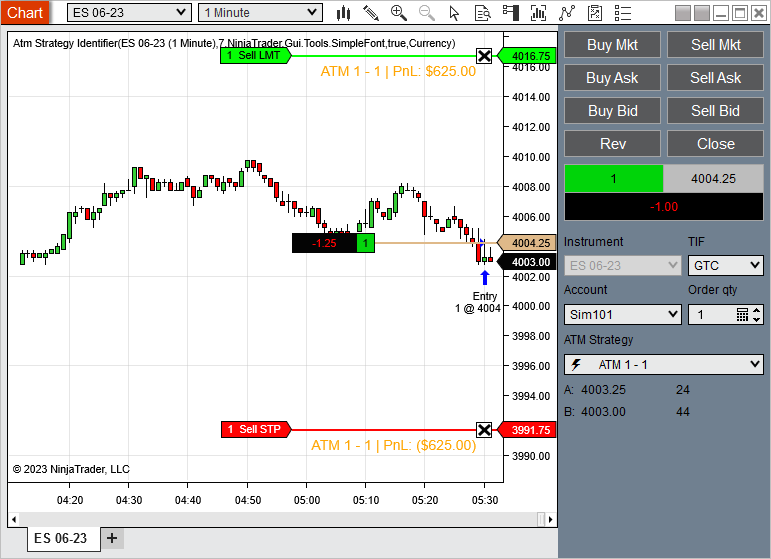
            Have you tried the AtmStrategyIdentifier script from the User App Share?
            This indicator serves to provide labels for Atm strategies that are present on your chart. Each new Atm strategy will rotate through the colors defined in your Brush Collection. Simply add to a chart, select the data series you want to have labels added to, choose your font and add all the brushes/colors you want [&#8230;]
            Chelsea B.NinjaTrader Customer Service

            Comment

            Latest Posts

            Collapse

            Topics Statistics Last Post
            Started by argusthome, 03-08-2026, 10:06 AM
            0 responses
            65 views
            0 likes
            Last Post argusthome  
            Started by NabilKhattabi, 03-06-2026, 11:18 AM
            0 responses
            41 views
            0 likes
            Last Post NabilKhattabi  
            Started by Deep42, 03-06-2026, 12:28 AM
            0 responses
            23 views
            0 likes
            Last Post Deep42
            by Deep42
             
            Started by TheRealMorford, 03-05-2026, 06:15 PM
            0 responses
            26 views
            0 likes
            Last Post TheRealMorford  
            Started by Mindset, 02-28-2026, 06:16 AM
            0 responses
            52 views
            0 likes
            Last Post Mindset
            by Mindset
             
            Working...
            X