Announcement
Collapse
No announcement yet.
Partner 728x90
Collapse
NinjaTrader
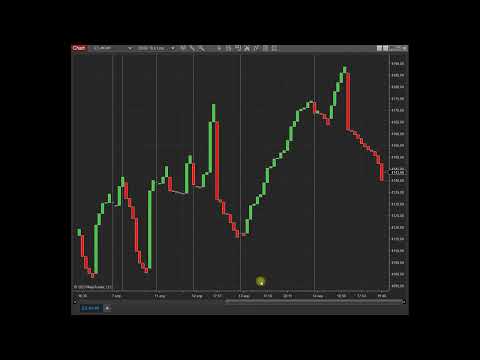
LineBreak 6 Tick 20000
Collapse
X
-
Hi Webus, It looks like this may be caused my something specific to your running environment. Please try testing this in a new environment.
To create a clean temporary NinjaTrader folder:- Shutdown NinjaTrader
- Rename (My) Documents\NinjaTrader 8\ to (My) Documents\NinjaTrader 8.original\
- Log into your user dashboard and click "Download" at the bottom left of the page to download the latest installer, run this installer while NinjaTrader is closed
https://account.ninjatrader.com/welcome - Run the repair from this (if the repair is unsuccessful, uninstall and then re-install NinjaTrader)
Try testing for the behavior in a new environment.
To switch back to your original environment:- Shutdown NinjaTrader
- Rename (My) Documents\NinjaTrader 8 to (My) Documents\NinjaTrader 8.secondary\
- Rename (My) Documents\NinjaTrader 8.original to (My) Documents\NinjaTrader 8\
- Start NinjaTrader
-
now everything is lost. How I can conenct to the Kinetick?Originally posted by NinjaTrader_ChrisL View PostHi Webus, It looks like this may be caused my something specific to your running environment. Please try testing this in a new environment.
To create a clean temporary NinjaTrader folder:- Shutdown NinjaTrader
- Rename (My) Documents\NinjaTrader 8\ to (My) Documents\NinjaTrader 8.original\
- Log into your user dashboard and click "Download" at the bottom left of the page to download the latest installer, run this installer while NinjaTrader is closed
https://account.ninjatrader.com/welcome - Run the repair from this (if the repair is unsuccessful, uninstall and then re-install NinjaTrader)
Try testing for the behavior in a new environment.
To switch back to your original environment:- Shutdown NinjaTrader
- Rename (My) Documents\NinjaTrader 8 to (My) Documents\NinjaTrader 8.secondary\
- Rename (My) Documents\NinjaTrader 8.original to (My) Documents\NinjaTrader 8\
- Start NinjaTrader
Comment
-
Hi webus, please go to the Windows Control Panel>Uninstall a Program>Repair the Ninjatrader 8 installation. This should remove the compile errors you are seeing. To enable your Kinetick account, go to Tools>Options>enable "Multi Provider" and after this you should see your Kinetick connection. The login screen is required so that the platform servers know who is logging in so it can not be disabled.
Comment
-
Ok, I got my documents folder back. I was unable to resolve the issue in the new folder. As soon as I returned the old folder back, the chart started loading correctly.
The freezing problem persisted even in the updated version of the platform. However, I noticed a pattern. The chart doesn't freeze if I don't open the Date Box. As soon as I open the date box, the chart hangs for 10 seconds. Do you have any ideas?
Comment
-
On the new folder, I do not know why you can not load a chart. You need to be connected to your data provider and also let me know more details about the issue. At what point can the chart not be loaded? Does it get stuck loading? Unfortunately I do not have any other suggestions about how to fix this, using the clean user folder will be the tell all if the issue is specific to your currently running environment or possible faulty graphics hardware.
Comment
Latest Posts
Collapse
| Topics | Statistics | Last Post | ||
|---|---|---|---|---|
|
Started by Geovanny Suaza, 02-11-2026, 06:32 PM
|
0 responses
647 views
0 likes
|
Last Post
|
||
|
Started by Geovanny Suaza, 02-11-2026, 05:51 PM
|
0 responses
369 views
1 like
|
Last Post
|
||
|
Started by Mindset, 02-09-2026, 11:44 AM
|
0 responses
108 views
0 likes
|
Last Post
by Mindset
02-09-2026, 11:44 AM
|
||
|
Started by Geovanny Suaza, 02-02-2026, 12:30 PM
|
0 responses
572 views
1 like
|
Last Post
|
||
|
Started by RFrosty, 01-28-2026, 06:49 PM
|
0 responses
573 views
1 like
|
Last Post
by RFrosty
01-28-2026, 06:49 PM
|

Comment