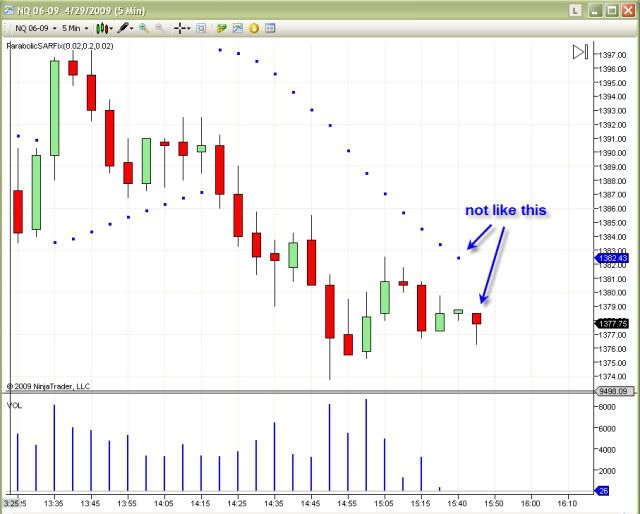
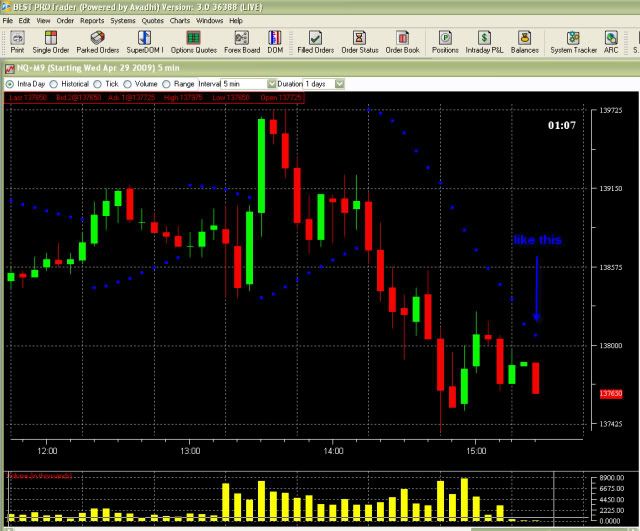
PSAR values are not rounded to tick size. Ex: 100.229 will show up as 100.23 in the data box, but in comparing if it touched price, 100.229 has not touched 100.23.
Announcement
Collapse
No announcement yet.
Partner 728x90
Collapse
NinjaTrader
Please fix Parabolic SAR once and for all!
Collapse
X
-
The version we released is accurate as we see it. kocmodpom you are referencing a reverse that should have occurred in post #21. When a new bar is built the PSAR comes down due to the accelerator. The new value ends up below the high of the bar and as such a reversal is done.
PSAR values are not rounded to tick size. Ex: 100.229 will show up as 100.23 in the data box, but in comparing if it touched price, 100.229 has not touched 100.23.Josh P.NinjaTrader Customer Service
-
-
Psar
Hello Josh,
I did get a strategy on ParabolicSAR a while back from somewhere in the site. However, that strategy contained the old ParabolicSAR indicator, also, it always reversed on the next bar, instead of reversing as it happened. Eventhough, I changed the CalculateOnBarClose to false, it still did not work. Could you please take a look at it and see if you can fix this problem in the strategy and replace the indicator in the strategy with the latest one (ParabolicSARFix). I have attached the old Strategy and the new PArabolicSARFix for your reference.
Comment
-
Changing which Parabolic it uses is super easy. Just open the strategy up in strategy editor and replace every instance of the original indicator with the improved one.Originally posted by keepdchange View PostHello Josh,
I did get a strategy on ParabolicSAR a while back from somewhere in the site. However, that strategy contained the old ParabolicSAR indicator, also, it always reversed on the next bar, instead of reversing as it happened. Eventhough, I changed the CalculateOnBarClose to false, it still did not work. Could you please take a look at it and see if you can fix this problem in the strategy and replace the indicator in the strategy with the latest one (ParabolicSARFix). I have attached the old Strategy and the new PArabolicSARFix for your reference.
As for getting it to reverse now instead of later, I think that has to do with the one bar lag the indicator has.
Comment
-
Hi kocmodpom, thanks for the input, that's the way to go...CalculateOnBarClose will only have an effect in realtime, for backtesting you can use the concept of this reference sample for simulating intrabar fills - http://www.ninjatrader-support2.com/...ead.php?t=6652
Comment
-
OK the calculate on barclose set to false does allow the Parabolic to be calculated on the current bar exactly like I wanted.
Now the problem is when I am backtesting a strategy, the entry and exits are still referencing the previous bar since when it flips the dot is no longer on that side of the bar but on the other side. This seems to be the biggest reason why the strategy doesn't give the correct results. How can I solve this in back testing?
Comment
-
kocmodpom,
You can ONLY trade on the next bar's open or later when backtesting. Reason for this is because when you evaluated your bars and your indicator values on a given bar, that bar was already closed. Being closed, you cannot trade anywhere on that bar. The next possible trading spot is the next bar's open and that is why your trades show up there.
You have a signal bar and a trade bar. The signal bar is where you get all your comparisons from. The actual order is placed on the trade bar which is the next bar.Josh P.NinjaTrader Customer Service
Comment
Latest Posts
Collapse
| Topics | Statistics | Last Post | ||
|---|---|---|---|---|
|
Started by Geovanny Suaza, 02-11-2026, 06:32 PM
|
0 responses
647 views
0 likes
|
Last Post
|
||
|
Started by Geovanny Suaza, 02-11-2026, 05:51 PM
|
0 responses
367 views
1 like
|
Last Post
|
||
|
Started by Mindset, 02-09-2026, 11:44 AM
|
0 responses
108 views
0 likes
|
Last Post
by Mindset
02-09-2026, 11:44 AM
|
||
|
Started by Geovanny Suaza, 02-02-2026, 12:30 PM
|
0 responses
571 views
1 like
|
Last Post
|
||
|
Started by RFrosty, 01-28-2026, 06:49 PM
|
0 responses
573 views
1 like
|
Last Post
by RFrosty
01-28-2026, 06:49 PM
|


Comment