
When selecting an alternate Input Dataseries for an Indicator, on the little screen that also allows selection of an indicator for Indicator-on-Indicator, I would like to see a very simple enhancement done...
Please enable the use of double-click to allow selection of an entry without having to click on "OK".
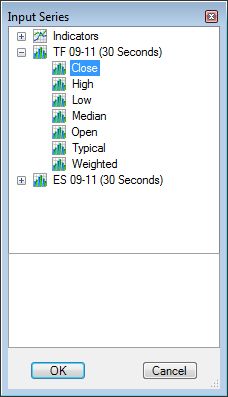
On the above screen, one could click on "Low" and then "OK". I would like to see double-click on "Low" do the same thing.
And to select "Close" for the "ES 09-11 (30-Seconds)" dataseries, once would have to first click on the "+", then click on "Close", then click on "OK". I would like to see just a double click on "ES 09-11 (30-Seconds)" (or on it's icon) accomplish the same thing (i.e., just default to "Close" for a dataseries, unless one clicks the "+" first.)
Not a big deal, but not expensive programmer-time-wise to add, either.
I just find myself going through this extra step all the time (sometimes multiple times each time I configure a single chart) so I've been wishing the process were more efficient. So if someone there has an extra few minutes sometime...
Please enable the use of double-click to allow selection of an entry without having to click on "OK".
On the above screen, one could click on "Low" and then "OK". I would like to see double-click on "Low" do the same thing.
And to select "Close" for the "ES 09-11 (30-Seconds)" dataseries, once would have to first click on the "+", then click on "Close", then click on "OK". I would like to see just a double click on "ES 09-11 (30-Seconds)" (or on it's icon) accomplish the same thing (i.e., just default to "Close" for a dataseries, unless one clicks the "+" first.)
Not a big deal, but not expensive programmer-time-wise to add, either.
I just find myself going through this extra step all the time (sometimes multiple times each time I configure a single chart) so I've been wishing the process were more efficient. So if someone there has an extra few minutes sometime...

Comment