
It looks like we may need more information than we can see in a screenshot. I believe we should try a different approach. Since the screenshots we are reviewing do not contain enough information to verify whether a price better than 12033.5 was reached, how were you able to determine this?
-
Jessica P.NinjaTrader Customer Service -
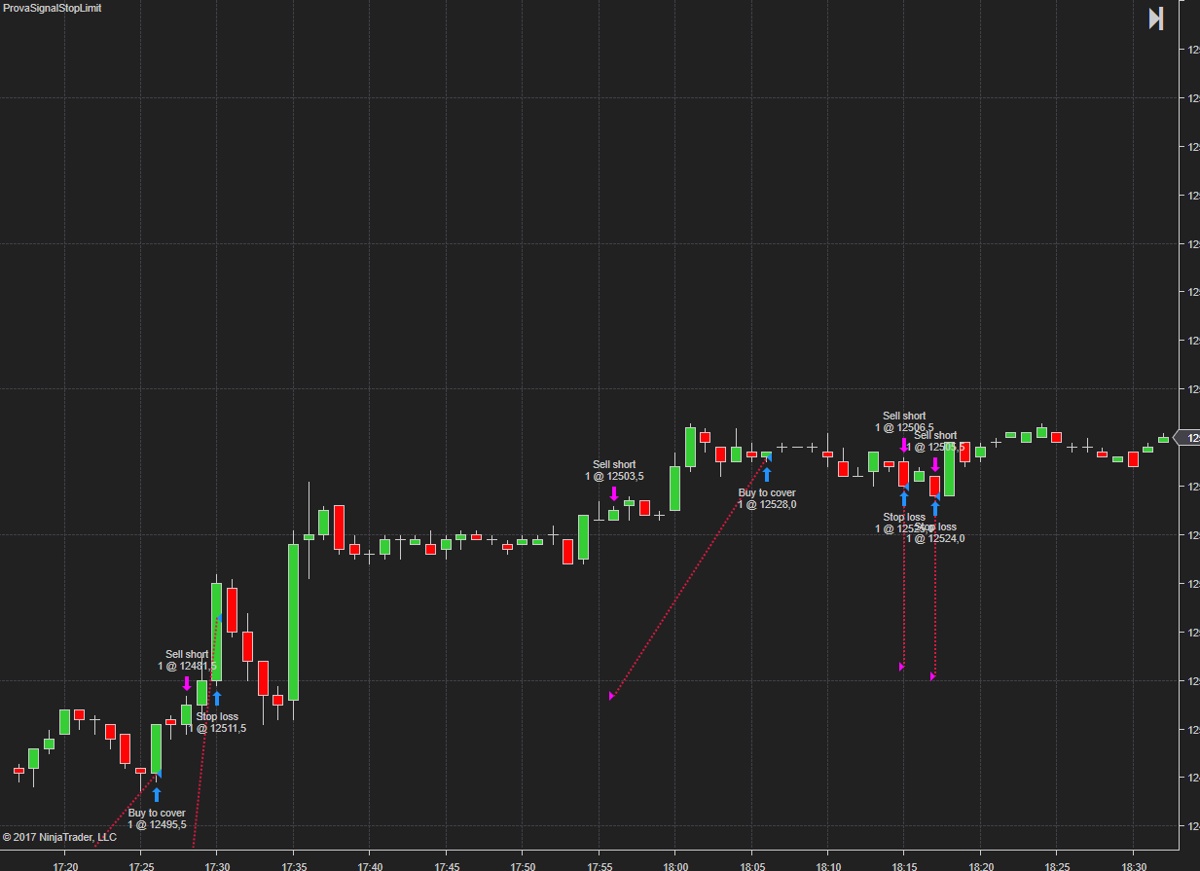
Look pics...
Point A....(where there is arrow)
and Point B (where the signal entry . )
My question is :
Is correct that the arrow is site under point A ?
(it will must to be under point B )Attached FilesLast edited by esignal; 04-28-2017, 03:46 PM.Comment
-
-
it is the last trade of this day..
it entry to 12441.5 short but the price does not reach it..
this is a problemAttached FilesComment
-
-
I appreciate your patience with this process. The pictures you are sending our way do not contain enough information to accurately determine prices. Were you reviewing logs or other pictures to make this determination?
I noticed you were able to make code changes, and retest, and generate new pictures based on these code changes. I am assuming you used the market replay connection to accomplish this. Instead of sending pictures, can you let us know which instrument you were trading and on what day, and send us a screen shot of your data series window (select a chart -> ctrl + f)Jessica P.NinjaTrader Customer ServiceComment
-
No...it'is not market replay..
Is continuum connection
i write a little code for you...
The result is similar
See this code...the problem is the same..
(Fdax 06-17 1 minute frame)Attached FilesComment
-
-
Thank you esignal. Since you are not using the Market Replay connection, can I ask how you are reliably reproducing the same market conditions, so that I may test the same way on my end that you are on yours and see the same thing on my end that you are seeing on yours? Are you saying this happens during historical data processing? This will help me give you better answers.Jessica P.NinjaTrader Customer ServiceComment
-
It looks like you may need to clean out your cache files and reset your database on your end. To do so :
- Shut down NinjaTrader 8
- Delete the contents of your (My) Documents\NinjaTrader 8\db\cache folder
- Copy your (My) Documents\NinjaTrader 8\db\NinjaTrader.sdf file to another location as a back-up
- Restart NinjaTrader holding down the ctrl key on your keyboard
- In the Tools -> Database menu, in the Reset DB section, check both boxes and press Reset, Yes, and OK
- In the Tools -> Database menu, in the Update Instruments section, check all the boxes and press Update
- Restart NinjaTrader 8
Please let us know if this continues after this procedure.Last edited by NinjaTrader_JessicaP; 05-02-2017, 09:42 AM.Jessica P.NinjaTrader Customer ServiceComment
-
The problem is not solve..
i following your instruction but the problem is the same..
Comment
-
I was able to verify this behavior on my end and determine the cause. I appreciate your patience with the troubleshooting process. Execution markers to answer your earlier question are not supposed to typically plot at prices that were never reached, which is why this was difficult to track down. However in this case there is an explanation.
Orders follow the adage "buy low, sell high" . A limit order fills at the specified price or better, and a stop order fills on the opposite side of the market from a limit order. A stop limit order places a limit order once a stop price has been reached. Therefore, when you write
Keeping in mind that you are specifying a value of 10 points - because you are not enteringCode:EnterShortStopLimit(High[0]-10,High[0]);
as advised earlier - this places your stop limit order well below the bar, as shown. Stop prices below the last traded price for short orders will trigger immediately when placed, and this stop price is the price being plotted on your chart. Because your limit price is the high price for the bar, this price will always be reached during historical bar processing, and this is why your fill price is displaying correctly.Code:EnterShortStopLimit(High[0]-10 [B]* TickSize[/B],High[0]);
To correct this behavior I recommend specifying price offsets in ticks instead of points.
Please let us know if there are any other ways we can help.Jessica P.NinjaTrader Customer ServiceComment
-
you write :
i try to write
To correct this behavior I recommend specifying price offsets in ticks instead of points.
if (CurrentBar < 10) return;
if (High[0] > High[10] && Position.MarketPosition==MarketPosition.Flat)
{
EnterShortStopLimit(High[0]-40*TickSize,High[0]);
SetStopLoss(CalculationMode.Price, High[0]+10);
}
if ((Low[0] < Low[10] && Position.MarketPosition == MarketPosition.Flat))
{
EnterShortStopLimit(Low[0] -40*TickSize, Low[0]);
SetStopLoss(CalculationMode.Price, Low[0] - 10);
}
if (Position.MarketPosition != MarketPosition.Flat && BarsSinceEntryExecution() > 8)
{
ExitLong();
ExitShort();
// stopLoss = 0;
//Print("stop loss Time[0]" + Time[0]);
}
but it don't solve the probem
Last edited by esignal; 05-03-2017, 05:29 AM.Comment
-
I noticed you kept a 40 tick below (intentionally below your candle) starting point for the stop market portion of your stop limit order. NinjaTrader is working as designed and what you are seeing is what you are supposed to be seeing.
The trade execution marker plots where your stop order is placed.
The price shown is where your limit order is placed.
Please review this publicly available link. We are happy to answer any questions we can.Jessica P.NinjaTrader Customer ServiceComment
-
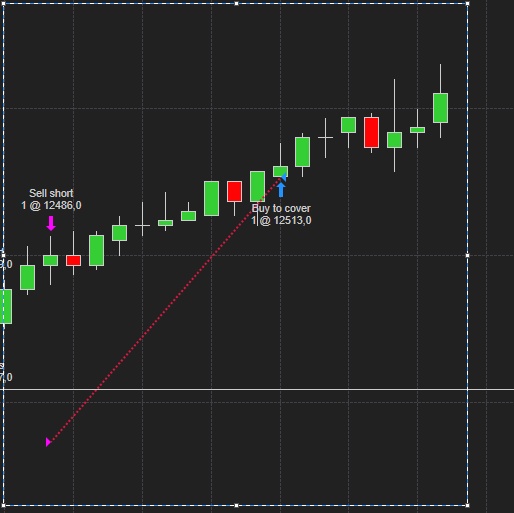
i ask you last question...
is correct or not?.....
Don't execute a short order but it buy to cover after 10 candleComment
-
Yes. Exit orders are always to-cover . You can learn more about which orders are buy-to-cover and sell-to-cover here
Jessica P.NinjaTrader Customer ServiceComment

| Topics | Statistics | Last Post | ||
|---|---|---|---|---|
|
0 responses
17 views
0 likes
|

by kinfxhk
07-14-2026, 09:39 AM
|
|||
|
0 responses
60 views
0 likes
|
by kinfxhk
07-13-2026, 10:18 AM
|
|||
|
0 responses
43 views
0 likes
|
by kinfxhk
07-13-2026, 09:50 AM
|
|||
|
0 responses
47 views
0 likes
|
by kinfxhk
07-13-2026, 07:21 AM
|
|||
|
0 responses
38 views
0 likes
|
by kinfxhk
07-11-2026, 02:11 AM
|
Comment