Announcement

Collapse
No announcement yet.

Partner 728x90

Collapse

Long x price stop y prices

Collapse
X
 
  • Filter
  • Time
  • Show
Clear All
new posts

    Long x price stop y prices

    hi,
    example :

    i want to enter next candle if price rises x Value and Stop Loss y price..

    how i code it? thanks

    #2
    Thank you for your question. Let's start with this example from the help guide,

    Code:
    [FONT=Courier New]// http://ninjatrader.com/support/helpGuides/nt8/en-us/close.htm
    protected override void OnBarUpdate()
    {
        // Evaluates if the current close is greater than the prior bar close
        if (Close[0] > Close[1])
            Print("We had an up day");
    }[/FONT]
    To see if it has risen x ticks, this becomes
    Code:
    [FONT=Courier New]// http://ninjatrader.com/support/helpGuides/nt8/en-us/close.htm
    protected override void OnBarUpdate()
    {
    [B]    int x = 3;[/B]
        // Evaluates if the current close is greater than the prior bar close
        if (Close[0] > Close[1][B] + x * TickSize[/B])
            Print("We had an up day");
    }[/FONT]
    Once here we can just replace the Print method with our order entry methods.


    Please let us know if there are any other ways we can help.
    Jessica P.NinjaTrader Customer Service

    Comment


      #3
      you don't understand

      sorry for my english...

      i give you other examples..

      Now the price is 1300...(close candle)..

      i want to enter long if the price is over 1350 (limit +10 tick ) and setstoploss to 1250..

      can you code it? thanks
      Last edited by esignal; 04-28-2017, 11:43 AM.

      Comment


        #4
        I mentioned the managed order entry methods in my previous post. For convenience I will post those code samples here, coupled with the tick size offset I mentioned in my previous post.

        Code:
        [FONT=Courier New]
        limitPrice = Close[0] + TickSize * 10;
        // http://ninjatrader.com/support/helpGuides/nt8/en-us/enterlonglimit.htm
        EnterLongLimit(limitPrice);[/FONT]
        Code:
        [FONT=Courier New]
        double stopPrice = 1250.0;
        // http://ninjatrader.com/support/helpGuides/nt8/en-us/setstoploss.htm
        SetStopLoss(CalculationMode.Currency, stopPrice);[/FONT]
        You will need to ensure that 1250 is below Close[0], and that you are setting SetStopLoss to a default value in your State.Configure section.

        This said, creating user code (aside from educational samples) is beyond the scope of the support we may provide. Please let us know if you would prefer to get in touch with a NinjaScript consultant who can provide this level of support.
        Jessica P.NinjaTrader Customer Service

        Comment


          #5
          but is correct to use EnterShortStopLimit?

          ex:


          if (entryShort>0 && Position.MarketPosition!=MarketPosition.Short)
          {
          EnterShortStopLimit(entryShort-5, entryShort );
          SetStopLoss(CalculationMode.Price, stopShort);
          }

          Comment


            #6
            You mentioned in post 3 that you were wanting to enter on the long side of the market. If you would rather enter on the short side of the market instead, this is your preference. This said, subtracting 5, rather than 5 times the TickSize, may not give you the results you expect.
            Jessica P.NinjaTrader Customer Service

            Comment


              #7
              i want to use EnterShortStopLimit because if the price crash important level....can will to be volatility
              and i want to limit my enter position...(if signal is example...price go under 1300, i want enter 1300 limit 1295)...

              Comment


                #8
                Thank you for helping me understand our goals. Please let us know if we can answer any other questions.
                Jessica P.NinjaTrader Customer Service

                Comment


                  #9
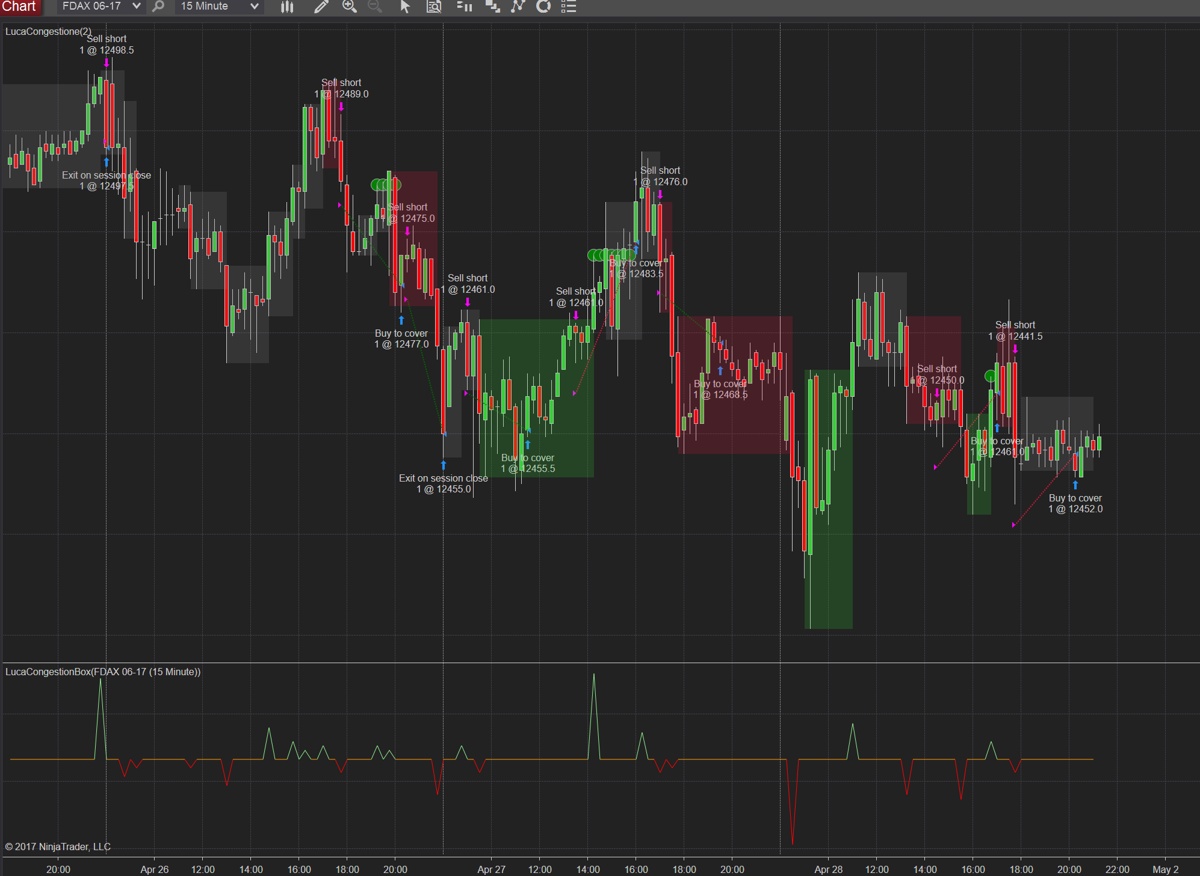
                  i've another problem...

                  if i use in my code EnterShortStopLimit

                  and i see strategy performance i see this pics (see pics )


                  is correct to see arrow even though the price has not been hit?
                  Attached Files

                  Comment


                    #10
                    While your timestamps are not showing, I believe this is an instance of this documented behavior in the help guide.

                    Originally posted by http://ninjatrader.com/support/helpGuides/nt8/en-us/how_trade_executions_are_plott.htm
                    Understanding trade executions on charts with tick based intervals

                    When using a chart with tick based intervals in NinjaTrader it is possible to have several bars with the same timestamp. This usually happens during high volatility times when heavy trading is happening within a very short amount of time. Since there are many bars with the same timestamp, NinjaTrader can only plot the trade execution on the first bar with the same timestamp of the execution since the executions are not tied to specific bars, but tied to specific timestamps. This can appear as if the trade execution occurred with an invalid fill price, but in reality the execution did occur on a valid price, just on a later bar with the same timestamp.

                    Example: Many ticks occurred on the 16:35:54 timestamp seen in the x-axis below the chart. Trade execution was at price 1058.75 on 16:35:54.

                    Since the execution occurred on 16:35:54 it is plotted on the first bar with the same timestamp. In this particular case, the first bar was not at the same price as the execution price so it would appear to be filled outside of the bar. Checking bars being plotted later on we find that 1058.75 was a valid price for timestamp 16:35:54 and that this execution was in fact on a valid price.
                    Jessica P.NinjaTrader Customer Service

                    Comment


                      #11
                      excuse me for timestamp but it's a chart 15 min timeframe..is not tick by tick

                      Comment


                        #12
                        Can you take a larger picture showing both your time and price axis?

                        As a step to find out what is happening,
                        Please use the steps below to change/check your Time Zone and sync the PC clock:
                        • Shutdown NinjaTrader
                        • Right-click the clock in the lower right corner of your desktop
                        • Select Adjust date/time
                        • For Windows 10 click 'Additional date, time, & regional settings' -> then click 'Set the time and date'
                        • Select the 'Internet Time' tab at the top
                        • Set the server to time.nist.gov and then click Update.
                        • If the message that appears says successful your PC clock should now be updated.
                        • If not, select a different server from the Server: drop-down and try again (repeat until one of the servers is successful)

                        After updating the PC clock, please restart NinjaTrader, then right-click the chart and select Reload All Historical Data.
                        Jessica P.NinjaTrader Customer Service

                        Comment


                          #13
                          the time of pc is update correctly...and i shutdown ninjatrader
                          see pics

                          Comment


                            #14
                            I appreciate your patience with this process. Your newest picture is missing both the 12033.5 order, and the price axis. Would it be possible to send a picture with this information?
                            Jessica P.NinjaTrader Customer Service

                            Comment


                              #15
                              see pics..
                              Do you want screenshot of order in strategy performance?
                              Attached Files

                              Comment

                              Latest Posts

                              Collapse

                              Topics Statistics Last Post
                              Started by NullPointStrategies, Yesterday, 05:17 AM
                              0 responses
                              67 views
                              0 likes
                              Last Post NullPointStrategies  
                              Started by argusthome, 03-08-2026, 10:06 AM
                              0 responses
                              142 views
                              0 likes
                              Last Post argusthome  
                              Started by NabilKhattabi, 03-06-2026, 11:18 AM
                              0 responses
                              76 views
                              0 likes
                              Last Post NabilKhattabi  
                              Started by Deep42, 03-06-2026, 12:28 AM
                              0 responses
                              47 views
                              0 likes
                              Last Post Deep42
                              by Deep42
                               
                              Started by TheRealMorford, 03-05-2026, 06:15 PM
                              0 responses
                              51 views
                              0 likes
                              Last Post TheRealMorford  
                              Working...
                              X