Announcement

Collapse
No announcement yet.

Partner 728x90

Collapse

Target / Stop Order line

Collapse
X
 
  • Filter
  • Time
  • Show
Clear All
new posts

    Target / Stop Order line

    HI
    Is there any way to access this drawing? I have tried downloading all the lines on the chart but order lines do not appear?
    I am interested in getting the length and the color.
    thanks
    Even better would be to access the little pnl box at the end but I guess we won't be able to do that!!
    Last edited by Mindset; 01-19-2025, 10:21 AM.

    #2
    Hello Mindset,

    There isn't a drawing tool for stop and target lines included with NinjaTrader Desktop.

    Are you asking about a 3rd party indicator that you are wanting to import?

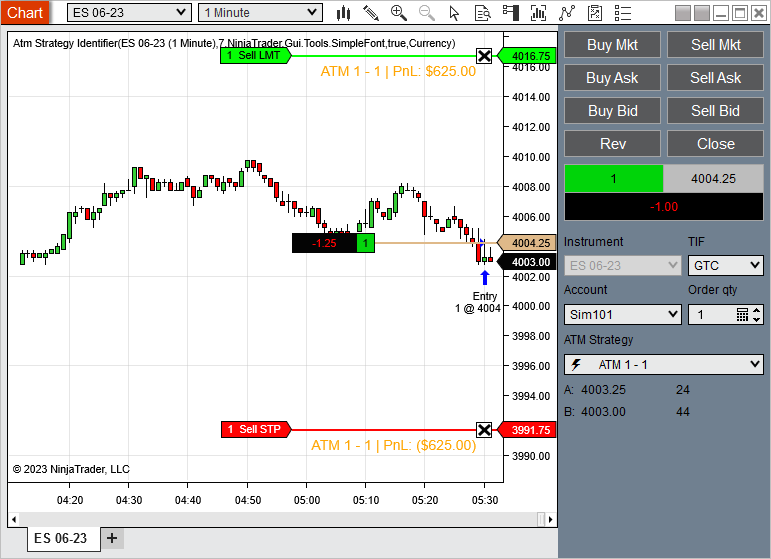
    Are you asking about the stop and target order lines when using Atm templates in Chart Trader?

    Are you asking about the Profitable / Unprofitable trades lines in the Data Series settings?

    With the PnL in chart trader this can be accessed with the AutomationID "ChartTraderControlPnLDisplay".
    Chelsea B.NinjaTrader Customer Service

    Comment


      #3
      Hi Chelsea
      No to all of that! - just the line that is produced when I enter eg a target,stop or even Entry limit/stop order.
      As we can amend it's properties in the chartrader I was hoping I could access the lineID as I would like to change target colors
      for myself dependent upon strategy.
      If it's not possible please put this forward as a suggestion.

      Comment


        #4
        Hello Mindset,

        "just the line that is produced when I enter eg a target,stop or even Entry limit/stop order."

        Hmm.. This still sounds like the order lines from Chart Trader, but you are stating that you are not referring to the order lines from chart trader..
        I suggested in post # 2:
        Are you asking about the stop and target order lines when using Atm templates in Chart Trader?
        But you are saying no, you are not referring to the chart trader order lines, is this correct?

        May I have a screenshot of the lines you are referring to? (Please do this on a new window with no indicators applied)
        Chelsea B.NinjaTrader Customer Service

        Comment


          #5
          Hi
          Yes here's an example of 2 target orders from a strategy entry but NOT using atmstrategies.
          Hope that now makes sense.

          Comment


            #6
            Hello Mindset,

            The entry orders, stop and target orders if using an atm strategy, would all be order lines from chart trader.

            These would be order lines from chart trader.

            Unfortunately, the code for these is not accessible and these do not have automation ids.

            You would need to design your own order lines which can be rendered in on render.
            Using shapes like rectangles or geometry you could render your own lines.
            Join the official NinjaScript Developer Community for comprehensive resources, documentation, and community support. Build custom indicators and automated strategies for the NinjaTrader platforms with our extensive guides and APIs.

            Join the official NinjaScript Developer Community for comprehensive resources, documentation, and community support. Build custom indicators and automated strategies for the NinjaTrader platforms with our extensive guides and APIs.

            Join the official NinjaScript Developer Community for comprehensive resources, documentation, and community support. Build custom indicators and automated strategies for the NinjaTrader platforms with our extensive guides and APIs.

            Join the official NinjaScript Developer Community for comprehensive resources, documentation, and community support. Build custom indicators and automated strategies for the NinjaTrader platforms with our extensive guides and APIs.

            Join the official NinjaScript Developer Community for comprehensive resources, documentation, and community support. Build custom indicators and automated strategies for the NinjaTrader platforms with our extensive guides and APIs.


            The SampleCustomRender indicator included with NinjaTrader provides the basics of custom rendering.

            Many of the Drawing tool scripts included with NinjaTrader are using Geometry and Rectangles and are open source for you to learn from.
            For example in the @Shapes.cs DrawingTools file shows drawing a rectangle in the Rectangle class, and drawing Geometry in the Triangle class.

            Below I am providing a link to an example of efficiently re-using brushes to reduce resource use.


            I'm also including a link to a User App Share that has code to translate order prices to x and y coordinates within a panel.
            This indicator serves to provide labels for Atm strategies that are present on your chart. Each new Atm strategy will rotate through the colors defined in your Brush Collection. Simply add to a chart, select the data series you want to have labels added to, choose your font and add all the brushes/colors you want […]


            As a tip, custom rendering in the price scale is not allowed, but if you want price markers in the price scale you can set the price value to a plot. In the OnRender() method do not call base.OnRender() and the plot will not render on the chart.​
            Chelsea B.NinjaTrader Customer Service

            Comment


              #7
              Thanks for that very extensive reply. I should add I have now modified #gemify OrderLineDecorator in an effort to distinguish between 1 target order and another which accomplishes the task i need with minimal effort.
              I would like to make opening up the properties for the stop/target/order lines a suggestion for a future build.
              thank you

              Comment


                #8
                Hello Mindset,

                Thank you for the suggestion. I will submit this as a feature request.

                Please note, we receive many requests and cannot reasonably implement all requested features or changes. Interest is tracked internally and if enough interest is tracked, it would be weighed against how feasible it would be to make those changes to consider implementing, so we cannot offer an ETA or promise of fulfillment.

                When new features are implemented, they will be listed in the Release Notes page of the Help Guide. The ID number may be different than the internal feature request tracking ID, but the description of the feature will let you know if that feature has been implemented.

                Release Notes - https://ninjatrader.com/support/help...ease_notes.htm
                Chelsea B.NinjaTrader Customer Service

                Comment

                Latest Posts

                Collapse

                Topics Statistics Last Post
                Started by NullPointStrategies, Yesterday, 05:17 AM
                0 responses
                58 views
                0 likes
                Last Post NullPointStrategies  
                Started by argusthome, 03-08-2026, 10:06 AM
                0 responses
                133 views
                0 likes
                Last Post argusthome  
                Started by NabilKhattabi, 03-06-2026, 11:18 AM
                0 responses
                73 views
                0 likes
                Last Post NabilKhattabi  
                Started by Deep42, 03-06-2026, 12:28 AM
                0 responses
                45 views
                0 likes
                Last Post Deep42
                by Deep42
                 
                Started by TheRealMorford, 03-05-2026, 06:15 PM
                0 responses
                50 views
                0 likes
                Last Post TheRealMorford  
                Working...
                X