
Announcement

Collapse
No announcement yet.

Partner 728x90

Collapse

How to use Current Bar last price

Collapse
X
 
  • Filter
  • Time
  • Show
Clear All
new posts

    How to use Current Bar last price


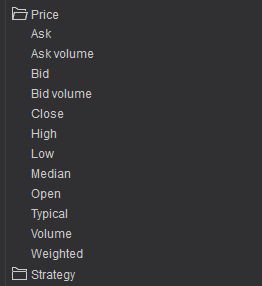
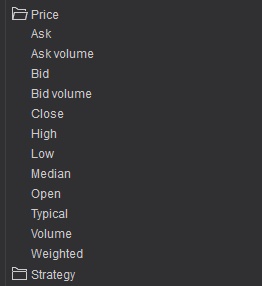
    i do not see Last as a choice here

    ideally i am trying to say current price last print etc <= Open[1]

    but do not see a way to do this

    if i use Low[0] <= Open[1] using after hours historical data chart to review i get my execution but it fills on the next bar Open price rather that the previous bar when the condition occurred

    any help appreciated thanks

    #2
    last = Close[0]

    Comment


      #3
      thanks but it certainly does not work that way viewing historical data after hours

      Comment


        #4
        Hello DTSSTS,

        Thanks for your post.

        As member nkhoi advises, Close[0] is last price.

        When running a strategy on historical data, the strategy will execute once at the end of the bar, if your code at the end of the bar places an order it would be filled on the next bar.

        Comment


          #5
          so it would be filled on the next bar in historical data, WHAT about realtime data, If the low of the previous bar is lower the the low of the reference bar to send the order will Close[0] <= Low[2] fill in real time on the CURRENT bar at the time the reference price was printed rather than the NEXT BAR

          Comment


            #6
            Hello DTSSTS,

            Thanks for your reply.

            What calculate mode are you using in the strategy? (OnBarClose, OnPriceChange, OnEachTick)
            What type order are you placing? (Limit or Market)

            Comment


              #7
              on price change and SellStopMarket

              Comment


                #8
                Hello DTSSTS,

                Thanks for your reply.

                With your strategy running Calculate.OnPriceChange, the order would be placed intrabar when the code conditions are executed (instead of only at the end of the bar on historical data).


                Comment


                  #9
                  Originally posted by NinjaTrader_PaulH View Post
                  Hello DTSSTS,

                  Thanks for your reply.

                  With your strategy running Calculate.OnPriceChange, the order would be placed intrabar when the code conditions are executed (instead of only at the end of the bar on historical data).


                  Is this true while backtesting a strategy? Or is this true only in real-time?
                  If not, how to place an intrabar order while backtesting a strategy?
                  Thank you

                  Comment


                    #10
                    Hello,

                    Thanks for your post and welcome to the NinjaTrader forums!

                    "Is this true while backtesting a strategy? Or is this true only in real-time?
                    If not, how to place an intrabar order while backtesting a strategy?"


                    When your script runs on historical data (backtesting or on a chart), the strategy will run as and perform as if you had selected Calculate.OnBarClose meaning that any decisions to place an order would be done at the end of the bar and would likely be filled on the following bar. The reason for this is that historical bars only consists of the OHLC values of that completed bar and does not contain the ticks that built the bar. During real-time data, if your code runs on Calculate.OnEachTick or Calculate.OnPriceChange, the orders are submitted as your conditions occur and doies not wait for the end of bar to submit.

                    To have an order filled intrabar on historical data, you can use the PlayBack connection with Market replay data. Market replay data contains all of the ticks that make up the bars and recreates them tick by tick as they were recorded. this would be the preferred way although it will take a longer period of time compared to the Strategy analyzer.

                    Alternately, you can modify your strategy by adding a 1 tick series, submitting your orders to that added data series, and enabling Tick Replay for the data series and using Calculate.OmnpriceChange or Calculate.OnEachTick. Please note that this means your strategy backtest run will require tick data for the duration you specify in the backtest, you won't be able to use High order fill and the Strategy analyzer will run slower due to the 1 tick series processing.

                    Comment

                    Latest Posts

                    Collapse

                    Topics Statistics Last Post
                    Started by NullPointStrategies, Yesterday, 05:17 AM
                    0 responses
                    65 views
                    0 likes
                    Last Post NullPointStrategies  
                    Started by argusthome, 03-08-2026, 10:06 AM
                    0 responses
                    139 views
                    0 likes
                    Last Post argusthome  
                    Started by NabilKhattabi, 03-06-2026, 11:18 AM
                    0 responses
                    75 views
                    0 likes
                    Last Post NabilKhattabi  
                    Started by Deep42, 03-06-2026, 12:28 AM
                    0 responses
                    45 views
                    0 likes
                    Last Post Deep42
                    by Deep42
                     
                    Started by TheRealMorford, 03-05-2026, 06:15 PM
                    0 responses
                    50 views
                    0 likes
                    Last Post TheRealMorford  
                    Working...
                    X