
Announcement

Collapse
No announcement yet.

Partner 728x90

Collapse

Assertion since today at startup (perhaps Trading Hour Template)

Collapse
X
 
  • Filter
  • Time
  • Show
Clear All
new posts

    Assertion since today at startup (perhaps Trading Hour Template)

    I used 8.0.3.1 so far and today I get the following assertion (s.screenshot). It also asked me for updating trading hour templates from your server (FDAX, FDXM) - perhaps it has something today with it.
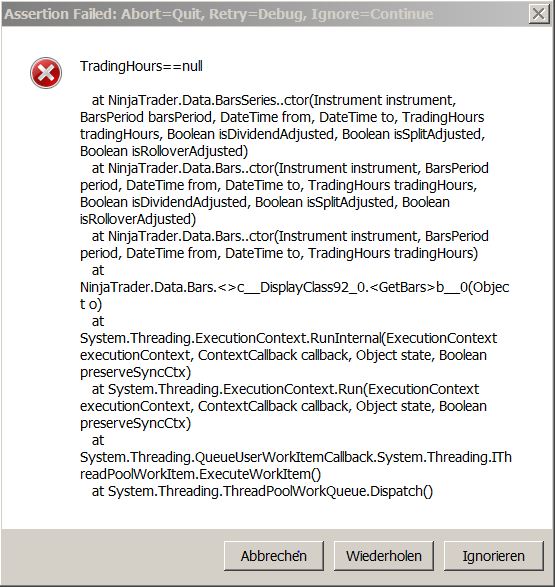


    Then I installed 8.0.4.0 and hoped, that this nightmare will be blown away, without luck. Now I have the following exception:

    2017-02-06 09:55:32:119 *************** unhandled exception trapped ***************
    2017-02-06 09:55:32:119 Object reference not set to an instance of an object.
    2017-02-06 09:55:32:119 System.NullReferenceException: Object reference not set to an instance of an object.
    at NinjaTrader.NinjaScript.NinjaScriptBase.SetState(S tate state)
    at NinjaTrader.Gui.NinjaScript.IndicatorRenderBase.Se tState(State state)
    at NinjaTrader.NinjaScript.NinjaScriptBase.Finalize()

    And yes, Safe Mode is working and no, I will not be happy to renew my workspace to see were the bug could be.
    Attached Files

    #2
    Hello BearingHH,

    Can you please select Ignore in the error and go to Control Center-->Tools-->Database Management. Click 'Update trading hour templates'. Make sure 'Predefined trading hour templates' is enabled and click Update. Check if you still experience the error message after a restart.

    Comment


      #3
      I forgot to mention in my last post, that I've already done it - from Safe Mode. Sadly I had installed the 8.0.4 version before. Then the assertion was gone, but I had the new exception, posted in the last paragraph of my last message.

      Don't know - perhaps I will try to re-install 8.0.3.1 again.

      Comment


        #4
        Hello BearingHH,

        Can you please send me all your NinjaTrader log and trace files so I can investigate. Log and trace files can be found at the following locations. Right click the log and trace folder and select Send to-->Compressed (zipped) folder. Subsequently attach both .zip files in your email and send it to platformsupport[at]ninjatrader[dot]com. Put 'Att Jason, 1656155' in the subject header.

        Windows start menu-->Documents-->NinjaTrader 8-->log

        Windows start menu-->Documents-->NinjaTrader 8-->trace

        Comment


          #5
          Thanks, but I will use 8.0.3.1 and if I've time in the future, I will check, what's going on. I'm happy that everything is working again so far.

          Comment

          Latest Posts

          Collapse

          Topics Statistics Last Post
          Started by argusthome, 03-08-2026, 10:06 AM
          0 responses
          86 views
          0 likes
          Last Post argusthome  
          Started by NabilKhattabi, 03-06-2026, 11:18 AM
          0 responses
          48 views
          0 likes
          Last Post NabilKhattabi  
          Started by Deep42, 03-06-2026, 12:28 AM
          0 responses
          30 views
          0 likes
          Last Post Deep42
          by Deep42
           
          Started by TheRealMorford, 03-05-2026, 06:15 PM
          0 responses
          33 views
          0 likes
          Last Post TheRealMorford  
          Started by Mindset, 02-28-2026, 06:16 AM
          0 responses
          67 views
          0 likes
          Last Post Mindset
          by Mindset
           
          Working...
          X