Announcement

Collapse
No announcement yet.

Partner 728x90

Collapse

Disappearing menu extensions

Collapse
X
 
  • Filter
  • Time
  • Show
Clear All
new posts

    Disappearing menu extensions

    When a sub-menu item appears on the left, it can't be selected. This is best described in the attached video.
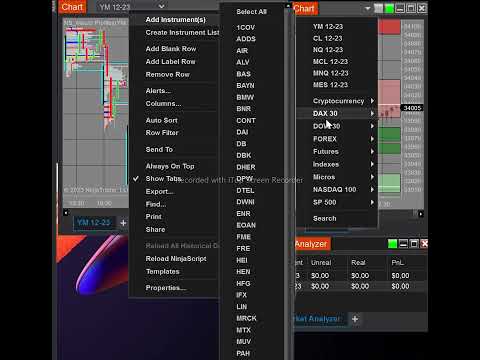

    #2
    Hello,
    Thank you for your post.

    Please reset instruments and repair DB, following steps below.
    1. First, disconnect from any data providers by navigating to the Control Center > Connections menu, and left-click on “disconnect” that appears to the right when hovering your mouse over any active connection
    2. Next, reset your instruments by navigating to the Control Center > Tools > Database Management
    3. In the Database Management window, under the “Update instruments” section, ensure that “General properties”, "Futures expiries" and “Symbol mappings” options are checked and then click Update
    4. Under the “Repair DB” section, click Repair
    5. Lastly, restart NinjaTrader for the changes to occur

    You can also manually change an instrument on a chart, simply begin typing the new instrument and expiry either (ES 03-24) into the Instrument Selector in the top left of the chart window, or directly onto the chart. These concepts are discussed here:
    https://ninjatrader.com/support/helpGuides/nt8/NT%20HelpGuide%20English.html?usingtheinstrumentse lector.htm
    https://ninjatrader.com/support/helpGuides/nt8/NT%20HelpGuide%20English.html?working_with_price_d ata.htm

    If you continue to experience the same, please email us your log and trace files right from the NinjaTrader platform (by going to Help-> Email Support), so we may investigate this matter further. Ensuring 'Log and Trace Files' is checked will include these files. This is checked by default.
    Thank you!​
    Last edited by NinjaTrader_Oxana; 01-12-2024, 08:19 AM.

    Comment


      #3
      Your response seems to focus on the instruments. The issue has to do with an entire platform navigation handicap (for charts that are on the right hand edge of my monitors)

      I have attached another screen video to clarify


      in any case, I have followed your instructions and the problem still persists. I will now proceed to send the log and trace files

      Comment


        #4
        What version are you using? I just tried on version 8.1.1.7 and don't see that issue.
        eDanny
        NinjaTrader Ecosystem Vendor - Integrity Traders

        Comment

        Latest Posts

        Collapse

        Topics Statistics Last Post
        Started by argusthome, 03-08-2026, 10:06 AM
        0 responses
        80 views
        0 likes
        Last Post argusthome  
        Started by NabilKhattabi, 03-06-2026, 11:18 AM
        0 responses
        46 views
        0 likes
        Last Post NabilKhattabi  
        Started by Deep42, 03-06-2026, 12:28 AM
        0 responses
        29 views
        0 likes
        Last Post Deep42
        by Deep42
         
        Started by TheRealMorford, 03-05-2026, 06:15 PM
        0 responses
        32 views
        0 likes
        Last Post TheRealMorford  
        Started by Mindset, 02-28-2026, 06:16 AM
        0 responses
        66 views
        0 likes
        Last Post Mindset
        by Mindset
         
        Working...
        X