
Announcement

Collapse
No announcement yet.

Partner 728x90

Collapse

Moving orders on SuperDom

Collapse
X
 
  • Filter
  • Time
  • Show
Clear All
new posts

    Moving orders on SuperDom

    Hi,

    How can I move stop or target orders on the SuperDom more than one tick at a time? I'd like to use the mouse to drag and drop it. Pretty sure it's possible but I don't see anything in the docs.
    #2
    Hello,
    Thank you for your post.

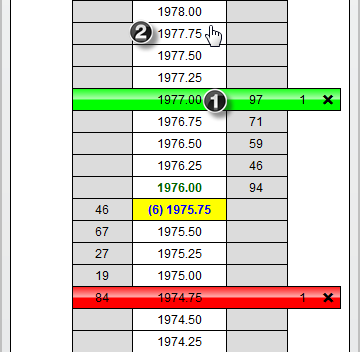
    Modifying Stop Loss and Profit Target orders:

    1.Click with your left mouse button in the center column on the Stop Loss or Profit Target order you want to modify.

    2.Once selected, you will see the cursor change to a hand from an arrow, then choose the price you are modifying the order to and click using your left mouse button to complete the modify process.


    Here is also a link to a short video: https://www.youtube.com/watch?v=r8eDrUv8AFo

    Additional info can be found our Help Guide: https://ninjatrader.com/support/help...s_superdom.htm

    Comment


      #3
      doh. No sure how I missed that one.

      Comment

      Latest Posts

      Collapse

      Topics Statistics Last Post
      Started by argusthome, 03-08-2026, 10:06 AM
      0 responses
      111 views
      0 likes
      Last Post argusthome  
      Started by NabilKhattabi, 03-06-2026, 11:18 AM
      0 responses
      59 views
      0 likes
      Last Post NabilKhattabi  
      Started by Deep42, 03-06-2026, 12:28 AM
      0 responses
      38 views
      0 likes
      Last Post Deep42
      by Deep42
       
      Started by TheRealMorford, 03-05-2026, 06:15 PM
      0 responses
      42 views
      0 likes
      Last Post TheRealMorford  
      Started by Mindset, 02-28-2026, 06:16 AM
      0 responses
      78 views
      0 likes
      Last Post Mindset
      by Mindset
       
      Working...
      X