
Announcement

Collapse
No announcement yet.

Partner 728x90

Collapse

Playback Data Stops - Chart Shows No Mouse Cursor

Collapse
X
 
  • Filter
  • Time
  • Show
Clear All
new posts

    Playback Data Stops - Chart Shows No Mouse Cursor

    I recently updated from 8.0.26.1 to 8.1.1.3 then uninstalled and reinstalled with version 8.1.1.1.
    I have 3 monitors (Left to Right) with 2, 1 and 1 chart on each. I use Global cursor on all, two with no time scroll.
    While using NT8 both my CPU and GPU are being used less than 10% by NT8. In total my CPU runs at less than 40% and I have 16 GB ram at around 50% used.

    When using Playback:
    The data/candles will stop updating and the clock will stop advancing even though the play button has been pressed. Market Replay data has been downloaded and deleted multiple times on multiple dates on multiple instruments.
    The RIGHT-most chart, smallest candle increment, will no longer show my mouse in the chart area. The chart trader will show and allow me to manipulate fields.

    When using LIVE market data:
    The data/candles will continue to update, but...
    The RIGHT-most chart will also act the same way, but is far less frequent. It could go 1-3 days (8-12 hours of use) without a problem.

    My workaround so far:
    I exit NT8 and get an error message...
    Code:
    Unhandled exception: Write lock may not be acquired with read lock held. This pattern is prone to deadlocks.
    Please ensure that read locks are released before taking a write lock. If an upgrade is necessary, use an upgrade lock in place of the read lock.
    When trying to reopen NT8 and entering in my username/password I get...
    Code:
    Unable to recover NinjaTrader custom assembly. The process cannot access the file
    'D:\Documents\NinjaTrader 8\bin\Custom\NinjaTrader.Vendor.dll' because it is being used by another process.
    Then I have to use Windows Task Manager to END TASK on NT8 before I can reopen NT8 and login properly...until the next time it messes up.


    Last edited by Bonavest; 05-04-2023, 08:14 AM.

    #2
    Hello Bonavest,

    Do you still see this happening on version 8.1.1.5?

    The error you are seeing can be cause by custom NinjaScript items, please also test this with your workspaces closed and in a new empty workspace. If you have default templates for charts make sure to create a new empty chart to check if the error happens while playback is used. A custom item could also be the cause for the processes staying open after exiting which makes it important to test without anything custom running.

    Comment


      #3
      Unfortunately, I am unable to use another version of NT8 at this time. I have to keep 8.1.1.1 to make sure that my Tradovate accounts display properly.
      They tend to disappear or not show up at all using 8.1.1.3 and not sure of 8.1.1.5 since that must have just come out in the last week.

      Comment


        #4
        Hello Bonavest,

        I would suggest to update as soon as you can to see if you still have those problems, if you are seeing them in the current version we can collect details to get that reported and fixed.

        Comment


          #5
          I have updated to 8.1.1.5 and had high hopes when I did not experience any lock ups all day yesterday during playback and my Tradovate accounts were showing up properly.

          This morning, however, Playback locked up after about 30 minutes and my Tradovate accounts were not showing up in the Control Panel, but curiously they would show up in my Trade Performance window and would show all my trades properly.

          UPDATE: My RIGHT most chart locked up during live trading this morning also. This is after I had deleted the chart window, created a New Chart and applied a template to it. This template contains no indicators that are not also on the other 3 charts, which never lock up or have errors.
          Last edited by Bonavest; 05-04-2023, 08:17 AM.

          Comment


            #6
            Hello Bonavest,

            When the playback locks up are you getting any errors in the control center log tab? If so can you copy/paste those here? Also are you using any third party items when this happens? Does this happen on a default chart without anything applied?

            For the tradovate accounts, when you notice they don't show up are there any log messages or were there any events like a disconnect?

            Comment


              #7
              In the Log is shows the wording of the error I originally posted regarding an 'Unhandled Exception' https://gyazo.com/4b9537700f3e0c4d3541d082f95d0999

              Comment


                #8
                <deleted> Ignore

                Comment


                  #9
                  Hello Bonavest,

                  Just to confirm are you getting that error with no custom items applied to the charts? If you have not please test closing all workspaces and leave a empty untitled workspace, then create a new chart to see if you get that same error. The error you pictured usually happens with custom rendering or threading in NinjaScript. If you see that happening on the blank chart it may be best to get a video of the problem so we can also see the mouse issue.

                  Comment


                    #10
                    For the issue to appear typically takes 1-3 hours of use. To clarify, if I have 4 charts with various indicators and/or external add-ons and only one of the charts has an issue locking up... Is it necessary to remove all indicators from all charts or is the problem/error we have identified localized to only the chart window locking up?

                    Today I removed all external add-ons from the 'problem' chart window and only kept indicators that are found within NT8 by default.

                    ...and after an hour or two of Playback the chart window locked up as usual.

                    Comment


                      #11
                      Hello Bonavest,

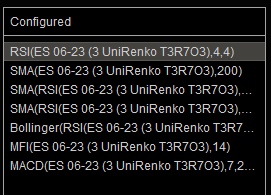
                      From the image I see that the indicators are using a unirenko chart, could you try this again using either the standard renko or any standard bars type?

                      If you still see that happen can you make a list of the specific steps you followed to see that using the default chart with no third party items so we can report that?

                      I would need to test that on my end to confirm that I can also see that happen and if so I could report it. If you can include a specific example which includes details on which instrument and period of time to test was used along with how long it takes to see the problem that would be helpful.

                      Comment


                        #12
                        *FYI... I completely uninstalled NT8 and reinstalled/recreated my workspace from scratch and added in all scripts and custom bar types etc.

                        So I have spent the weekend troubleshooting this problem... I started with only UniRenko candles on the four charts with no issue and began adding indicators a few at a time. I first began with those that are built in to NT8 like SMA/EMA, RSI and MACD etc. Then began adding 3rd party ones from the NT8 Ecosystem User Share.

                        Strangely enough the only thing I can say after all my testing is that the problem seems to only happen when I have a Chrome window open and more specifically I think only when a tab is on Youtube playing video. This utilizes 30% of my GPU while the window is displayed, but 0% when it is minimized, which it usually is when I am trading.

                        I have never had this problem when I do not have a Chrome window open.

                        Another strange issue that I had in my testing was my center screen chart did the freezing thing. This has never happened before, but I'm unsure of what may have been different to cause this.
                        Last edited by Bonavest; 05-08-2023, 02:16 PM.

                        Comment


                          #13
                          Hello Bonavest,

                          You could try using a different browser and doing the same steps and see if you still get the same problem.I have never encountered a problem where chrome would be required to see a problem in NinjaTrader. NinjaTrader does not use the chrome webkit or have any reliance on chrome so that would point to more of a GPU problem if doing that is some how effecting other applications on the PC.

                          I did note that you recreated your workspace. I just want to stress that if you use a custom workspace with custom items we are going to have to loop back to testing without those items. I won't be able to use anything but stock items to report a problem so any steps you use should only include stock bars types and indicators. If you only see the problem when using your workspace with custom items it is very likely related to something in that workspace causing a problem.

                          Comment


                            #14
                            Have you tried using your tradovate account with version 8.0.28? That's what I'm using for my tradovate Apex prop firm and it works great

                            Comment


                              #15
                              Originally posted by backtester831 View Post
                              Have you tried using your tradovate account with version 8.0.28? That's what I'm using for my tradovate Apex prop firm and it works great
                              NT8 8.1.1.1 is the latest version that Apex says works well for Tradovate. That version seems to have some issues with my custom workspace that was working fine at 8.0.26.1

                              It would seem at this point, I am on my own if my workspace contains anything other than what is included with the initial NT8 install.

                              Comment

                              Latest Posts

                              Collapse

                              Topics Statistics Last Post
                              Started by argusthome, 03-08-2026, 10:06 AM
                              0 responses
                              65 views
                              0 likes
                              Last Post argusthome  
                              Started by NabilKhattabi, 03-06-2026, 11:18 AM
                              0 responses
                              41 views
                              0 likes
                              Last Post NabilKhattabi  
                              Started by Deep42, 03-06-2026, 12:28 AM
                              0 responses
                              23 views
                              0 likes
                              Last Post Deep42
                              by Deep42
                               
                              Started by TheRealMorford, 03-05-2026, 06:15 PM
                              0 responses
                              26 views
                              0 likes
                              Last Post TheRealMorford  
                              Started by Mindset, 02-28-2026, 06:16 AM
                              0 responses
                              52 views
                              0 likes
                              Last Post Mindset
                              by Mindset
                               
                              Working...
                              X