
Announcement

Collapse
No announcement yet.

Partner 728x90

Collapse

Export Chart Data to CSV

Collapse
X
 
  • Filter
  • Time
  • Show
Clear All
new posts

    Export Chart Data to CSV

    I would like to export my chart data, including open, high, low, close and volume as well as any indicator values, to a CSV file. Is that possible?

    #2
    Hello josef,

    You can export historical data into a .txt files as per the instructions at the link below. Unfortunately it does not include indicator values.


    To export indicator values, you would have to create a custom indicator using NinjaScript. Please see the link below for information on NinjaScript.

    Comment


      #3
      Originally posted by NinjaTrader_Jason View Post
      Hello josef,

      You can export historical data into a .txt files as per the instructions at the link below. Unfortunately it does not include indicator values.


      To export indicator values, you would have to create a custom indicator using NinjaScript. Please see the link below for information on NinjaScript.
      http://ninjatrader.com/support/helpG...injascript.htm
      Jason say I create a custom indicator and use the print function and drop my indicator values to the output window. Then I open up a minute chart and load up, let's say, 200 days worth of minute data. Will the output window print the entire 200 days worth of data or does it have a limit? Thanks.

      Comment


        #4
        Unfortunately I am not a programmer myself and not sure if this will work. I suggest to test it and check if all information is shown in the output window.

        Comment


          #5
          Originally posted by staycool3_a View Post

          Jason say I create a custom indicator and use the print function and drop my indicator values to the output window. Then I open up a minute chart and load up, let's say, 200 days worth of minute data. Will the output window print the entire 200 days worth of data or does it have a limit? Thanks.
          I know this is an old post but having said that ... I wanted to clear this up for anyone wondering if that is possible and the answer is Absolutely Yes you can do this .
          When you are Printing your Data Say Print("High "+High[1]...etc)
          Once you are Sure What Data You want say Like a CSV Data would look like ...( Date/Time , High, Low, Open, Close )
          Then Run Your File Copy and Paste Into S Text File , Name it Whatever You want .CSV Make sure You Place Your Header at the top >>>> Date/Time , High, Low, Open, Close,
          Bingo You have Every thing You Want . If You can Print it you can copy it .

          Just make sure You aren't Printing Crap in between .

          The way i would do it is In OnBarupdate()
          {

          if(FirstBar) ### Be creative
          {
          Print("Date/Time , High, Low, Open, Close,") ### This Is Your header For Your CSV File
          Print(Date + "," + High[0] + "," + Low[0] + "," + Open[0] + "," + Close[0] + "," + ) #### FirstLine Of Your CSV Data
          }else
          {
          Print(Date + "," + High[0] + "," + Low[0] + "," + Open[0] + "," + Close[0] + "," + ) #### Subsequent Data Lines
          }


          }

          Run Your Script And Voila You have All Your data

          Comment


            #6
            All,

            Thank you Kahunas this was helpful but the limitation to the script output window (suppressing info) is something of a bother. So I found a post by JoshP which that write all the data you want in the script. Here is the example script file and explanation here, I also attached it.

            This effectively records everything you could want. To automate it all, I added a single print of headers to == State.Configure,:
            HTML Code:
                        else if (State == State.Configure)
                        {
                            sw = File.AppendText(path);  // Open the path for writing
                            sw.WriteLine("DateTime, Open, High, Low, Close, In Trade, Open P/L"); // Append a new line to the file
                            sw.Close(); // Close the file to allow future calls to access the file again.
                        }​
            Then, to write each line of activity (per the example file) I did:

            HTML Code:
            protected override void OnBarUpdate()
            {
            //_____________________________________________PRINTS FOR DATA ONLY______________________________________________ __________________________________
            if (Position.MarketPosition != MarketPosition.Flat)
               inTrade=true;
            else
               inTrade=false;
            sw = File.AppendText(path); // Open the path for writing
            sw.WriteLine(Bars.GetTime(0) + ", " + Open[0]+ ", " + High[0]+ ", " + Low[0] + ", " + Close[0] + ", " + inTrade + ", " + Position.GetUnrealizedProfitLoss(PerformanceUnit.Currency, Close[0])); //  Append a new line to the file
            sw.Close(); // Close the file to allow future calls to access the file again.
            }​
            **It is also necessary to add variables
            HTML Code:
            private string path; //For stream writer
            private StreamWriter sw; // a variable for the StreamWriter that will be used​
            and declare...
            HTML Code:
            using System.IO;
            so make sure you check the example file for the necessary changes to your script. All of this is explained by NT JoshP in the referenced post link.

            It ran pretty slow writing, took over an hour just for two weeks on a 5M chart script which wrote a 306MB text file. I would back test a single day and check your file for accuracy, then let it rip overnight. You could add some prints after sw.Close(); to make sure it was appending lines during your test. I would slash out any prints before writing a large amount of data though.

            The file output default location is under Documents>NinjaTrader8. You should see the name of your file there as .txt

            Here is what my first few lines looked like using the above example:

            DateTime, Open, High, Low, Close, In Trade, Open P/L
            5/16/2023 6:05:00 PM, 4127.75, 4128.5, 4127.75, 4128.5, False, 0
            5/16/2023 6:05:00 PM, 4127.75, 4128.5, 4127.75, 4128.5, False, 0
            5/16/2023 6:05:00 PM, 4127.75, 4128.5, 4127.75, 4128.5, False, 0
            5/16/2023 6:05:00 PM, 4127.75, 4128.5, 4127.75, 4128.5, False, 0
            5/16/2023 6:05:00 PM, 4127.75, 4128.5, 4127.75, 4128.5, False, 0
            5/16/2023 6:05:00 PM, 4127.75, 4128.5, 4127.75, 4128.5, False, 0
            5/16/2023 6:05:00 PM, 4127.75, 4128.5, 4127.75, 4128.5, False, 0
            5/16/2023 6:05:00 PM, 4127.75, 4128.5, 4127.75, 4128.5, False, 0
            5/16/2023 6:05:00 PM, 4127.75, 4128.5, 4127.75, 4128.5, False, 0
            5/16/2023 6:05:00 PM, 4127.75, 4128.5, 4127.75, 4128.5, False, 0
            5/16/2023 6:05:00 PM, 4127.75, 4128.5, 4127.75, 4128.5, False, 0
            5/16/2023 6:05:00 PM, 4127.75, 4128.5, 4127.75, 4128.5, False, 0
            5/16/2023 6:05:00 PM, 4127.75, 4128.5, 4127.75, 4128.5, False, 0
            5/16/2023 6:05:00 PM, 4127.75, 4128.5, 4127.75, 4128.5, False, 0
            5/16/2023 6:05:00 PM, 4127.75, 4128.5, 4127.75, 4128.5, False, 0
            5/16/2023 6:05:00 PM, 4127.75, 4128.5, 4127.75, 4128.5, False, 0​

            Perfect!

            Hope this helps, You should be able to print to file anything you can script. I haven't tried, but I see no reason why this wouldn't work with indicator values as well. I would simply record the indicator value OnBarUpdate() into a varibale and print that variable as I did with inTrade.
            Attached Files

            Comment


              #7
              Hello HaveGunsWillTravel,

              Thanks for your post.

              That is correct. The NinjaScript Output window does have a limitation to the number of prints that will display.

              As you stated, you could use a StreamWriter to write information to a file that could then be reviewed.

              We have a reference sample on the help guide linked here demonstrating the use of a StreamWriter: https://ninjatrader.com/support/help...o_write_to.htm
              <span class="name">Brandon H.</span><span class="title">NinjaTrader Customer Service</span><iframe name="sig" id="sigFrame" src="/support/forum/core/clientscript/Signature/signature.php" frameborder="0" border="0" cellspacing="0" style="border-style: none;width: 100%; height: 120px;"></iframe>

              Comment


                #8
                I use a cool drawing tool that lets you click 2 points on a chart to select the data in-between, then can open excel and hit Control + V to paste OHLC data into excel. I collect data of periods leading up to major breakouts, and use some machine learning tools to find commonalities. I got the tool on this site [REDACTED]
                Last edited by NinjaTrader_BrandonH; 08-30-2023, 07:02 AM.

                Comment


                  #9
                  Hello MargieEuroDollar,

                  Thanks for your notes.

                  I have removed the link you shared because we do not allow promotional third-party links on our forum.
                  <span class="name">Brandon H.</span><span class="title">NinjaTrader Customer Service</span><iframe name="sig" id="sigFrame" src="/support/forum/core/clientscript/Signature/signature.php" frameborder="0" border="0" cellspacing="0" style="border-style: none;width: 100%; height: 120px;"></iframe>

                  Comment


                    #10
                    Originally posted by MargieEuroDollar View Post
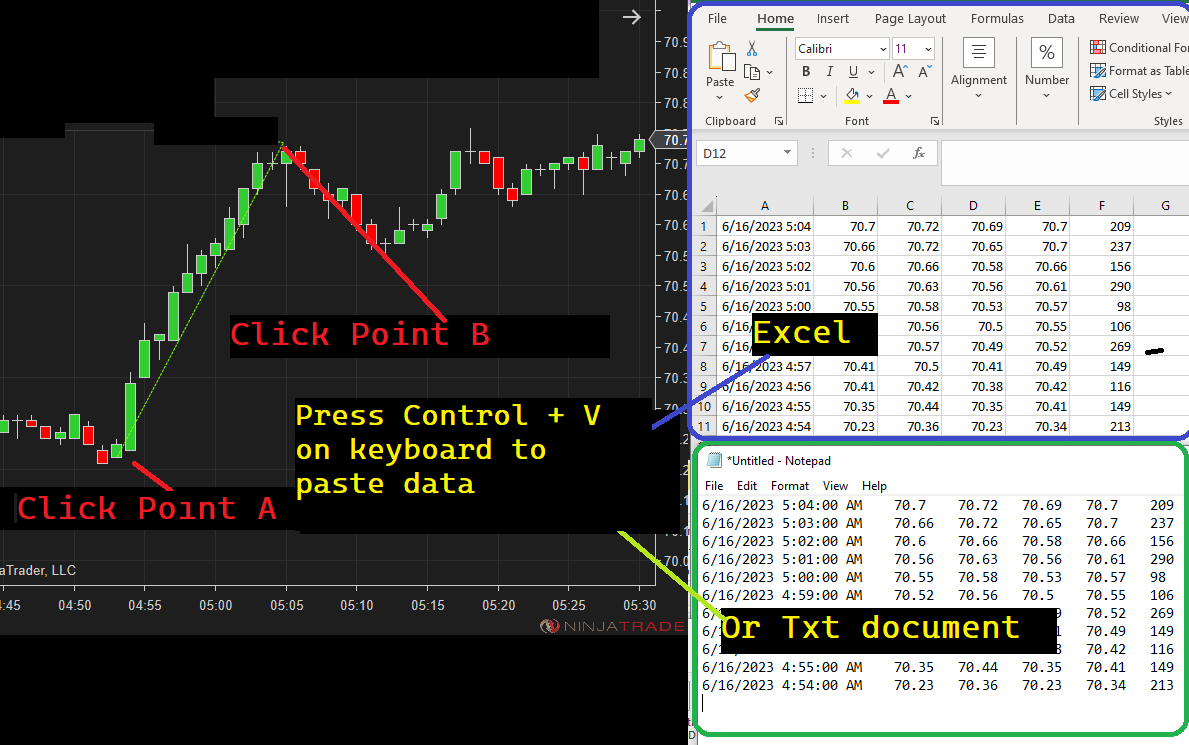
                    I use a cool drawing tool that lets you click 2 points on a chart to select the data in-between, then can open excel and hit Control + V to paste OHLC data into excel. I collect data of periods leading up to major breakouts, and use some machine learning tools to find commonalities. I got the tool on this site [REDACTED]
                    The drawing tool mentioned above, is offered in NinjaTrader ecosystem, Export data drawing tool.
                    Search trading apps & services to cusomize your NinjaTrader platform with trading indicators, signals and strategies.

                    NTAlgos Trading Software
                    NinjaTrader Ecosystem Vendor - NTAlgos

                    Comment

                    Latest Posts

                    Collapse

                    Topics Statistics Last Post
                    Started by argusthome, 03-08-2026, 10:06 AM
                    0 responses
                    104 views
                    0 likes
                    Last Post argusthome  
                    Started by NabilKhattabi, 03-06-2026, 11:18 AM
                    0 responses
                    52 views
                    0 likes
                    Last Post NabilKhattabi  
                    Started by Deep42, 03-06-2026, 12:28 AM
                    0 responses
                    34 views
                    0 likes
                    Last Post Deep42
                    by Deep42
                     
                    Started by TheRealMorford, 03-05-2026, 06:15 PM
                    0 responses
                    38 views
                    0 likes
                    Last Post TheRealMorford  
                    Started by Mindset, 02-28-2026, 06:16 AM
                    0 responses
                    74 views
                    0 likes
                    Last Post Mindset
                    by Mindset
                     
                    Working...
                    X