Announcement

Collapse
No announcement yet.

Partner 728x90

Collapse

Check atmstrategy MarketPosition in an indicator?

Collapse
X
 
  • Filter
  • Time
  • Show
Clear All
new posts

    Check atmstrategy MarketPosition in an indicator?

    I created an indicator with different selectors for quantity, account, instrument and atm strategies. Inside the OnBarUpdate() I have a simple EMA crossover condition to take trades with the selected Atm Strategy. Taking one trade works, but I can't reset the order to null to take a second trade. The method GetAtmStrategyMarketPosition("id") doesn't work and gives me an error that this name is not known in this context. I have an Order object _entryLong and it should only take trades when there is no active order or no active atm running. How can i do that from within an indicator?
    Thank you for your help!
    Click image for larger version

Name:	image.png
Views:	178
Size:	95.4 KB
ID:	1305033

    #2
    Hello HappyTrader76,

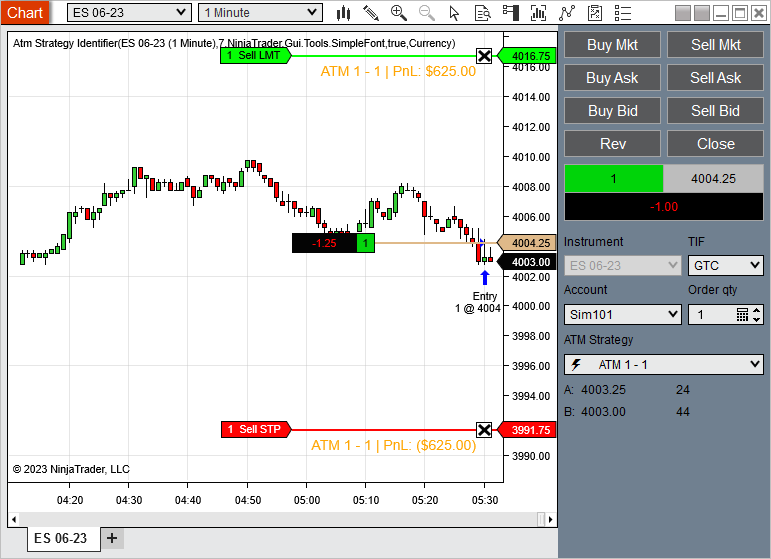
    The AtmStrategyIdentifier has logic to get orders with an atm strategy from an Account object which you may find helpful.
    This indicator serves to provide labels for Atm strategies that are present on your chart. Each new Atm strategy will rotate through the colors defined in your Brush Collection. Simply add to a chart, select the data series you want to have labels added to, choose your font and add all the brushes/colors you want […]


    The order variables should be set back to null from the <Account>.OrderUpdate() or <Account>.ExecutionUpdate event handler method once the exit order has filled.
    Chelsea B.NinjaTrader Customer Service

    Comment


      #3
      Thank you Chelsea B for the quick response. Actually setting back the variables to null is exactly what I want to do but I couldn't figure out how to do that. I was thinking something like: if _orderId.Length > 0 && MarketPosition.Flat then _orderId = string.Empty and _entryLong = null. I don't know how to identify if the order filled was an exit order when the stoploss was hit or if it was the profit target. Any help here would be appreciated. Thank you!

      Comment


        #4
        Hello HappyTrader76,

        From the <Account>.OrderUpdate event you could check the order.OrderAction for OrderAction.Sell or OrderAction.BuyToCover which would be an exit order. The order.OrderType would let you know if this is OrderType.Limit or OrderType.StopMarket.
        You could also check the order.Name to be 'Stop1', 'Stop2', 'Target1', 'Target2', etc.
        Chelsea B.NinjaTrader Customer Service

        Comment


          #5
          Thank you ChelseaB! That helps.

          Comment

          Latest Posts

          Collapse

          Topics Statistics Last Post
          Started by Geovanny Suaza, 02-11-2026, 06:32 PM
          0 responses
          601 views
          0 likes
          Last Post Geovanny Suaza  
          Started by Geovanny Suaza, 02-11-2026, 05:51 PM
          0 responses
          347 views
          1 like
          Last Post Geovanny Suaza  
          Started by Mindset, 02-09-2026, 11:44 AM
          0 responses
          103 views
          0 likes
          Last Post Mindset
          by Mindset
           
          Started by Geovanny Suaza, 02-02-2026, 12:30 PM
          0 responses
          559 views
          1 like
          Last Post Geovanny Suaza  
          Started by RFrosty, 01-28-2026, 06:49 PM
          0 responses
          558 views
          1 like
          Last Post RFrosty
          by RFrosty
           
          Working...
          X