
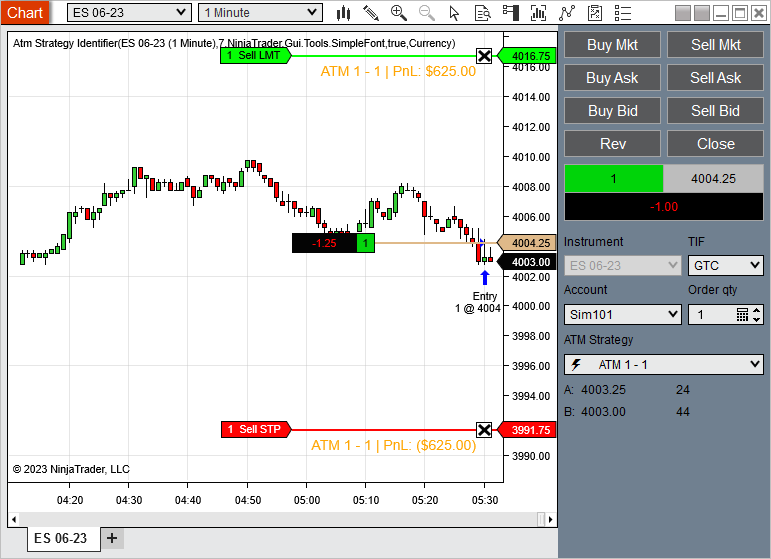
Hi - Chart Trader buttons have a feature that whenever a new order is placed then the ATM strategy stop and targets that are applied to each new order are the same as that of the currently active ATM strategy for the active position. Please see the attached GIF to demonstrate what I am referring to. This is really helpful as it allows managing the full position. Please can you help me direct me toward the code which will help me select the active ATM strategy for the existing position?
I am trying to do the same for an indicator I am programming. It has chart buttons to submit new order and it uses the following code to apply the selected ATM strategy template to each new order. However, this creates multiple stops and targets for each new order unlike the Chart Trader method demonstrated in GIF.
My code below
I am trying to do the same for an indicator I am programming. It has chart buttons to submit new order and it uses the following code to apply the selected ATM strategy template to each new order. However, this creates multiple stops and targets for each new order unlike the Chart Trader method demonstrated in GIF.
My code below
Code:
NinjaTrader.Gui.NinjaScript.AtmStrategy.AtmStrategySelector atmSelector = (Window.GetWindow(ChartControl.Parent).FindFirst(" ChartTraderControlATMStrategySelector") as NinjaTrader.Gui.NinjaScript.AtmStrategy.AtmStrategySelector);

myOrder = account.CreateOrder(Instrument, OrderAction.Buy, OrderType.Limit, OrderEntry.Manual, TimeInForce.Gtc, myQuantity, Math.Min(Low[1], GetCurrentBid() - 1 * TickSize), 0, string.Empty, "Entry", DateTime.MaxValue, null);

if (atmSelector.SelectedAtmStrategy != null)

{
NinjaTrader.NinjaScript.AtmStrategy.StartAtmStrategy(atmSelector.SelectedAtmStrategy, myOrder);
}
Attached Files


Comment