Announcement

Collapse
No announcement yet.

Partner 728x90

Collapse

AtmStrategyIdentifier - Keeps changing brush color on restart.

Collapse
X
 
  • Filter
  • Time
  • Show
Clear All
new posts

    AtmStrategyIdentifier - Keeps changing brush color on restart.

    Hi!

    I use the ATMStrategyIdentifier every day. I love it.

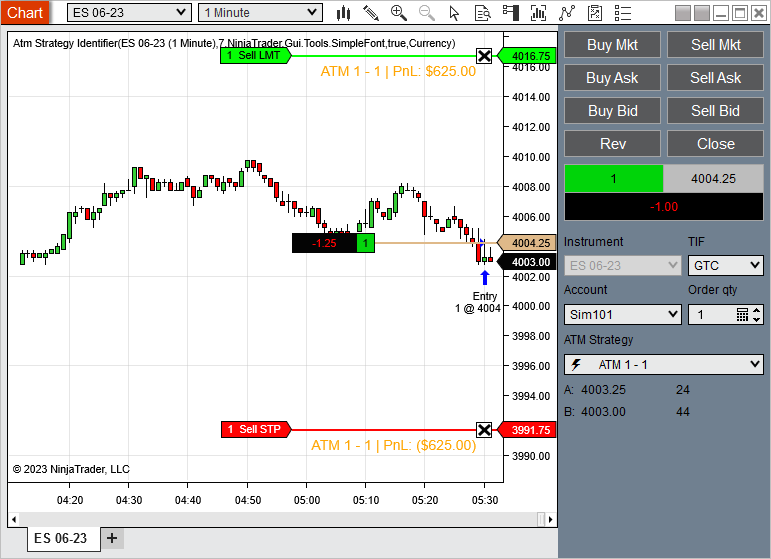
    One issue I have is that every time I restart NT the AtmStrategyIdentifier adds a new brush (orange colored).
    So every day I delete the orange brush and reset it as a black brush so I can see the text (I chart on light colored backgrounds and cannot see the orange text.)

    The rest of the trading day it maintains the black brush. But if I restart, it adds a new orange brush, which colors the text orange. So I have to delete that brush and set it to black again. This happens daily for me.

    Is this something that can be corrected? I've looked at the code, but I just can't figure out how to make the necessary change.

    Thank you so much for this useful tool! And thanks for any help you can offer!​

    #2
    Post a link to the indicator? Where does it come from ?

    Comment


      #3
      Yes! Here's the link to the indicator:

      This indicator serves to provide labels for Atm strategies that are present on your chart. Each new Atm strategy will rotate through the colors defined in your Brush Collection. Simply add to a chart, select the data series you want to have labels added to, choose your font and add all the brushes/colors you want […]


      It says it was created by NinjaTrader_Jim a few years ago and updated in February this year.

      Comment


        #4
        Hello JWallace,

        Thanks for your post.

        The Atm Strategy Identifier has been fixed and updated on the Ecosystem User App Share.

        Please remove the Atm Strategy Identifier script from your platform, download the updated Atm Strategy Identifier indicator from the Ecosystem User App Share, and import the updated indicator onto your platform.

        Atm Strategy Identifier: https://ninjatraderecosystem.com/use...egyidentifier/

        Note to remove the NinjaScript from the platform, open a New > NinjaScript Editor window, open the Indicators folder, right click on the AtmStrategyIdentifier file, and select 'Remove'.

        To import the updated file, go to Tools > Import > NinjaScript AddOn.
        <span class="name">Brandon H.</span><span class="title">NinjaTrader Customer Service</span><iframe name="sig" id="sigFrame" src="/support/forum/core/clientscript/Signature/signature.php" frameborder="0" border="0" cellspacing="0" style="border-style: none;width: 100%; height: 120px;"></iframe>

        Comment


          #5
          Great! Thank you!!
          It works perfectly.
          Last edited by JWallace; 07-03-2023, 05:09 PM.

          Comment

          Latest Posts

          Collapse

          Topics Statistics Last Post
          Started by Geovanny Suaza, 02-11-2026, 06:32 PM
          0 responses
          650 views
          0 likes
          Last Post Geovanny Suaza  
          Started by Geovanny Suaza, 02-11-2026, 05:51 PM
          0 responses
          370 views
          1 like
          Last Post Geovanny Suaza  
          Started by Mindset, 02-09-2026, 11:44 AM
          0 responses
          109 views
          0 likes
          Last Post Mindset
          by Mindset
           
          Started by Geovanny Suaza, 02-02-2026, 12:30 PM
          0 responses
          574 views
          1 like
          Last Post Geovanny Suaza  
          Started by RFrosty, 01-28-2026, 06:49 PM
          0 responses
          577 views
          1 like
          Last Post RFrosty
          by RFrosty
           
          Working...
          X