
Hello WHICKED,
I the template you have provided in post # 72 causes errors as there are indicators I don't have.
To confirm, the behavior absolutely cannot be reproduced without the template?
(If so, we would need to rule out the template being the cause of the behavior.)
Also, the amount of indicators could be causing a performance issue.
When the flashing occurs are you able to smoothly scroll the chart? (If not, the CPU is overloaded and the number of indicators needs to be reduced)
Is this not possible to reproduce without the massive amount of indicators? (This would also indicate an overloaded CPU)
-
as mentioned prior - open with Unirenko set the settings as shown in my prior post. Apply the chart template that I attached.Originally posted by NinjaTrader_ChelseaB View Post
Set it to NQ. and then let the charts update/render and you will start seeing the render issues - rescaling etc. As Leeroy stated - they see it on the panels and not the main panel - I have seen it happen on both main panel and individual indicator panels - typically they all 'rescale/flash' at the same time.Leave a comment:
-
Hello WHICKED,
I will let our development know that users feel something is causing a flashing issue in 8.1.3.0 that was not present in 8.0.26.1 without providing steps to reproduce.
If they are able to discover something, a bug report will be created.
Note, without the minimum steps to reproduce, it may not be possible for this to be corrected.
Let me know if you would like to provide steps for me to reproduce so that I can enter a bug report to expedite this getting corrected.Leave a comment:
-
WHICKED I've never seen flashing on the main panel. For me it's always indicator panels. Interesting. Well, at least we have a video of it.Leave a comment:
-
this response does not matter - as stated prior even with all of these indicators added to the chart - version 8.0.26.1 did not have the chart rescale issue. If you are saying its a performance issue - then why on that old version did the rescale not happen?Originally posted by NinjaTrader_ChelseaB View Post
You get the point? SOMETHING in the internal workings of NinjaTrader between version 8.0.26.1 and 8.0.27.x BROKE the charting implementation.
Even with a reduced amount of draw objects (which has been mentioned by other vendors and other people on this thread) there is STILL the rescale issue. It does not matter about the amount - its that something in the drawing process was CHANGED.
You wanted an example - I gave you an video of it doing it - i gave you the exact chart template that is able to replicate the behavior.
Your statement of its a performance issue is all good and fine, but that does not explain why it was not present in 8.0.26 and started in 8.0.27.
Now your developers have a example of the problem - NOW they can look at it.Leave a comment:
-
Hello WHICKED,
There is a massive amount of indicators on these charts in your screenshot which is likely to over utilize the CPU and cause performance issues.
If the issue is over performance on this specific computer it would be advised to reduce the indicators running in the workspace.
Please try closing all open workspaces.
In a new workspace open a new blank chart with no template applied.
Add only the manually drawn line.
Duplicate the tab into a new window 10 times.
Are you able to reproduce?Leave a comment:
-
heres even a video using the unirenko and the inbuild indicators from the chart template above - you can see as the market starts 'moving' things start to render improperly and the main panel rescales 'flashes' then returns - price markers do not render from time to time and change colors.
again - this issue WAS NOT observed in 8.0.26.1 - it started happening on 8.0.27.x and beyond.
Examples at timestamp 2:50, 3:30, 4:30, 4:40,
Last edited by WHICKED; 06-20-2024, 10:04 AM.Leave a comment:
-
yeah - and already did all that and STILL have the issue - updated drivers etc etc.
and how many times have I stated. this was NOT an issue on 8.0.26.1 - using the exact same code - same layout that I gave you.
You need to put this on NQ during lots of volatility and you will see the flashing. Like I have said over and over again - this did not happen on 8.0.26.1 only on 8.0.27.x and higher did this show up. And that has also be re-iterated multiple times by VENDORS and non-vendors in this thread.
The difference here is NT versions, not the code that we are programming. Every single person that has seen this issue DID NOT see it in 8.0.26.x - they started seeing it from 8.0.27.x and onward.
SO - now tell me with all of us having different machines and hardware and code - etc and we all are seeing the same issue - the only commonality is.... the NT platform.Leave a comment:
-
Hello WHICKED,
This was tested on the ES 09-24 while connected to NinjaTrader Brokerage for real-time data.
If this is happening specifically during high volume, I would suspect you are having a performance issue with the specific machine. This may not be related to a bug with the platform.
Below is a link to a forum post about performance.
Leave a comment:
-
at what time of day? did you only do replay/playback?
did you do this on NQ? or did you use some slow moving instrument?Leave a comment:
-
Hello WHICKED,
I've used UniRenko bars download from the User App Share here: .
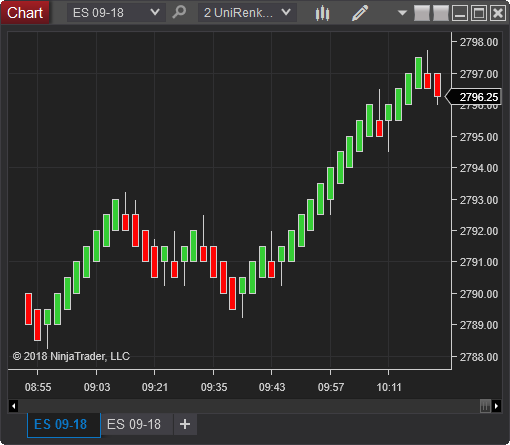
I was not able to reproduce any flashing.
Leave a comment:
-
There is the chart template - you will see if you open multiple charts with the following Unirenko settings that eventually price markers start rendering weirdly and then the main chart will 'rescale' and will snap back. - the more charts you have the more apparent the issues become.
[ATTACH]n1307512[/ATTACH]Leave a comment:
-
Hello WHICKED,
Regarding a reproducing test script, the full logic is not needed and we are not requesting it.
We need a simple test script with the few lines that can reproduce the behavior.
No other logic should be added to the script.
Unfortunately, without this, we are not able to report the behavior to our development.
That said, if you are stating this can be reproduced by specifically adding 10 charts and drawing objects on them, this is something we can test.
I've tested opening 10 charts and adding both the SMA and a drawing object, but I'm not seeing any flashing.
Below is a link to a video of the test.
Leave a comment:
-
Well - there's a reason that no scripts have been shared - as mentioned above.
As for the need to be able to replicate the issue - it happens with SMA it happens with anything that is a draw object. So - make 5-10 charts and load them with anything or everything that is a draw object, plot etc
Do this on lets say unirenko charts and set to a low setting say 1,1,2 for the trend, reversal etc
you will see the flashing - as many have mentioned it is with non-timebased systems - even on range charts.Leave a comment:

| Topics | Statistics | Last Post | ||
|---|---|---|---|---|
|
0 responses
123 views
0 likes
|

by kinfxhk
07-14-2026, 09:39 AM
|
|||
|
0 responses
104 views
0 likes
|
by kinfxhk
07-13-2026, 10:18 AM
|
|||
|
0 responses
83 views
0 likes
|
by kinfxhk
07-13-2026, 09:50 AM
|
|||
|
0 responses
103 views
0 likes
|
by kinfxhk
07-13-2026, 07:21 AM
|
|||
|
0 responses
83 views
0 likes
|
by kinfxhk
07-11-2026, 02:11 AM
|
Leave a comment: