
Announcement

Collapse
No announcement yet.

Partner 728x90

Collapse

question regarding OnStateChange() sequence

Collapse
X
 
  • Filter
  • Time
  • Show
Clear All
new posts

    question regarding OnStateChange() sequence

    Hi support and all,

    I am developing an indicator and i am trying to figure out why i get multiple State of the same type while i add the indicator on the chart and press the OK button in the UI window ?

    Here is the sequence of State that i get from this very basic handler:

    Code:
    protected override void OnStateChange()
    {            
        Print("State == " + State);
    }
    
    output:
    State == SetDefaults
    State == SetDefaults
    State == SetDefaults
    State == Terminated
    State == Terminated
    State == SetDefaults
    State == Configure
    State == DataLoaded
    State == Historical
    State == Transition
    State == Realtime
    State == Terminated
    ​​
    How is it that the last State = Terminated while the indicator is till loaded on the chart ? ANd what about the multiple State == SetDefaults and State == Terminated at the beginning ?

    #2
    How well have you studied the NinjaScript Life Cycle help page?

    Also, your prints are insufficient to help identify which indicator
    instances are being created/terminated.

    Try adding this to your code,

    Code:
    private System.Guid guid = System.Guid.NewGuid();
    protected override void OnStateChange()
    {
        Print("TestStates{" + guid + "} State="+State);
    }
    The Guid will uniquely identify each indicator instance, which will
    help you as you study the state changes happening in OnStateChange.

    Comment


      #3
      @bltdavid

      Thanks, but i still do not know why i get multiple guid from the same script.
      The output here represents the State change which occured while opening the UI window parameters,adding the indicator and pressing the OK button.

      Code:
      guid: c61622ce-0e03-420b-b0fc-35a167f912cc, State == SetDefaults
      guid: 4f3ff7ab-5f74-4e15-96c8-57b65f2de2a7, State == SetDefaults
      guid: 25f58ef0-0f2d-459e-b930-6267e91ac982, State == SetDefaults
      guid: 25f58ef0-0f2d-459e-b930-6267e91ac982, State == Terminated
      guid: c61622ce-0e03-420b-b0fc-35a167f912cc, State == Terminated
      guid: 3f29a469-6e51-481b-a372-fe0dab965442, State == SetDefaults
      guid: 3f29a469-6e51-481b-a372-fe0dab965442, State == Configure
      guid: 3f29a469-6e51-481b-a372-fe0dab965442, State == DataLoaded
      guid: 3f29a469-6e51-481b-a372-fe0dab965442, State == Historical
      guid: 3f29a469-6e51-481b-a372-fe0dab965442, State == Transition
      guid: 3f29a469-6e51-481b-a372-fe0dab965442, State == Realtime
      guid: 4f3ff7ab-5f74-4e15-96c8-57b65f2de2a7, State == Terminated​

      Comment


        #4
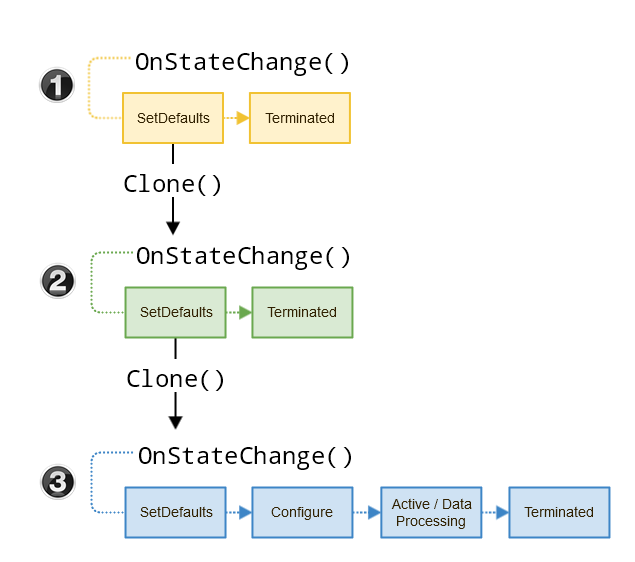
        Hi, you are getting the same prints because these printouts are coming from multiple different scripts. Since you are initializing your GUID from the class level, the instance of the script is created 3 times, so you may see the same GUID 2-3 times; 2 times for scripts that you are not adding to the chart, and 3 times for the script you are adding to the chart. See the diagram from the NinjaScript lifecycle here:

        Comment


          #5
          Originally posted by trendisyourfriend View Post
          but i still do not know why i get multiple guid from the same script.
          Multiple instances of the same script are running, and each
          instance does its own printing.

          That Life Cycle help page explains how 3 indicator instances
          were created, giving some pretty decent examples.

          What parts of that help page are unclear to you?

          Comment


            #6
            I understand the sequence that is on the help page but the thing is that there is only one instance of my indicator that runs. It is something new i am building and i just test it on the same chart. Very strange. The output i posted above makes it clear that the guid == fe0dab965442 belongs to the chart i am playing with to test my indicator and the sequence of State is behaving as expected. The other States and guid, i have no idea where they come from.

            Originally posted by bltdavid View Post

            Multiple instances of the same script are running, and each
            instance does its own printing.

            That Life Cycle help page explains how 3 indicator instances
            were created, giving some pretty decent examples.

            What parts of that help page are unclear to you?

            Comment


              #7
              Everytime you pull up the indicator list on a chart, an instance is created. It should only see SetDefaults state. If you refer to the diagram, you'll see that additionally, an instance is cloned which results in more than just that one. I don't think it's possible to add an indicator to a chart without at least three getting instantiated, and pulling up the list and not adding anything results in at least two per indicator.

              That's why you shouldn't be doing anything heavy in the instantiation - instantiation should be extremely lightweight. You should save your initialization and resource usage for State.Configure or State.DataLoaded.
              Last edited by QuantKey_Bruce; 06-14-2023, 06:20 PM.
              Bruce DeVault
              QuantKey Trading Vendor Services
              NinjaTrader Ecosystem Vendor - QuantKey

              Comment


                #8
                Originally posted by trendisyourfriend View Post
                I understand the sequence that is on the help page but the thing is that there is only one instance of my indicator that runs. It is something new i am building and i just test it on the same chart. Very strange. The output i posted above makes it clear that the guid == fe0dab965442 belongs to the chart i am playing with to test my indicator and the sequence of State is behaving as expected. The other States and guid, i have no idea where they come from.
                It is not strange at all.

                You need to better comprehend the Life Cycle help page.

                You don't seem to understand it.
                There are multiple instances that run, but only one instance
                'runs' visually on your chart. You are failing to comprehend the
                other instances -- these instances also 'run'.

                Let's start with understanding the first instance:
                Just by the sheer act of you opening the Indicators dialog, an
                instance of your indicator is created. This is done internally,
                and you have no control over it. It is a real instance and it 'runs',
                but NT sends this particular instance State.SetDefaults and later
                also sends State.Terminated, but no other states. So, it is created
                and it does 'run', but it does not 'run' visually on your chart
                because this instance never gets that far -- NT only uses this
                first instance to populate the dialog panel showing available
                indicators -- so, this first instance only ever sees two states.
                This is on purpose and by design, and it all happens internally.

                Still confused?
                That's just how the Indicators dialog works. Creating an instance
                of one class or another happens under the hood thousands upon
                thousands of times per second, that's just the nature of program
                execution. Your indicator is like a 'plugin' and it gets incorporated
                into various situations (like this dialog) where extra instances need
                to be created. Got it? The key is that not all instances will 'run'
                through all states -- the only instance that 'runs' through all states
                is the one 'applied' to your chart -- the other instances are created
                under the hood and only exist for a special purpose -- these special
                purpose instances don't get applied to your chart.

                [EDIT: When I say 'applied' to your chart, I mean associated with a
                bar series -- which is, ya know, the whole point of the chart window,
                to show you those bars.]

                You must increase your comprehension: each instance 'runs' in the
                sense that it is created and NT does call OnStateChange at least
                twice. Inside OnStateChange, you call Print, so therefore, naturally,
                you see the Print output for this first instance.

                Piece of cake, right?
                What's not to understand?

                You say you have no idea where it comes from?
                It comes from NT itself, because every time you right-click and
                open the Indicators dialog, NT creates a new instance of every
                indicator on your system
                . NT does this every time, in every
                chart window, every time you open that dialog -- all these
                instances are strictly for internal use by the Indicators dialog.
                They don't completely run every state (doh!) but they do run
                through State.SetDefaults and State.Terminated -- and they
                are invisible to you, but still detectable because of the State
                changes.

                Obviously this all happens extremely fast, because (in most cases)
                the Indicators dialog pops up in the blink of an eye -- but I'm telling
                you, an instance of every indicator in that list was created on the fly,
                and NT called OnStateChange with State.SetDefaults for every single
                instance -- and only then did the dialog window appear.

                Make sense?

                And, that's just the first instance. If you don't understand what is
                happening with this first instance, and why you see its Print output,
                you need to be very specific about the pieces that are confusing you.
                Last edited by bltdavid; 06-14-2023, 07:18 PM.

                Comment


                  #9
                  trendisyourfriend In addition to all the excellent comments already made, think of your Indicator code as the template from which instances of that Indicator are created. One coded Indicator can have many contemporaneous instances. That is most obvious when we put the same Indicator on multiple charts.

                  But even when the NinjaTrader platform uses your code to put the Indicator on any single chart, it also creates more than one instance in that process. All but one of those are temporary and terminated before the Indicator is "finally on the chart". This is perhaps unexpected, but well-documented in the references above.

                  When you see multiple different GUIDs for your one Indicator codebase, you are seeing the underlying activities that the NinjaTrader platform performs just to put one instance of that Indicator on the chart. Going from "I want to select this Indicator and put it on this chart, so let me start to do that" to "there it is now, great!" actually happens in the platform by it creating and terminating a number of different instances of that one Indicator to allow it to perform all the necessary things to get the end result of one instance of that Indicator on the chart.

                  In the end, the chart has only the one final instance that remains. But interim instances are created for various purposes to get to that end result. It may not be intuitive to us as users, but if that's how it's implemented and we know that (again, carefully reading that reference documentation for the lifecycle of an Indicator should be very helpful), we accept that, understand what it means for us as coders of Indicators, and adjust accordingly.

                  Hope that also helps.

                  Thanks.

                  EDIT: In parallel to my writing my reply here, bltdavid added his always helpful additional commentary. Hopefully, all these responses are useful for you.
                  Last edited by jeronymite; 06-14-2023, 06:59 PM.
                  Multi-Dimensional Managed Trading
                  jeronymite
                  NinjaTrader Ecosystem Vendor - Mizpah Software

                  Comment


                    #10
                    I wanted to take a moment to extend my sincerest gratitude and appreciation to each and every one of you for your invaluable support and assistance regarding my recent inquiry.

                    The collective knowledge and passion exhibited here is truly inspiring. Once again, thank you all for your unwavering commitment to fostering a helpful atmosphere.​

                    Comment

                    Latest Posts

                    Collapse

                    Topics Statistics Last Post
                    Started by Geovanny Suaza, 02-11-2026, 06:32 PM
                    0 responses
                    576 views
                    0 likes
                    Last Post Geovanny Suaza  
                    Started by Geovanny Suaza, 02-11-2026, 05:51 PM
                    0 responses
                    334 views
                    1 like
                    Last Post Geovanny Suaza  
                    Started by Mindset, 02-09-2026, 11:44 AM
                    0 responses
                    101 views
                    0 likes
                    Last Post Mindset
                    by Mindset
                     
                    Started by Geovanny Suaza, 02-02-2026, 12:30 PM
                    0 responses
                    553 views
                    1 like
                    Last Post Geovanny Suaza  
                    Started by RFrosty, 01-28-2026, 06:49 PM
                    0 responses
                    551 views
                    1 like
                    Last Post RFrosty
                    by RFrosty
                     
                    Working...
                    X