
Announcement

Collapse
No announcement yet.

Partner 728x90

Collapse

Add Plot Names to single indicator?

Collapse
X
 
  • Filter
  • Time
  • Show
Clear All
new posts

    Add Plot Names to single indicator?

    Hi,

    Could anyone give me some advice as to how to mod this wonderful indicator to only work on one indicator?
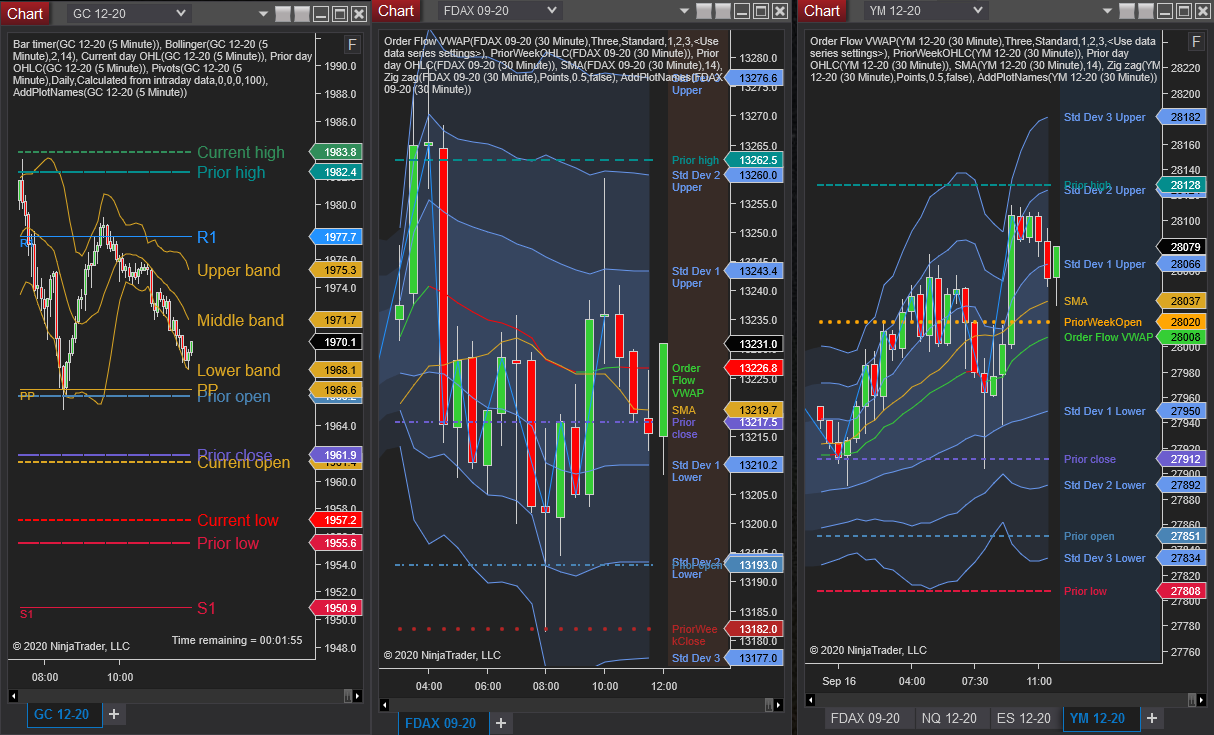
    This indicator, when added to a panel, will sort through all indicator plots and if available, pull their plot name to use as a label for the plot. The plot names are then drawn on the chart centered Y-axis on the last plot value. The plot names are colored according to the plot itself. Changing […]


    I want to make a copy and change it from being general to only work on one specific indicator that doesn't plot names.

    Thanks!

    #2
    yes you could do it by telling a line in that indies code the show names on only the indies w a certain letter, name it 'x' and you can add a secondary repeat of that line that if there is a indie named 'b' then it will display the plot names, you can also say if there is no indie Label to show names of those indies, depends on if you only have one to show names or names of others exceeding one.
    I have part of that inside an indie which I want named on plots, so then add a secondary line that says 'x' and 'y' can be named and dipsplay in the margin their labels, which works same as long as those others name been renamed in label then added.

    Comment


      #3
      You can modify the indicator to only look for specific indicator. You can add a condition that is: if (indicator.Name == (name of your indicator)) then show the plot name (or any name you wish)

      Comment


        #4
        Hello Bob-Habanai,

        The above answers would be the correct approach. You would need to add additional conditions to the indicators logic to look at the indicators name. Tasker-182 provided a good example of how to do that.

        Comment


          #5
          I tried numerous possibilities and eventually gave up, but I appreciate the replies.

          This is the part I tried changing. This is the original code:

          Code:
          // all of this for adding plot names
          try
          {
          if(indicatorCollection == null) return;
          
          TextFormat textFormat = TextFontta.ToDirectWriteTextFormat();
          
          foreach (NinjaTrader.Gui.NinjaScript.IndicatorRenderBase indicator in indicatorCollection)
          {
          if (indicator.Panel == this.Panel || indicator.Panel == 0) // process each indicator in this panel
          {
          if (indicator.Name != "AddPlotBPivots") // don't need to label this indicator...
          {
          if (indicator.State == State.Realtime)
          {
          for (int seriesCount = 0; seriesCount < indicator.Values.Length ; seriesCount++) // process each plot of the indicator
          {
          double y = -1;
          double startX = -1;
          int lastBarPainted = ChartBars.ToIndex-1;
          Plot plot = indicator.Plots[seriesCount];
          startX = ChartPanel.W - RSmargin +LEoffset;
          double val = indicator.Values[seriesCount].GetValueAt(lastBarPainted);
          y = chartScale.GetYByValue(val) - (textFormat.FontSize / 2)-1; // try to center text on plot's last location
          Point startPoint = new Point(startX, y);
          TextLayout textLayout = new TextLayout(Globals.DirectWriteFactory, plot.Name, textFormat, textFormat.FontSize+textLength, textFormat.FontSize);
          RenderTarget.DrawTextLayout(startPoint.ToVector2() , textLayout, plot.BrushDX);
          textLayout.Dispose();
          }
          }
          }
          }
          ​There's also another part I didn't touch, but does that need to be changed too?

          Code:
          protected override void OnBarUpdate()
          {
          indicatorCollection = null;
          if (ChartControl != null && ChartControl.Indicators != null)
          lock (ChartControl.Indicators)
          indicatorCollection = ChartControl.Indicators.ToList();
          }
          
          public override void OnRenderTargetChanged()
          {
          indicatorCollection = null;
          if (ChartControl != null && ChartControl.Indicators != null)
          lock (ChartControl.Indicators)
          indicatorCollection = ChartControl.Indicators.ToList();
          }

          Comment


            #6
            Hello Bob-Habanai,

            You dont need to modify the OnBarUpdate or OnRenderTargetChanged code.

            If you are trying to make this work for only a single indicator you would need to check for that indicators name as part of the conditions in the loop.

            Code:
            if (indicator.Name == "MyIndicatorNameHere") // only label the indicator you wanted.

            Comment


              #7
              Hi Jessy,

              I tried putting your line here:

              Code:
              foreach (NinjaTrader.Gui.NinjaScript.IndicatorRenderBase indicator in indicatorCollection)
              {
              [B]if (indicator.Name == "PriorDayOHLC") // only label the indicator you wanted.[/B]
              {
              if (indicator.Name != "AddPlotBPivots") // don't need to label this indicator...
              Could you help direct me to where the line would go? Thank you!​

              Comment


                #8
                I tried to bold the line for you to read, but apparently I'm not allowed to bold the important line.

                Comment


                  #9
                  Hello Bob-Habanai,

                  You dont need to add indicators which you dont want as conditions. Adding only the one indicator that you wanted would prevent other differently named indicators from being used.

                  Code:
                  foreach (NinjaTrader.Gui.NinjaScript.IndicatorRenderBase indicator in indicatorCollection)
                  {
                  if (indicator.Name == "PriorDayOHLC") // only label the indicator you wanted.

                  Comment

                  Latest Posts

                  Collapse

                  Topics Statistics Last Post
                  Started by Geovanny Suaza, 02-11-2026, 06:32 PM
                  0 responses
                  653 views
                  0 likes
                  Last Post Geovanny Suaza  
                  Started by Geovanny Suaza, 02-11-2026, 05:51 PM
                  0 responses
                  370 views
                  1 like
                  Last Post Geovanny Suaza  
                  Started by Mindset, 02-09-2026, 11:44 AM
                  0 responses
                  109 views
                  0 likes
                  Last Post Mindset
                  by Mindset
                   
                  Started by Geovanny Suaza, 02-02-2026, 12:30 PM
                  0 responses
                  574 views
                  1 like
                  Last Post Geovanny Suaza  
                  Started by RFrosty, 01-28-2026, 06:49 PM
                  0 responses
                  577 views
                  1 like
                  Last Post RFrosty
                  by RFrosty
                   
                  Working...
                  X