Announcement

Collapse
No announcement yet.

Partner 728x90

Collapse

One click chart trading

Collapse
X
 
  • Filter
  • Time
  • Show
Clear All
new posts

    One click chart trading

    Is there a function I can call within OnRender() to draw a price marker at a specific price?

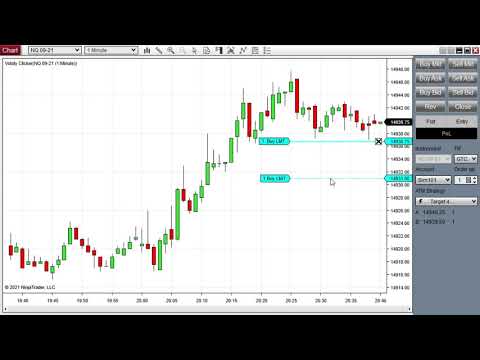
    We have developed an indicator called Clicker for one-click order entry on charts. In short, it shows an order preview at the mouse pointer when the modifier keys are pressed (e.g., CTRL for buy and CTRL+ALT for sell). When the mouse button is clicked, an order is sent.

    More info:

    Clicker enables NinjaTrader one-click chart trading. Improve your execution speed by placing orders with a single click on the chart! Modifier keys (e.g., CTRL, ALT, SHIFT) and mouse buttons (e.g., left or middle) are configurable. For buy orders, clicking below (above) the market price sends a limit (stop-market) order, as showed in Figure


    The issue is that we have to use a plot series to draw the price marker and sometimes it gets out of sync with the order preview. Even when we call it using TriggerCustomEvent()right before drawing the order preview. Is there a direct way to render a price marker without having to use a plot series? I have seen a few requests for this feature in the past. Are there any updates on this?
    Last edited by VolatyTrading; 09-13-2021, 03:50 PM.

    #2
    Hello VolatyTrading,

    Thank you for the post.

    There is currently no supported api for drawing in the price axis and using a plot would be the suggestion for what you are trying to do.

    I can't really tell from the video where it is getting out of sync however if it relates to rendering and the chart just not being updated at that time you may be able to force a render. you can add then immediately remove a drawing object as a means to re render the chart. Removing a drawing object should cause a re render, in your method you could draw a dummy object and then remove it as the next line to trigger that. That would be my only suggestion in case the chart is not updated with the mouse movement in some way.

    I look forward to being of further assistance.

    Comment


      #3
      NinjaTrader_Jesse thanks, the issue does not show up in the video, but does happen every once in a while. Where can I add/remove the drawing object? I assume it should be done outside of OnRender() in order to trigger a rerender so, say, calling Draw.Arc()and then removing it whenever the mouse moves should work?

      Comment


        #4
        Hello VolatyTrading,

        You would need to be the judge of where to add that based on where the problem is happening. I couldn't really make a good estimate from the provided information other than potentially the mouse event as you noted. You would have to give it a try and see if there are any performance impacts or if the problem is resolved at all by doing that.

        You could do something as simple as:
        Code:
        Draw.Dot(this, "tag1", false, 0, 0, Brushes.Transparent);
        RemoveDrawObject("tag1");


        I look forward to being of further assistance.

        Comment

        Latest Posts

        Collapse

        Topics Statistics Last Post
        Started by Geovanny Suaza, 02-11-2026, 06:32 PM
        0 responses
        566 views
        0 likes
        Last Post Geovanny Suaza  
        Started by Geovanny Suaza, 02-11-2026, 05:51 PM
        0 responses
        330 views
        1 like
        Last Post Geovanny Suaza  
        Started by Mindset, 02-09-2026, 11:44 AM
        0 responses
        101 views
        0 likes
        Last Post Mindset
        by Mindset
         
        Started by Geovanny Suaza, 02-02-2026, 12:30 PM
        0 responses
        547 views
        1 like
        Last Post Geovanny Suaza  
        Started by RFrosty, 01-28-2026, 06:49 PM
        0 responses
        548 views
        1 like
        Last Post RFrosty
        by RFrosty
         
        Working...
        X