Announcement

Collapse
No announcement yet.

Partner 728x90

Collapse

Draw.Text to place label based on primary data not secondary data position

Collapse
X
 
  • Filter
  • Time
  • Show
Clear All
new posts

    #16
    Hi Paul,
    I tried that but it only throws out-of-range error.

    Comment


      #17
      Hello kashter,

      Thanks for your reply.

      I can't see from the code you post where the issue would be but the bottom line is you need to draw on your charts when BarsInProgress = 0.

      While we can't provide a debugging service, if you want to attach your source code file I can take a quick look to see if there is anything obvious or can advise debugging steps. if you do not want to post your entire code file in the forums, you are welcome to send into PlatformSupport[at]NinjaTrader[dot]Com. Mark the subject line Atten Paul, ticket # 3233036. In the body of the e-mail, include a link to this thread for reference.

      Comment


        #18
        Paul,
        I would be grateful of you could have a look at the code and give me your take.

        In addition to the three additional AddDataSeries, the OBU is as follows;
        Code:
        protected override void OnBarUpdate()
        {
        
        if (BarsInProgress == 0 && CurrentBar > 0)
        {
        
        if (!Values[0].IsValidDataPoint(0))
        Values[0][0] = Values[0][1];
        
        if (!Values[1].IsValidDataPoint(0))
        Values[1][0] = Values[1][1];
        
        if (!Values[2].IsValidDataPoint(0))
        Values[2][0] = Values[2][1];
        
        // Draw.Text(this, "H[1]", "H[1] " + Highs[1][0].ToString(), 0, Highs[1][0], Brushes.Firebrick);
        // Draw.Text(this, "L[1]", "L[1] " + Lows[1][0].ToString(), 0, Lows[1][0], Brushes.Snow);
        // Draw.Text(this, "C[1]", "C[1] " + Closes[1][0].ToString(), 0, Closes[1][0], Brushes.LimeGreen);
        }
        
        
        if (BarsInProgress == 1)// && CurrentBars[1] > 0)
        {
        ClearOutputWindow();
        Print(string.Format("CurrentBar1 {0} \nOpen[1] {1} \nHigh[1] {2} \nLow[1] {3} \nClose[1] {4} ", 0, Opens[1][0], Highs[1][0], Lows[1][0], Closes[1][0]));
        
        // extend the added data series frame for each primary bar so there are consecutive bars set so we can see it on the chart
        if (Values[1].IsValidDataPoint(0))
        Values[0][0] = Highs[1][0]; //or BarsArray[1].GetHigh(CurrentBars[1])
        Values[1][0] = Lows[1][0]; //or BarsArray[1].GetLow(CurrentBars[1])
        Values[2][0] = Closes[1][0]; //or BarsArray[1].GetClose(CurrentBars[1])
        
        Draw.Text(this, "H[1]", "H[1] " + Highs[1][0].ToString("\n0.00"), 0, Highs[1][0], Brushes.Firebrick); //tried ChartBars.GetBarIdxByTime(ChartControl, Time[0]) but still no good
        Draw.Text(this, "L[1]", "L[1] " + Lows[1][0].ToString("\n0.00"), 0, Lows[1][0], Brushes.Snow);
        Draw.Text(this, "C[1]", "C[1] " + Closes[1][0].ToString("\n0.00"), 0, Closes[1][0], Brushes.LimeGreen);

        Comment


          #19
          Hello kashter,

          Thanks for your reply.

          Please attach the complete.cs file itself so I can see the complete picture.

          Thanks in advance.

          Comment


            #20
            Here you go Paul
            Attached Files

            Comment


              #21
              Hello kashter,

              Thanks for your reply.

              You currently have this line: if (BarsInProgress == 0 && CurrentBar > 0). This issue is that your code need to wait for the added data series to have a bar.

              Please try: if (BarsInProgress == 0 && CurrentBars[1] > 0) and uncomment the draw statements and comment out the draw statement in the BarsInProgress == 1 section.

              Click image for larger version

Name:	kashter-1.PNG
Views:	229
Size:	34.1 KB
ID:	1168858


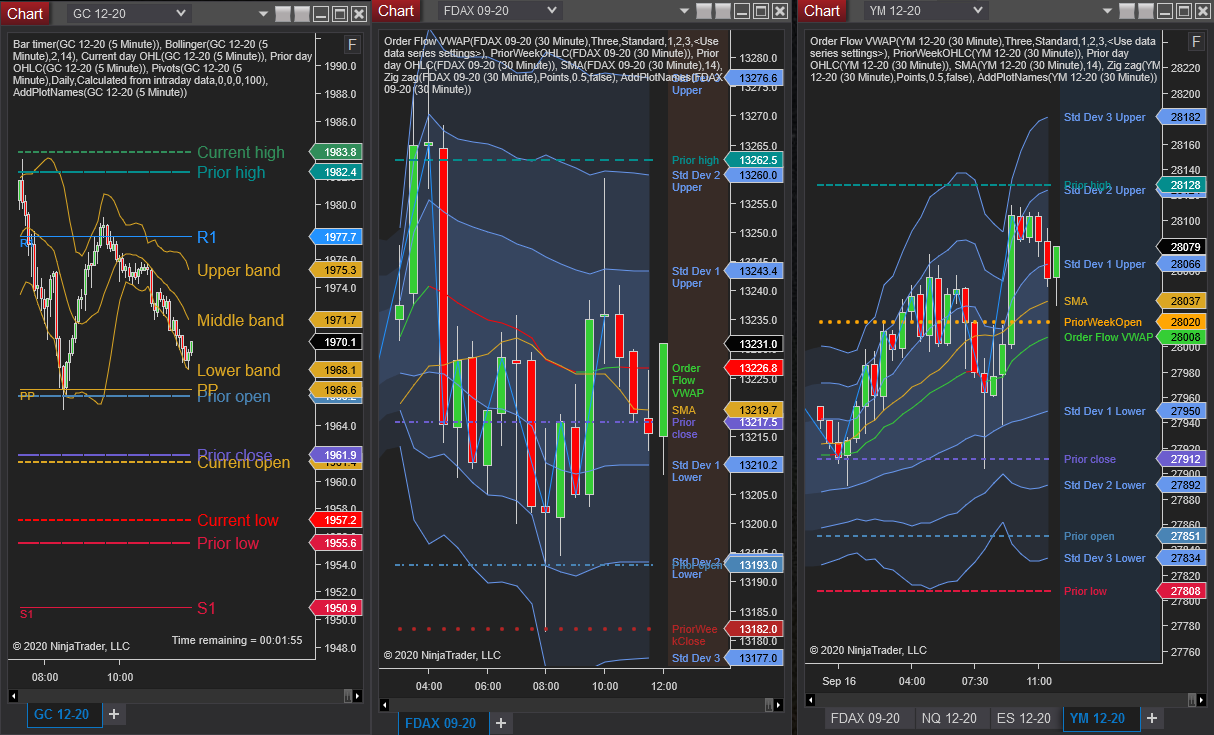
              If you want to have just the plot names shown, you could use an indicator called AddPlotNames, looks like this:

              Click image for larger version

Name:	kashter-2.PNG
Views:	205
Size:	35.6 KB
ID:	1168859

              That indicator is free and publicly available in the NT user app section of the Ninjatrader ecosystem. Here is a link:

              This indicator, when added to a panel, will sort through all indicator plots and if available, pull their plot name to use as a label for the plot. The plot names are then drawn on the chart centered Y-axis on the last plot value. The plot names are colored according to the plot itself. Changing […]


              Please note: The NinjaTrader Ecosystem website is for educational and informational purposes only and should not be considered a solicitation to buy or sell a futures contract or make any other type of investment decision. The add-ons listed on this website are not to be considered a recommendation and it is the reader's responsibility to evaluate any product, service, or company. NinjaTrader Ecosystem LLC is not responsible for the accuracy or content of any product, service or company linked to on this website.

              Comment


                #22
                Thank you very much Paul, finally got a working code.
                I am aware of the AddPlatNames, the problem is it will place the name of every single plot and offers no way to limit this. I do not need all the names, just a select few. Thanks again.

                For those interested, I have attached the final version. I hope you find it useful.
                Attached Files
                Last edited by kashter; 08-24-2021, 11:05 PM. Reason: Attaching the working version of the MyPriorDaysHLC

                Comment

                Latest Posts

                Collapse

                Topics Statistics Last Post
                Started by Geovanny Suaza, 02-11-2026, 06:32 PM
                0 responses
                571 views
                0 likes
                Last Post Geovanny Suaza  
                Started by Geovanny Suaza, 02-11-2026, 05:51 PM
                0 responses
                331 views
                1 like
                Last Post Geovanny Suaza  
                Started by Mindset, 02-09-2026, 11:44 AM
                0 responses
                101 views
                0 likes
                Last Post Mindset
                by Mindset
                 
                Started by Geovanny Suaza, 02-02-2026, 12:30 PM
                0 responses
                549 views
                1 like
                Last Post Geovanny Suaza  
                Started by RFrosty, 01-28-2026, 06:49 PM
                0 responses
                550 views
                1 like
                Last Post RFrosty
                by RFrosty
                 
                Working...
                X