Announcement

Collapse
No announcement yet.

Partner 728x90

Collapse

Can you change color of a candle on price change and finalize the color on BarClose?

Collapse
X
 
  • Filter
  • Time
  • Show
Clear All
new posts

    Can you change color of a candle on price change and finalize the color on BarClose?

    I have create an Indicator that changes color of the bar on bar close but I realize that I want it to change on price change and bar close. Is this possible?
    The hope would be that as soon as it is possible that the candle will be a hammer it changes color and then changes back if it ends up not being a hammer.
    Any help would be greatly appreciated.
    This is how it work so far.

    Code:
    namespace NinjaTrader.NinjaScript.Indicators
    {
    public class HammerColor : Indicator
    {
    protected override void OnStateChange()
    {
    if (State == State.SetDefaults)
    {
    Description = @"Enter the description for your new custom Indicator here.";
    Name = "HammerColor";
    Calculate = Calculate.OnBarClose;
    IsOverlay = true;
    DisplayInDataBox = true;
    DrawOnPricePanel = true;
    DrawHorizontalGridLines = true;
    DrawVerticalGridLines = true;
    PaintPriceMarkers = true;
    ScaleJustification = NinjaTrader.Gui.Chart.ScaleJustification.Right;
    //Disable this property if your indicator requires custom values that cumulate with each new market data event.
    //See Help Guide for additional information.
    IsSuspendedWhileInactive = true;
    WickPercMax = 89;
    WickPercMin = 67;
    BarColorUp = Brushes.Blue;
    BarColorDown = Brushes.Yellow;
    }
    else if (State == State.Configure)
    {
    }
    }
    
    protected override void OnBarUpdate()
    {
    // Print("O="+Open[0]+"H="+High[0]+"L="+Low[0]+"O-L/(H-L)*100="+(Open[0]-Low[0])/(High[Math.Min(CurrentBar, 1)]-Low[Math.Min(CurrentBar, 1)])*100+"H-O/(H-L)*100="+(High[0]-Open[0])/(High[Math.Min(CurrentBar, 1)]-Low[Math.Min(CurrentBar, 1)])*100);
    if (Close[0]>Open[0] && (Open[0]-Low[0])/(High[Math.Min(CurrentBar, 1)]-Low[Math.Min(CurrentBar, 1)])*100>=WickPercMin && (Open[0]-Low[0])/(High[Math.Min(CurrentBar, 1)]-Low[Math.Min(CurrentBar, 1)])*100<=WickPercMax)
    // { //hammer
    BarBrush = BarColorUp;
    // Draw.Text(this, "test"+CurrentBar, "O="+Open[0]+"L="+Low[0]+"O-L/(H-L)="+(Open[0]-Low[0])/(High[Math.Min(CurrentBar, 1)]-Low[Math.Min(CurrentBar, 1)]), 0, Low[0]);
    // }
    else if (Close[0]<Open[0] && (High[0]-Open[0])/(High[Math.Min(CurrentBar, 1)]-Low[Math.Min(CurrentBar, 1)])*100>=WickPercMin && (High[0]-Open[0])/(High[Math.Min(CurrentBar, 1)]-Low[Math.Min(CurrentBar, 1)])*100<=WickPercMax)
    // {//inverted hammer
    BarBrush = BarColorDown;
    // Draw.Text(this, "test"+CurrentBar, "H="+High[0]+"O="+Open[0]+"H-O/H-L="+(High[0]-Open[0])/(High[Math.Min(CurrentBar, 1)]-Low[Math.Min(CurrentBar, 1)]), 0, High[0]);
    // }
    }
    
    #region Properties
    [NinjaScriptProperty]
    [Range(80, int.MaxValue)]
    [Display(Name="WickPercMax", Order=1, GroupName="Parameters")]
    public int WickPercMax
    { get; set; }
    
    [NinjaScriptProperty]
    [Range(60, int.MaxValue)]
    [Display(Name="WickPercMin", Order=2, GroupName="Parameters")]
    public int WickPercMin
    { get; set; }
    
    [NinjaScriptProperty]
    [XmlIgnore]
    [Display(Name="BarColorUp", Order=3, GroupName="Parameters")]
    public Brush BarColorUp
    { get; set; }
    
    [Browsable(false)]
    public string BarColorUpSerializable
    {
    get { return Serialize.BrushToString(BarColorUp); }
    set { BarColorUp = Serialize.StringToBrush(value); }
    }
    
    [NinjaScriptProperty]
    [XmlIgnore]
    [Display(Name="BarColorDown", Order=4, GroupName="Parameters")]
    public Brush BarColorDown
    { get; set; }
    
    [Browsable(false)]
    public string BarColorDownSerializable
    {
    get { return Serialize.BrushToString(BarColorDown); }
    set { BarColorDown = Serialize.StringToBrush(value); }
    }
    #endregion
    
    }
    }
    Last edited by WeyldFalcon; 02-02-2021, 11:18 AM.

    #2
    Hello WeyldFalcon,

    Thank you for your post.

    Certainly, it would be possible to set your Calculate setting to OnPrice change in State == State.SetDefaults, then separate out some logic to fire on each price change and some to only fire on the first tick of a new bar to finalize the previous bar's color, and even print text like you have commented out in your example. Here's an example building off your script:

    Code:
     protected override void OnBarUpdate()
    {
    // since we are finalizing bars only once they close and must then reference the previous bar
    // ensure we have at least one bar on the chart to look back to before processing
    if(CurrentBar < 1)
    return;
    
    // check whether it is the first tick of bar
    if(IsFirstTickOfBar)
    {
    // if so finalize color and print text for the previous bar
    if (Close[1]>Open[1] && (Open[1]-Low[1])/(High[Math.Min(CurrentBar-1, 1)]-Low[Math.Min(CurrentBar-1, 1)])*100>=WickPercMin && (Open[1]-Low[1])/(High[Math.Min(CurrentBar-1, 1)]-Low[Math.Min(CurrentBar-1, 1)])*100<=WickPercMax)
    { //hammer
    BarBrushes[1] = BarColorUp;
    Draw.Text(this, "test"+(CurrentBar-1), "O="+Open[1]+"L="+Low[1]+"O-L/(H-L)="+(Open[1]-Low[1])/(High[Math.Min(CurrentBar-1, 1)]-Low[Math.Min(CurrentBar-1, 1)]), 1, Low[1]);
    }
    else if (Close[1]<Open[1] && (High[1]-Open[1])/(High[Math.Min(CurrentBar-1, 1)]-Low[Math.Min(CurrentBar-1, 1)])*100>=WickPercMin && (High[1]-Open[1])/(High[Math.Min(CurrentBar-1, 1)]-Low[Math.Min(CurrentBar-1, 1)])*100<=WickPercMax)
    {//inverted hammer
    BarBrushes[1] = BarColorDown;
    Draw.Text(this, "test"+(CurrentBar-1), "H="+High[1]+"O="+Open[1]+"H-O/H-L="+(High[1]-Open[1])/(High[Math.Min(CurrentBar-1, 1)]-Low[Math.Min(CurrentBar-1, 1)]), 1, High[1]);
    }
    // if not set the bar brush for the previous bar back to default settings and do not print
    else
    {
    BarBrushes[1] = null;
    }
    }
    
    // the below will be triggered on each price change of the currently forming bar instead of once per bar on the first tick
    // Print("O="+Open[0]+"H="+High[0]+"L="+Low[0]+"O-L/(H-L)*100="+(Open[0]-Low[0])/(High[Math.Min(CurrentBar, 1)]-Low[Math.Min(CurrentBar, 1)])*100+"H-O/(H-L)*100="+(High[0]-Open[0])/(High[Math.Min(CurrentBar, 1)]-Low[Math.Min(CurrentBar, 1)])*100);
    
    // check whether either of these are true for the currently forming bar on each price change, if so change color
    if (Close[0]>Open[0] && (Open[0]-Low[0])/(High[Math.Min(CurrentBar, 1)]-Low[Math.Min(CurrentBar, 1)])*100>=WickPercMin && (Open[0]-Low[0])/(High[Math.Min(CurrentBar, 1)]-Low[Math.Min(CurrentBar, 1)])*100<=WickPercMax)
    { //hammer
    BarBrushes[0] = BarColorUp;
    }
    else if (Close[0]<Open[0] && (High[0]-Open[0])/(High[Math.Min(CurrentBar, 1)]-Low[Math.Min(CurrentBar, 1)])*100>=WickPercMin && (High[0]-Open[0])/(High[Math.Min(CurrentBar, 1)]-Low[Math.Min(CurrentBar, 1)])*100<=WickPercMax)
    {//inverted hammer
    BarBrushes[0] = BarColorDown;
    }
    // if not set the bar brush back to the default
    else
    {
    BarBrushes[0] = null;
    }
    
    }
    Note that since we're accessing the previous bar and current bar's BarBrush, we use the BarBrushes[BarsAgo] so we're changing the color of the correct bar.

    Please let us know if we may be of further assistance to you.

    Comment


      #3
      Hello Kate,
      Wow, thank you that is really great!
      It changes color whenever it is going to be a hammer when heading in the direction of the eventual direction. This is a step up. I was hoping it would change color as soon as there was a possibility it would become a hammer.
      For example in the image below you can see the last bar has the potential to be an inverted hammer if the price goes all the way down to 3795.50. The way the code currently works it will only turn yellow if the price drops below 3796.
      Is this possible? If not that is still way better than what I had created, thank you
      Click image for larger version

Name:	Capture.jpg
Views:	521
Size:	29.1 KB
ID:	1139574

      Comment


        #4
        Oh, wait! I figured it out, I forgot that the current check was still checking for up vs down as the first part of the if/else.
        Here is the new code in case anybody is interested.
        Code:
        {
        // since we are finalizing bars only once they close and must then reference the previous bar
        // ensure we have at least one bar on the chart to look back to before processing
        if(CurrentBar < 1)
        return;
        
        // check whether it is the first tick of bar
        if(IsFirstTickOfBar)
        {
        // if so finalize color and print text for the previous bar
        if (Close[1]>Open[1] && (Open[1]-Low[1])/(High[1]-Low[1])*100>=WickPercMin && (Open[1]-Low[1])/(High[1]-Low[1])*100<=WickPercMax)
        { //hammer
        BarBrushes[1] = BarColorUp;
        // Draw.Text(this, "test"+(CurrentBar-1), "O="+Open[1]+"L="+Low[1]+"O-L/(H-L)="+(Open[1]-Low[1])/(High[1]-Low[1]), 1, Low[1]);
        }
        else if (Close[1]<Open[1] && (High[1]-Open[1])/(High[1]-Low[1])*100>=WickPercMin && (High[1]-Open[1])/(High[1]-Low[1])*100<=WickPercMax)
        {//inverted hammer
        BarBrushes[1] = BarColorDown;
        // Draw.Text(this, "test"+(CurrentBar-1), "H="+High[1]+"O="+Open[1]+"H-O/H-L="+(High[1]-Open[1])/(High[1]-Low[1]), 1, High[1]);
        }
        // if not set the bar brush for the previous bar back to default settings and do not print
        else
        {
        BarBrushes[1] = null;
        }
        }
        
        // the below will be triggered on each price change of the currently forming bar instead of once per bar on the first tick
        // Print("O="+Open[0]+"H="+High[0]+"L="+Low[0]+"O-L/(H-L)*100="+(Open[0]-Low[0])/(High[1]-Low[1])*100+"H-O/(H-L)*100="+(High[0]-Open[0])/(High[1]-Low[1])*100);
        
        // check whether either of these are true for the currently forming bar on each price change, if so change color
        if ((Open[0]-Low[0])/(High[1]-Low[1])*100>=WickPercMin && (Open[0]-Low[0])/(High[1]-Low[1])*100<=WickPercMax)
        { //hammer
        BarBrushes[0] = BarColorUp;
        // Draw.Text(this, "test"+(CurrentBar), "O="+Open[0]+"L="+Low[0]+"O-L/(H-L)="+(Open[0]-Low[0])/(High[1]-Low[1]), 1, Low[0]);
        }
        else if ((High[0]-Open[0])/(High[1]-Low[1])*100>=WickPercMin && (High[0]-Open[0])/(High[1]-Low[1])*100<=WickPercMax)
        {//inverted hammer
        BarBrushes[0] = BarColorDown;
        // Draw.Text(this, "test"+(CurrentBar), "H="+High[0]+"O="+Open[0]+"H-O/H-L="+(High[0]-Open[0])/(High[1]-Low[1]), 1, High[0]);
        }
        // if not set the bar brush back to the default
        else
        {
        BarBrushes[0] = null;
        }

        Comment


          #5
          Sometimes the previous bar stays colored until it the chart moves on to the 2nd bar after it. Is this because we are checking on price change for the program but checking IsFirstTickOfBar which is tick-based? Is there an IsFirstPriceOfBar or something similar? If not should I change the program to be tick-based?

          Comment


            #6
            Hello WelyldFalcon,

            This is Jim responding on behalf of Kate who is out of the office at this time.

            IsFirstTickOfBar will always iterate on the first tick of a new bar as this will be necessary to recreate OnBarClose-like calculations where the first tick of a new bar signals a bar closure.

            If you want to track only when prices change, you could consider creating a private double and updating that only when you see price changes. For example:

            Code:
            private double lastPrice;
            protected override void OnBarUpdate()
            {
                if (lastPrice != Close[0])
                {
                    //New Price Change
                    lastPrice = Close[0];
                }
            }
            We look forward to assisting.

            Comment


              #7
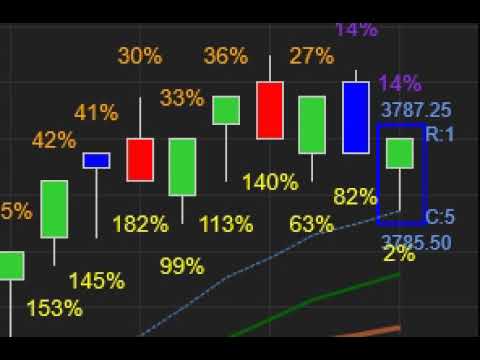
              Thank you, although this also ends up with the previous candle to the current candle sometimes staying the new color until the candle 2 candles after it shows up.
              Notice how the previous candle is currently blue? It should change to red as soon as the new candle is created right? It does change to red once the next candle shows up but I am curious why it does not change as soon as the current candle starts?
              Click image for larger version

Name:	Capture.jpg
Views:	480
Size:	47.3 KB
ID:	1139739
              Last edited by WeyldFalcon; 02-03-2021, 01:54 PM.

              Comment


                #8
                Hello WeyldFalcon,

                Thank you for your reply.

                What is your current calculate setting In OnStateChange?

                Not seeing the color change until 2 bars later seems like what would occur if you have this set to OnBarClose instead of OnPriceChange.

                Thanks in advance; I look forward to assisting you further.

                Comment


                  #9
                  OnEachTick or at least I think that is what this does below
                  Code:
                  if (State == State.SetDefaults)
                  {
                  Description = @"Enter the description for your new custom Indicator here.";
                  Name = "HammerColor";
                  Calculate = Calculate.OnEachTick;
                  IsOverlay = true;
                  DisplayInDataBox = true;
                  DrawOnPricePanel = true;
                  DrawHorizontalGridLines = true;
                  DrawVerticalGridLines = true;
                  PaintPriceMarkers = true;
                  ScaleJustification = NinjaTrader.Gui.Chart.ScaleJustification.Right;
                  //Disable this property if your indicator requires custom values that cumulate with each new market data event.
                  //See Help Guide for additional information.
                  IsSuspendedWhileInactive = true;
                  WickPercMax = 89;
                  WickPercMin = 67;
                  BarColorUp = Brushes.Blue;
                  BarColorDown = Brushes.Orange;
                  }
                  it does not happen all the time just once in a while. most of the time the color changes as soon as the next candle arrives.
                  Last edited by WeyldFalcon; 02-04-2021, 09:49 AM.

                  Comment


                    #10
                    Hello WeyldFalcon,

                    Thank you for your reply.

                    I've been testing this on my end and I'm not seeing it wait to finalize the bar painting til two bars later - I'm just seeing it paint the prior bar immediately when set to OnEachTick. Would you be able to supply a video of what you're seeing?

                    Thanks in advance; I look forward to assisting you further.

                    Comment


                      #11
                      I am not allowed to upload files with extension .mp4 what format should it be?
                      Last edited by WeyldFalcon; 02-04-2021, 07:38 PM.

                      Comment


                        #12
                        Using Screen Recorder Pro and uploaded to youtube.

                        if it helps this was ES on Jan 13th 2021 at around 8:51am
                        Last edited by WeyldFalcon; 02-05-2021, 08:40 AM.

                        Comment


                          #13
                          Hello WeyldFalcon,

                          Thank you for your reply.

                          I'm having a hard time reproducing this in Playback. So that I can test as accurately as possible, what interval and bar type are you using for your chart? For example, 1 minute, 1 minute heiken ashi, etc. Also, what time zone are you in?

                          Thanks in advance; I look forward to assisting you further.

                          Comment


                            #14
                            Range 6 for this one but it happens on range 8 and 18 as well.

                            Comment


                              #15
                              Hello WeyldFalcon,

                              Thank you for your reply.

                              I haven't been able to replicate this behavior with the version I have on my end. So that we can make sure I'm testing with the exact same code you are, please export the indicator from Tools > Export > NinjaScript Add-on. Do not check the box to export as a compiled assembly or I will not be able to review the code. Please attach the resulting .Zip file to your reply.

                              Thanks in advance; I look forward to assisting you further.

                              Comment

                              Latest Posts

                              Collapse

                              Topics Statistics Last Post
                              Started by Geovanny Suaza, 02-11-2026, 06:32 PM
                              0 responses
                              566 views
                              0 likes
                              Last Post Geovanny Suaza  
                              Started by Geovanny Suaza, 02-11-2026, 05:51 PM
                              0 responses
                              330 views
                              1 like
                              Last Post Geovanny Suaza  
                              Started by Mindset, 02-09-2026, 11:44 AM
                              0 responses
                              101 views
                              0 likes
                              Last Post Mindset
                              by Mindset
                               
                              Started by Geovanny Suaza, 02-02-2026, 12:30 PM
                              0 responses
                              547 views
                              1 like
                              Last Post Geovanny Suaza  
                              Started by RFrosty, 01-28-2026, 06:49 PM
                              0 responses
                              548 views
                              1 like
                              Last Post RFrosty
                              by RFrosty
                               
                              Working...
                              X