
Announcement

Collapse
No announcement yet.

Partner 728x90

Collapse

How to change the charts base instrument (period, type, basetype) with an indicator?

Collapse
X
 
  • Filter
  • Time
  • Show
Clear All
new posts

    How to change the charts base instrument (period, type, basetype) with an indicator?

    I would like to reset a charts base instrument from within an indicator function so that the chart and all indicators on the chart are reloaded, just like I changed it from the chart's instrument window.
    So something like:

    Chart.BarsPeriod.BarsPeriodType = BarsPeriodType.HeikenAshi;
    Chart.BarsPeriod.BaseBarsPeriodType = BarsPeriodType.Tick;
    Chart.BarsPeriod.BaseBarsPeriodValue = 1000;

    Is that possible and how?

    PS: I'm not talking about adding a dataserie for an indicator, I really want to reload the whole chart with all indicators (with a different chart instrument setting).
    #2
    Hello wjadevries,

    It is not possible to manipulate the data series or chart directly from code like that, you would instead need to work with keyboard events to simulate manual keyboard changes.

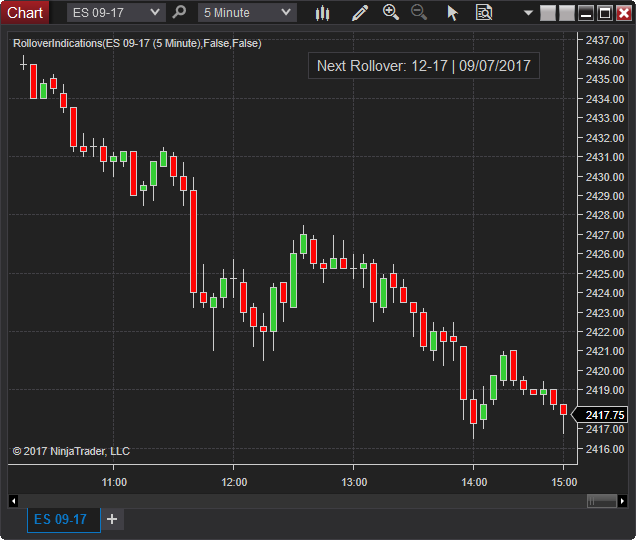
    You can see the rollover indications indicator for an example of changing the instrument.
    Shows a button on the chart to roll the expiry to the next available contract month. Option to hide button until a number of days before or on roll date. Another option to confirm by opening the instrument overlay selector or automatically rollover without confirmation. (Update June 27th, 2019 – Added an option to show […]


    The NinjaTrader Ecosystem website is for educational and informational purposes only and should not be considered a solicitation to buy or sell a futures contract or make any other type of investment decision. The add-ons listed on this website are not to be considered a recommendation and it is the reader's responsibility to evaluate any product, service, or company. NinjaTrader Ecosystem LLC is not responsible for the accuracy or content of any product, service or company linked to on this website.

    Comment


      #3
      Nope, already found it myself.
      Code is:

      Code:
      ChartControl.Dispatcher.InvokeAsync((Action)(() =>
      {
      try {
      NinjaTrader.Gui.NinjaScript.AtmStrategy.AtmStrategySelector atm = Window.GetWindow(ChartControl.Parent).FindFirst("ChartTraderControlATMStrategySelector") as NinjaTrader.Gui.NinjaScript.AtmStrategy.AtmStrategySelector;
      for(int i=0; i<atm.Items.Count; i++) {
      try {
      NinjaTrader.NinjaScript.AtmStrategy strat = (NinjaTrader.NinjaScript.AtmStrategy)(atm.Items[i]);
      if (strat.DisplayName==cs.strategy.DisplayName) {
      atm.SelectedIndex = i;
      break;
      }
      } catch(Exception) {}
      }
      NinjaTrader.Gui.Tools.AccountSelector acc = Window.GetWindow(ChartControl.Parent).FindFirst("ChartTraderControlAccountSelector") as NinjaTrader.Gui.Tools.AccountSelector;
      acc.SelectedAccount = cs.account;
      Print("account set");
      NinjaTrader.Gui.Tools.InstrumentSelector inst = Window.GetWindow(ChartControl.Parent).FindFirst("ChartWindowInstrumentSelector") as NinjaTrader.Gui.Tools.InstrumentSelector;
      inst.Instrument = cs.instrument;
      Print("instrument set");
      NinjaTrader.Gui.Tools.IntervalSelector interval = Window.GetWindow(ChartControl.Parent).FindFirst("ChartWindowIntervalSelector") as NinjaTrader.Gui.Tools.IntervalSelector;
      cs.interval.BarsPeriodType = BarsPeriodType.Tick;
      interval.Interval = cs.interval;
      Print("interval set");
      } catch (Exception e) {
      Print(InternalName + this.Instrument.FullName + ":" + e.Message);
      }
      }));
      PS: sorry for no indentation, but your forum editor doesn't retain tabs nor spaces when pasting text.
      Last edited by wjadevries; 10-15-2020, 04:51 PM.

      Comment

      Latest Posts

      Collapse

      Topics Statistics Last Post
      Started by CarlTrading, 03-31-2026, 09:41 PM
      1 response
      81 views
      1 like
      Last Post NinjaTrader_ChelseaB  
      Started by CarlTrading, 04-01-2026, 02:41 AM
      0 responses
      41 views
      0 likes
      Last Post CarlTrading  
      Started by CaptainJack, 03-31-2026, 11:44 PM
      0 responses
      64 views
      2 likes
      Last Post CaptainJack  
      Started by CarlTrading, 03-30-2026, 11:51 AM
      0 responses
      66 views
      0 likes
      Last Post CarlTrading  
      Started by CarlTrading, 03-30-2026, 11:48 AM
      0 responses
      54 views
      0 likes
      Last Post CarlTrading  
      Working...
      X