Announcement

Collapse
No announcement yet.

Partner 728x90

Collapse

Breakout of X Bar Low or X Bar High

Collapse
X
 
  • Filter
  • Time
  • Show
Clear All
new posts

    Breakout of X Bar Low or X Bar High

    Hello folks

    Have you seen this indicator in Ninjatrader 7 or 8
    if not, can somebody help to make this, as it is only 5 lines for Low and 5 lines for High
    and I got this code from TradeStation

    ++++++++++++++++++++++++++++++++++++++++++++++++++ +++++++
    { Search Tag: WA-Brkout of X Bar Low }
    { Search Tag: WA-Brkout of X Bar High }

    input:
    Length( 14 ) [DisplayName = "Length", ToolTip =
    "Enter the number of bars over which to track the lowest low."] ;

    if Low < Lowest( Low, Length )[1] then
    begin
    Plot1( Low, !( "BrkoutLo" ) ) ;
    Alert ;
    end ;

    input:
    Length( 14 ) [DisplayName = "Length", ToolTip =
    "Enter the number of bars over which to track the highest high."] ;

    if High > Highest( High, Length )[1] then
    begin
    Plot1( High, !( "BrkoutHi" ) ) ;
    Alert ;
    end ;

    { ** Copyright © TradeStation Technologies, Inc. All Rights Reserved **
    ** TradeStation reserves the right to modify or overwrite this analysis technique
    with each release. ** }

    ++++++++++++++++++++++++++++++++++++++++++++++++++ +++++++
    ++++++++++++++++++++++++++++++++++++++++++++++++++ +++++++

    #2
    Tyler
    could you help me with this, as this idea seems similar to what i need

    ++++++++++++++++++++++++++++++++++++++++++++++++++ +++++++
    { Search Tag: WA-Brkout of X Bar Low }
    { Search Tag: WA-Brkout of X Bar High }

    input:
    Length( 14 ) [DisplayName = "Length", ToolTip =
    "Enter the number of bars over which to track the lowest low."] ;

    if Low < Lowest( Low, Length )[1] then
    begin
    Plot1( Low, !( "BrkoutLo" ) ) ;
    Alert ;
    end ;

    input:
    Length( 14 ) [DisplayName = "Length", ToolTip =
    "Enter the number of bars over which to track the highest high."] ;

    if High > Highest( High, Length )[1] then
    begin
    Plot1( High, !( "BrkoutHi" ) ) ;
    Alert ;
    end ;

    { ** Copyright © TradeStation Technologies, Inc. All Rights Reserved **
    ** TradeStation reserves the right to modify or overwrite this analysis technique
    with each release. ** }

    ++++++++++++++++++++++++++++++++++++++++++++++++++ +++++++
    Comment


      #3
      Hello kumaresh11live,

      Thank you for your post.

      I'm not aware of an existing indicator that would do this, but something like this could be achieved by setting up alerts based on the existing MAX and MIN inidicators.

      If you apply a 14 period MAX indicator using the High of the data series and a 14 period MIN indicator using the Low of the data series to your chart, this will plot visually on the chart and you can then use these indicators to set alerts - if the close price is greater than the MAX, you can trigger an alert, and you can set a second alert for when the close price is below the MIN.

      Here's information on those two indicators from our help guide:


      And here's a link to our help guide regarding setting up alert conditions:


      Please let us know if we may be of further assistance to you.

      Comment


        #4
        Hello Kate

        thk you and appreciate that

        i do have a question on this, if I set the period to 7,
        would it look for the previous 7 bars and see if current bar is lowest low of the last 7 bars?
        ​​​​​​​would it look for the previous 7 bars and see if current bar is Highest high of the last 7 bars?
        if it does it, then it will be what I am looking for

        Kumaresh

        Comment


          #5
          Hello kumaresh11live,

          Thanks you for your reply.

          Yes, that's correct, you can set the period of the MAX and MIN indicators to be 7 and the MAX would look for the highest high and the MIN the lowest low within the last 7 bars.

          Please let us know if we may be of further assistance to you.

          Comment


            #6
            Hello Kumaresh,

            Your post was moved from the thread linked below as this was not related to using the Alerts window.
            If this can be done, any guidance would be appreciated: I want an Alert to be triggered when 1) A bar whose close is higher than its open, closes on its high 2) A bar whose close is lower than its open, closes on its low.


            We respectfully request that you do not post the same inquiry on multiple forum threads.
            Chelsea B.NinjaTrader Customer Service

            Comment


              #7
              Kate
              if i change the ArrowDown to "dot" in place of arrow, ca i get dots in the syntax below
              and adjust how do I adjust the dot size

              if (Low[0] < value)
              Draw.ArrowDown(this, CurrentBar.ToString(), true, 0, High[0] + TickSize, Brushes.Red);

              thk you again

              Kumaresh

              Comment


                #8
                Chelsea
                sure, I understand but when I posted my 1st thread, i didn't see the other one which was related and already there

                Kumaresh

                Comment


                  #9
                  Kate

                  All I want is dots and dont need Alerts
                  where Lowest low for the last 7 bars (red dot)
                  where Highest high for the last 7 bars (green dot)

                  i tried this example below and couldn't compile. can you give me the
                  Example

                  // Prints the lowest low value over the last 20 periods
                  double value = MIN(Low, 20)[0];
                  Print("The current MIN value is " + value.ToString());


                  // Note the above call with a barsAgo of 0 includes the current MIN of the input low series in the value. If we want to check for example for a break of this value, storing the last bar's MIN would be needed.
                  double value = MIN(Low, 20)[1];

                  if (Low[0] < value)
                  Draw.ArrowDown(this, CurrentBar.ToString(), true, 0, High[0] + TickSize, Brushes.Red);

                  Comment


                    #10
                    Hello kumaresh11live,

                    Thank you for your reply.

                    What is the text of the error you receive when you compile? Could you provide a screenshot of your current code?

                    Thanks in advance; I look forward to assisting you further.

                    Comment


                      #11
                      Kate
                      First of us, I am a Trader and not a programmer or developer so I know nothing about adding a new indicator in NT8
                      so pl help me out to tell me how to add this in NT8

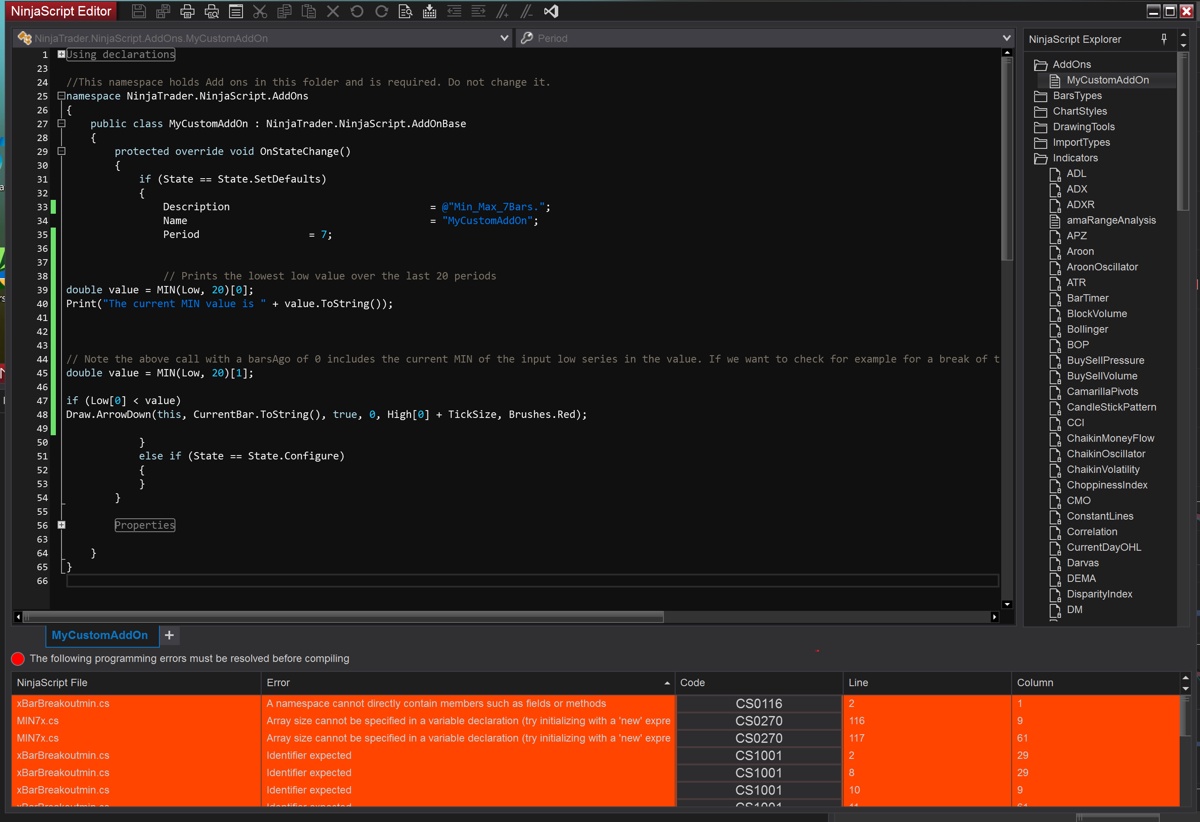
                      I added as a new add on and pasted those lines from MIN link you gave me
                      This is what i get


                      Comment


                        #12
                        Hello kumaresh11live,

                        Thank you for your reply.

                        You would not want to create an add-on, you would want to create an indicator. Add-ons are more complicated and generally would require more advanced programming skills. You've also got several other scripts that are throwing errors there that should be debugged, deleted, or excluded from compilation before you will be able to successfully compile.

                        Here's a link to our help guide on how to deal with compile errors:


                        Specifically, this example from our help guide would be a good place to start:


                        This would be a good simple indicator to create to start to learn how to create NinjaScript items like indicators and strategies.

                        We do have resources to help you begin creating NinjaScript Strategies/Indicators. All links below are publicly available.

                        The best way to begin learning NinjaScript is to use the Strategy Builder. With the Strategy Builder you can setup conditions and variables and then see the generated code in the NinjaScript Editor by clicking the View Code button.

                        I'm also providing a link to a pre-recorded set of videos 'Strategy Builder 301' and 'NinjaScript Editor 401' for you to view at your own convenience.

                        Strategy Builder 301
                        NinjaScript Editor 401

                        If you are new to C#, to get a basic foundation for the concepts and syntax used in NinjaScript I would recommend this section of articles in our NT7 help guide first:

                        Basic Programming Concepts

                        For general C# education I have personally found Dot Net Perls to be a great reference site with easy to understand examples.


                        There are a few Sample Automated Strategies which come pre-configured in NinjaTrader that you can use as a starting point. These are found under New -> NinjaScript Editor -> Strategy. You will see locked strategies where you can see the details of the code, but you will not be able to edit (you can though always create copies you can later edit via right click > Save as)

                        We also have some Reference samples online as well as ‘Tips and Tricks’ for both indicators and strategies:

                        Click here to see our NinjaScript Reference Samples
                        Click here to see our NinjaScript Tips

                        These samples can be downloaded, installed and modified from NinjaTrader and hopefully serve as a good base for your custom works.

                        Further, the following link is to our help guide with an alphabetical reference list to all supported methods, properties, and objects that are used in NinjaScript.

                        Alphabetical Reference

                        And our Educational Resources in the NinjaTrader 8 help guide.

                        Educational Resources

                        A set of specific tutorials for creating conditions in the NinjaTrader 8 Strategy Builder in the NinjaTrader 8 help guide.

                        Condition Builder

                        You can also contact one of our professional NinjaScript Consultants or Educators who would be eager to create or modify this script at your request or assist you with your script. Please let me know if you would like a list of professional NinjaScript Consultants or Educators who would be happy to create or modify any script at your request or assist you in learning NinjaScript.

                        Please let me know if I may be of further assistance.

                        Comment


                          #13
                          Kate
                          ok, t did say wrong. it was a new indicator and not add-on I created
                          also, let me delete the other indicators and exclude them from compile,

                          also i have fuull time job + I am a Trader so "'I DONT have time or interest in learning about NT programming for now"" but i still appreciate you for giving me these links

                          so can you confirm if I pasted these lines correctly,
                          If not where should I paste this in the body of a new Indicator? pl help on this


                          ++++++++++++++++++++++++++++++++++++++++++++++++++ ++++++

                          // Prints the lowest low value over the last 20 periods
                          double value = MIN(Low, 20)[0];
                          Print("The current MIN value is " + value.ToString());

                          // Note the above call with a barsAgo of 0 includes the current MIN of the input low series in the value. If we want to check for example for a break of this value, storing the last bar's MIN would be needed.
                          double value = MIN(Low, 20)[1];

                          if (Low[0] < value)
                          Draw.ArrowDown(this, CurrentBar.ToString(), true, 0, High[0] + TickSize, Brushes.Red);
                          ++++++++++++++++++++++++++++++++++++++++++++++++++ ++++++

                          Comment


                            #14
                            Hello kumaresh11live,

                            Thank you for your reply.

                            If you are referring to your previous screenshot, that IS an add-on you've tried to create. You will want to delete that script entirely and create a new Indicator file by right clicking on the Indicators folder in the NinjaScript Explorer panel on the right side of the NinjaScript Editor and selecting "New Indicator". This will guide you through a wizard that will help you set up the basic skeleton of the indicator.

                            The code you've copied would need to go within the OnBarUpdate() method in an Indicator script in order to compile properly. You would also need to ensure you have enough bars to calculate, so you would also need to add a CurrentBar check before this code, at the beginning of OnBarUpdate, like this:

                            if (CurrentBar < 20) return;

                            What this does is prevent the script from processing further if there aren't enough bars on the chart yet to cover the whole period you're asking the Min to be calculated over. This would need to go inside OnBarUpdate, before the code you've copied up there.

                            Please let us know if we may be of further assistance to you.

                            Comment


                              #15
                              kate
                              Thank you
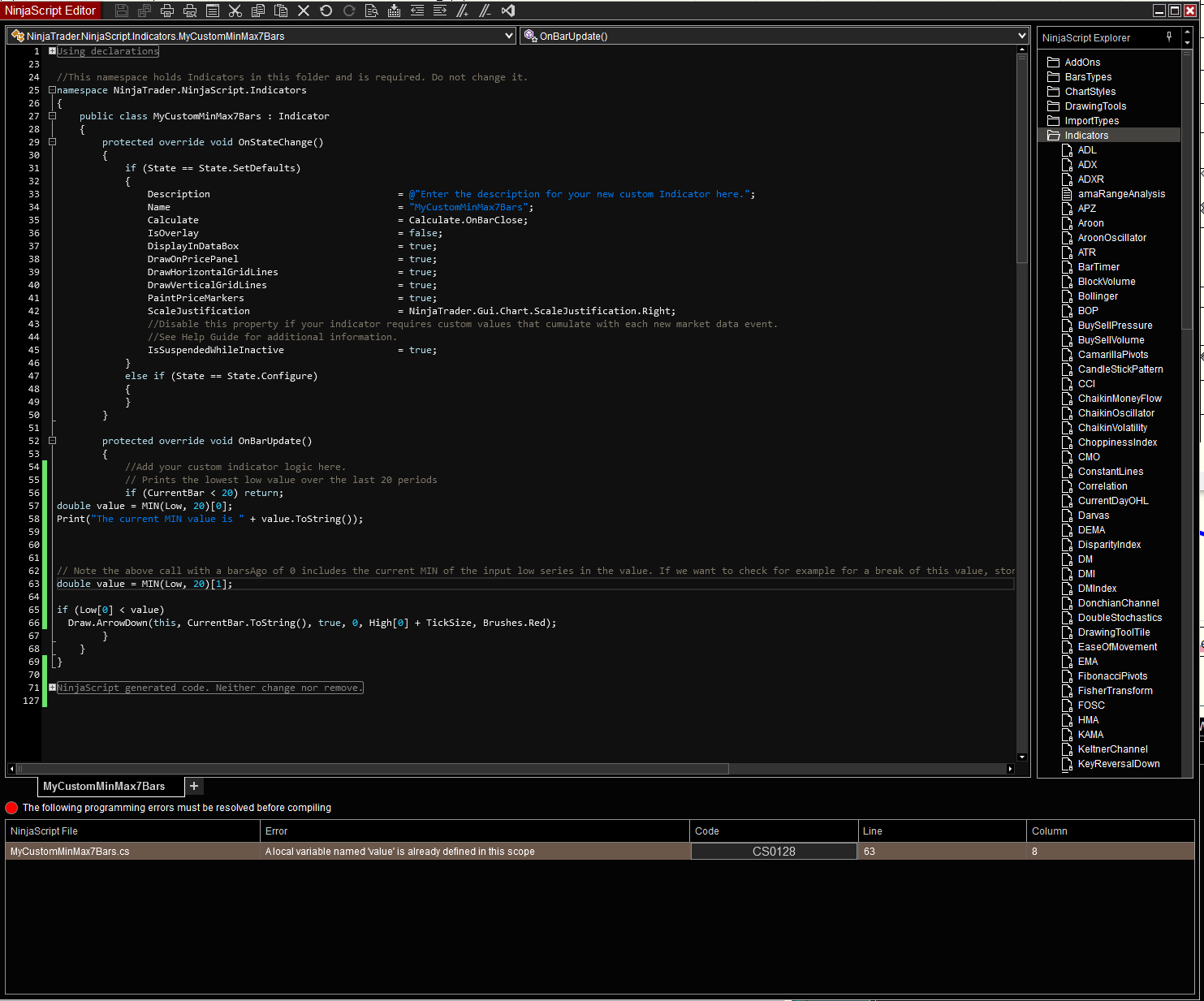
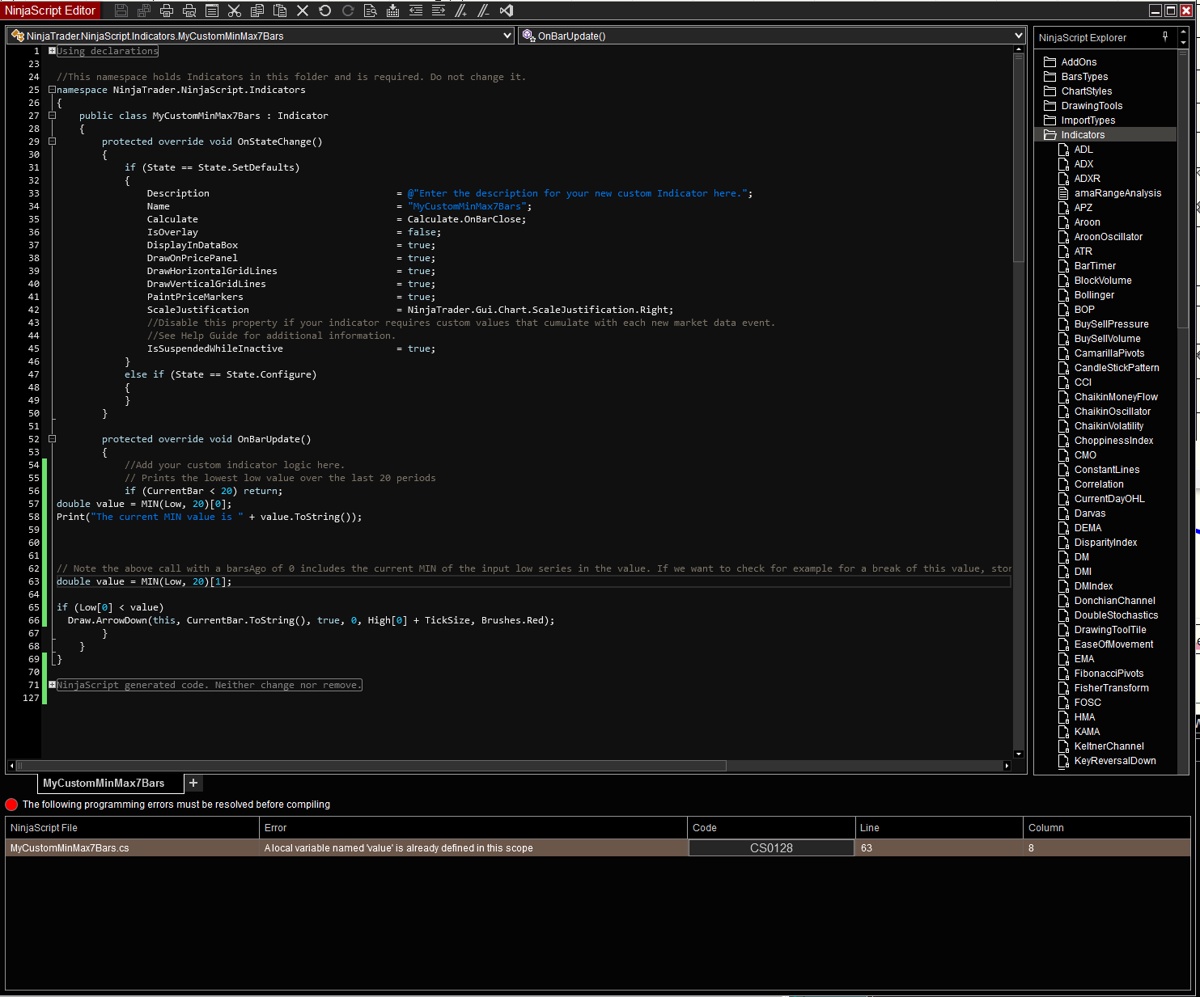
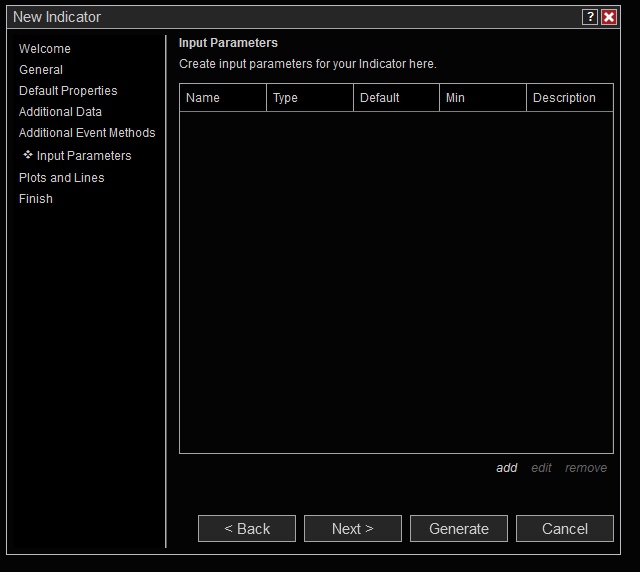
                              and here is screen hots of creating a new indicator. this is exact window I had before
                              and I kept clicking Next to Next and didnt add any detail for "input parameters" or "plots, lines"". is that correct

                              now, we are down to one error and this is new error


                              Comment

                              Latest Posts

                              Collapse

                              Topics Statistics Last Post
                              Started by Geovanny Suaza, 02-11-2026, 06:32 PM
                              0 responses
                              649 views
                              0 likes
                              Last Post Geovanny Suaza  
                              Started by Geovanny Suaza, 02-11-2026, 05:51 PM
                              0 responses
                              370 views
                              1 like
                              Last Post Geovanny Suaza  
                              Started by Mindset, 02-09-2026, 11:44 AM
                              0 responses
                              109 views
                              0 likes
                              Last Post Mindset
                              by Mindset
                               
                              Started by Geovanny Suaza, 02-02-2026, 12:30 PM
                              0 responses
                              573 views
                              1 like
                              Last Post Geovanny Suaza  
                              Started by RFrosty, 01-28-2026, 06:49 PM
                              0 responses
                              576 views
                              1 like
                              Last Post RFrosty
                              by RFrosty
                               
                              Working...
                              X