
Announcement

Collapse
No announcement yet.

Partner 728x90

Collapse

GetOwnerStrategy()

Collapse
X
 
  • Filter
  • Time
  • Show
Clear All
new posts

    GetOwnerStrategy()

    In an indicator, I'm showing a visual on the Chart Panel related to working orders. But it should only happen when a working order is associated with an Atm Strategy. To identify this I'm using the following logic:

    if(order.GetOwnerStrategy() != null)
    if(order.GetOwnerStrategy().Name != null)
    if(order.GetOwnerStrategy().Name=="AtmStrategy")
    // do stuff

    Is the GetOwnerStrategy() method the best way to find out if an order is associated with an Atm Strategy? If so, are there other default NT values that this method might return instead of "AtmStrategy"?

    Thanks.
    #2
    Hello martyn73,

    Thanks for your post.

    GetOwnerStrategy() is not documented and behavior may be subject to change, but it appears that you can use the method as you have described. Through testing, this will return the name of a NinjaScript strategy if the order belongs to a NinjaScript strategy. Manual orders which do not have an owning strategy will not have a print here.

    You should be able to move forward using this method, but as a reminder, please be sure to check the functionality with new updates as this method is not locked into documentation.

    Please let us know if we can be of further assistance.

    Comment


      #3
      Thanks, that helps.

      Comment


        #4
        Originally posted by martyn73 View Post
        In an indicator, I'm showing a visual on the Chart Panel related to working orders. But it should only happen when a working order is associated with an Atm Strategy. To identify this I'm using the following logic:

        if(order.GetOwnerStrategy() != null)
        if(order.GetOwnerStrategy().Name != null)
        if(order.GetOwnerStrategy().Name=="AtmStrategy")
        // do stuff

        Is the GetOwnerStrategy() method the best way to find out if an order is associated with an Atm Strategy? If so, are there other default NT values that this method might return instead of "AtmStrategy"?

        Thanks.
        Are you calling this Get.OwnerStrategy() in OnBarUpdate or in which method?? I also need to find if there is a Limit order created by Strategy Template still pending

        Comment


          #5
          Hello trades4x,

          The orders will be associated through an account and would update during that accounts events.

          Yes, you could get the owner of a order from OnBarUpdate(), but it might be best to get that information as the order is updating.

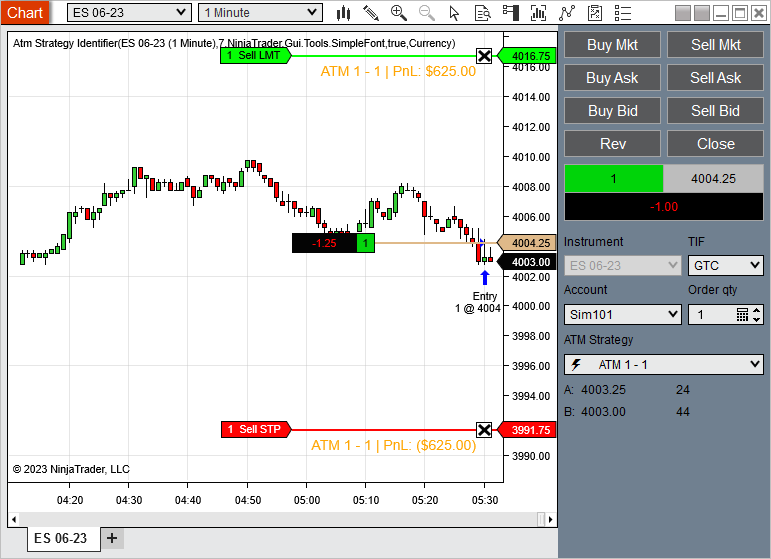
          The AtmStrategyIdentifier on the User App Share has sample code of getting orders from an account, and determining the Atm Strategy owner of each order.
          This indicator serves to provide labels for Atm strategies that are present on your chart. Each new Atm strategy will rotate through the colors defined in your Brush Collection. Simply add to a chart, select the data series you want to have labels added to, choose your font and add all the brushes/colors you want […]
          Chelsea B.NinjaTrader Customer Service

          Comment


            #6
            Use order.GetOwnerStrategy().DisplayName to get the name of the strategy as it appears in the Control Center window

            Comment


              #7
              Also, try using order.GetOwnerStrategy().Template.

              It should return the name of the template (ie, the string argument
              atmStrategyTemplateName​ when calling StartAtmStratetgy)

              Comment

              Latest Posts

              Collapse

              Topics Statistics Last Post
              Started by Mindset, 04-21-2026, 06:46 AM
              0 responses
              64 views
              0 likes
              Last Post Mindset
              by Mindset
               
              Started by M4ndoo, 04-20-2026, 05:21 PM
              0 responses
              94 views
              0 likes
              Last Post M4ndoo
              by M4ndoo
               
              Started by M4ndoo, 04-19-2026, 05:54 PM
              0 responses
              51 views
              0 likes
              Last Post M4ndoo
              by M4ndoo
               
              Started by cmoran13, 04-16-2026, 01:02 PM
              0 responses
              108 views
              0 likes
              Last Post cmoran13  
              Started by PaulMohn, 04-10-2026, 11:11 AM
              0 responses
              63 views
              0 likes
              Last Post PaulMohn  
              Working...
              X