Announcement

Collapse
No announcement yet.

Partner 728x90

Collapse

how to know start point and End point of Line

Collapse
X
 
  • Filter
  • Time
  • Show
Clear All
new posts

    how to know start point and End point of Line

    hi,
    i have this line code :

    Code:
    
    Draw.Line(this, "Trend" + CurrentBar, true, indexMemFIrstPoint, Low[indexMemFIrstPoint], 0, valTrendTerzoPunto, UpTrendColor, DashStyleHelper.Solid, 2);
    i want to know the start point and end point of line..(i want to know it using Tag of draw.line)


    i want to know StartAnchor and EndAnchor of the Line
    Last edited by turbofib; 07-22-2017, 10:28 AM.

    #2
    Hello,

    Thank you for the question.

    I wanted to clarify, are you asking how to access the Anchors of a Line object using the sample from the help guide?

    If so, you could change the third sample to remove draw.IsGlobalDrawingTool and instead add a check for your Tag name instead.

    Alternatively, you could use the first sample to supply a tag name directly but this would require similar syntax to the third example to cast to a line and then access its anchor.

    Could you confirm is this what you were asking?

    I look forward to being of further assistance.

    Comment


      #3
      Hello !

      I'm also trying to get the StartY and EndY value of an object made by hand and not in the context of the NinjaScript, it look like you managed to fix your issue turbofib, but, could you share how you did to get the StartY and EndY Value ?
      We are not necessarily all as fast than you

      Thanks ! Have a great day !

      Comment


        #4
        Excuse for my english......

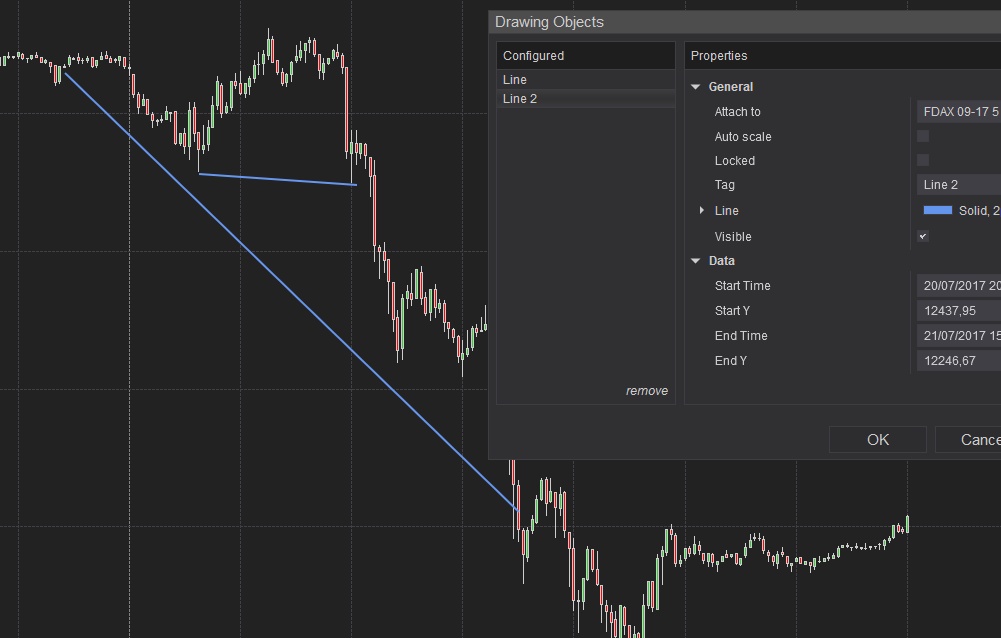
        watch it :


        you draw 2 lines....i see name in drawing object : " Line" and "Line 2" ....this is name of tag..

        now i loop it :


        foreach (DrawingTool draw in DrawObjects)
        {
        if (!(draw is DrawingTools.Line)) continue;
        DrawingTools.Line globalLine = draw as DrawingTools.Line;
        if (globalLine.Tag.Contains("Line"))
        {
        Print(Time[0] + " Start Point " + globalLine.StartAnchor.Price + " End Point " + globalLine.EndAnchor.Price);
        }
        }
        this would write point start and point end of your line draw made by hand

        I hope to help you...

        Comment


          #5
          Thanks a lot turbofib !
          You just saved me days, you are fantastic !

          By the way, your english is great

          Comment

          Latest Posts

          Collapse

          Topics Statistics Last Post
          Started by Geovanny Suaza, 02-11-2026, 06:32 PM
          0 responses
          597 views
          0 likes
          Last Post Geovanny Suaza  
          Started by Geovanny Suaza, 02-11-2026, 05:51 PM
          0 responses
          343 views
          1 like
          Last Post Geovanny Suaza  
          Started by Mindset, 02-09-2026, 11:44 AM
          0 responses
          103 views
          0 likes
          Last Post Mindset
          by Mindset
           
          Started by Geovanny Suaza, 02-02-2026, 12:30 PM
          0 responses
          556 views
          1 like
          Last Post Geovanny Suaza  
          Started by RFrosty, 01-28-2026, 06:49 PM
          0 responses
          555 views
          1 like
          Last Post RFrosty
          by RFrosty
           
          Working...
          X