
Announcement

Collapse
No announcement yet.

Partner 728x90

Collapse

Remote Trade Copier for NinjaTrader

Collapse
X
 
  • Filter
  • Time
  • Show
Clear All
new posts

    Remote Trade Copier for NinjaTrader

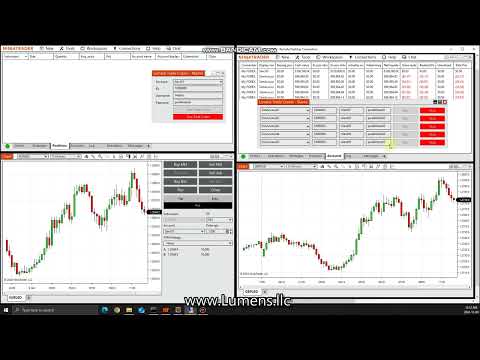
    Our NinjaTrader Trade Copier is finished. Big thanks to the NinjaTrader support team for guiding us along the way to help us complete it.

    The trade copier does NinjaTrader to NinjaTrader copying and can copy to a few other platforms. Also works with manual trading and automated trading. Trades can be copied to the same NinjaTrader instance or to a remote NinjaTrader instance.

    Here's a couple videos of it in action...


    Last edited by defa0009; 02-15-2025, 07:07 PM.

    #2
    Hello defa0009,

    Thank you for your inquiry.

    Yes, NinjaScript is written in C#. You don't need to download anything to develop in NinjaScript other than NinjaTrader itself.

    If you are new to C#, to get a basic foundation for the concepts and syntax used in NinjaScript I would recommend this section of support articles first:
    Basic Programming Concepts

    For general C# education I have personally found Dot Net Perls to be a great reference site with easy to understand examples.


    We also have great resources in relation to Strategy Development on our Support Forum. There is a very active developer community in our support forum that supplements the responses provided by NinjaTrader support staff providing all users with an exceptional support experience.
    Take me to your support forum!

    There are a few Sample Automated Strategies which come pre-configured in NinjaTrader that you can use as a starting point. These are found under New -> NinjaScript Editor -> Strategy. You will see locked strategies where you can see the details of the code, but you will not be able to edit (you can though always create copies you can later edit via right click > Save as)

    We also have some Reference samples online as well as ‘Tips and Tricks’ for both indicators and strategies:
    Click here to see examples created by the support team
    Click here to see our NinjaScript Reference Samples
    Click here to see our NinjaScript Tips

    These samples can be downloaded, installed and modified from NinjaTrader and hopefully serve as a good base for your custom works.

    Also, below I am also linking you to the Educational Resources section of the Help Guide to help you get started with NinjaScript.


    Further, the following link is to our help guide with an alphabetical reference list to all supported methods, properties, and objects that are used in NinjaScript.
    Alphabetical Reference

    And our Educational Resources in the NinjaTrader 8 help guide.
    Educational Resources

    A set of specific tutorials for creating conditions in the NinjaTrader 8 Strategy Builder in the NinjaTrader 8 help guide.
    Condition Builder

    I'm also providing a link to a support article with further helpful resources on getting started with C# and NinjaScript.


    Please let me know if I may answer any specific questions for you throughout your journey of becoming a NinjaScript Developer.

    Comment


      #3
      Hello,

      You can access all orders placed to a specified account through the Account object. The Help Guides below have example code on how to access the Account and then loop through the collection of Orders on the account.


      Please let us know if you have any further questions.

      Comment


        #4
        Hello defa0009,

        We need to be able to test our integration with a Forex chart but when we open Forex charts in NinjaTrader there is no data?
        For this I suggest you post on the Platform Technical Support section of the forum or contact support[AT]ninjatrader.com, this is the Development section of the forum for NinjaScript related inquiries.

        Also none of the Ninjascript examples show which directives to use. For example to use the Account or the Positions class which directives does the developer use? Thanks
        Directives aren't necessary for coding in NinjaScript. You don't need any directives to access the Account and Positions class via NS, the code sample in the Help Guide demonstrate how these can be accessed.

        Comment


          #5
          Hello defa0009,

          My apologies, I thought you were referring to something like directives in C like define and #include. In C# what you are describing are called using statements.

          Yes, using statements are necessary but if you are using the NinjaScript Wizard all necessary code, including using statements, will be automatically generated.

          Comment


            #6
            Hello defa0009,

            We don't have an existing sample script, however there is code in the Help Guide demonstrating:

            Looping through trades:

            private Account myAccount;

            Code:
            protected override void OnStateChange()
            {
            if (State == State.SetDefaults)
            {
            // Initialize myAccount
            }
            
            }
            
            private void OnAccountItemUpdate(object sender, AccountItemEventArgs e)
            {
            // Print the name and order action of each order processed on the account
            foreach (Order order in myAccount.Orders)
            {
            Print(String.Format("Order placed: {0} - {1}", order.Name, order.OrderAction));
            }
            }
            You can get all the following info from the Order object: https://ninjatrader.com/support/help.../nt8/order.htm


            Attached is an example script demonstrating subscribing to account-level events as well.
            Attached Files

            Comment


              #7
              Hello defa0009,

              Orders are all orders placed to that account (open or closed), they can be working, filled, cancelled, rejected etc orders. If you take a look at the Help Guide link from my previous response, near the bottom of the page you can see you can check the OrderState of the Order.

              Please let us know if you have any further questions.

              Comment


                #8
                Hello defa0009,

                You can simply filter by active orders via the OrderState.

                We have provided a sample script that demonstrates initializing the account and the Help Guide provided the code for looping through the Order object via OnAccountItemUpdate method. If you take a look at the same code, this method is already included in the sample as well.

                Slightly editing the provided code from the Help Guide to filter any filled, canceled, or rejected orders will get you any active orders placed to the account.


                Code:
                private Account myAccount;
                 
                protected override void OnStateChange()
                {
                  if (State == State.SetDefaults)
                  {
                      // Initialize myAccount
                  }
                }
                 
                private void OnAccountItemUpdate(object sender, AccountItemEventArgs e)
                {
                  // Print the name and order action of each order processed on the account
                  foreach (Order order in myAccount.Orders)
                  {
                     if (order.OrderState != OrderState.Filled && order.OrderState != OrderState.Cancelled && order.OrderState != OrderState.Rejected)
                         Print(String.Format("Order placed: {0} - {1}", order.Name, order.OrderAction));
                  }
                }
                The Positions collection will get you active positions only however won't provide all the information you're looking for like AverageFillPrice, LimitPrice, StopPrice, etc. This can be obtained from the Order object.

                If the provided solutions aren't sufficient we apologize for any inconvenience caused. Thank you for considering NinjaTrader.

                Comment


                  #9
                  Hello defa0009,

                  That example compiles fine for me. Did you import the script or copy and paste the code? You may be missing some using statements.

                  I recommend importing the script directly into the platform (Tools > Import > NinjaScript).

                  Comment

                  Latest Posts

                  Collapse

                  Topics Statistics Last Post
                  Started by Geovanny Suaza, 02-11-2026, 06:32 PM
                  0 responses
                  553 views
                  0 likes
                  Last Post Geovanny Suaza  
                  Started by Geovanny Suaza, 02-11-2026, 05:51 PM
                  0 responses
                  324 views
                  1 like
                  Last Post Geovanny Suaza  
                  Started by Mindset, 02-09-2026, 11:44 AM
                  0 responses
                  100 views
                  0 likes
                  Last Post Mindset
                  by Mindset
                   
                  Started by Geovanny Suaza, 02-02-2026, 12:30 PM
                  0 responses
                  543 views
                  1 like
                  Last Post Geovanny Suaza  
                  Started by RFrosty, 01-28-2026, 06:49 PM
                  0 responses
                  546 views
                  1 like
                  Last Post RFrosty
                  by RFrosty
                   
                  Working...
                  X