
Announcement

Collapse
No announcement yet.

Partner 728x90

Collapse

Create a custom "Snap Mode"

Collapse
X
 
  • Filter
  • Time
  • Show
Clear All
new posts

    Create a custom "Snap Mode"

    I have a formula I want to use for snap mode but I had to create a custom drawing tool to use it.
    How do I add my own Snap Mode so it can be used across all drawing tools?
    #2
    Hello, thanks for writing in. Unfortunately, the snapping mode that a drawing tool uses is not overrideable.

    Comment


      #3
      Would you be receptive to adding a new snap mode that incorporates the Euclidean distance formula to snap to the nearest open, high, low, or close price relative to the position of the mouse pointer? I can provide the function I use to determine the nearest price I use for my drawing tool.

      Comment


        #4
        Hi, I will be happy to submit a feature request to our development team. Please provide as much detail as possible about the function of the new snap mode and I will also add a request of generalizing it to make the snap behavior overrideable for full customization.

        Kind regards,
        -ChrisL​

        Comment


          #5
          Thanks.

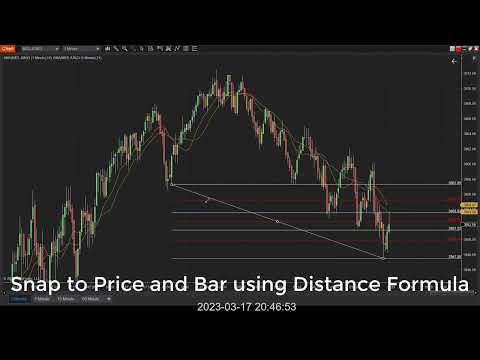
          First attachment is an enhancement to the "Price" snap mode. The function finds the nearest price to snap to using the distance between the pointer and every OHLC price on screen. The code is integrated into my Fibonacci drawing tool with this one line of code:
          Code:
          dataPoint.Price = nearest_price(chartControl, chartPanel, chartScale, dataPoint);
          The second attachment is an enhancement to the "Bar And Price" snap mode. This is similar to the one above but returns both Price and Time so the points to be snapped to the nearest Bar and Price. This can easily be integrated with three lines few lines of code:
          Code:
          PriceAndTime p = nearest_price_and_time(chartControl, chartPanel, chartScale, dataPoint);
          dataPoint.Price = p.Price;
          dataPoint.Time = p.Time;
          These allows users to quickly, lazily and accurately snap to prices without having to do much work.

          Here's a video demonstration:
          Attached Files
          Last edited by hurleydood; 03-17-2023, 08:19 PM.

          Comment


            #6
            hurleydood thank you sir!

            Comment


              #7
              hurleydood, any thoughts on how to snap to the plots also?

              I think it is possible to extract the logic from "AddPlotNames" indicator ( https://ninjatraderecosystem.com/use.../addplotnames/ ) to do this.
              Last edited by rafaelcoisa; 05-24-2023, 04:50 PM.

              Comment

              Latest Posts

              Collapse

              Topics Statistics Last Post
              Started by Geovanny Suaza, 02-11-2026, 06:32 PM
              0 responses
              633 views
              0 likes
              Last Post Geovanny Suaza  
              Started by Geovanny Suaza, 02-11-2026, 05:51 PM
              0 responses
              364 views
              1 like
              Last Post Geovanny Suaza  
              Started by Mindset, 02-09-2026, 11:44 AM
              0 responses
              105 views
              0 likes
              Last Post Mindset
              by Mindset
               
              Started by Geovanny Suaza, 02-02-2026, 12:30 PM
              0 responses
              567 views
              1 like
              Last Post Geovanny Suaza  
              Started by RFrosty, 01-28-2026, 06:49 PM
              0 responses
              568 views
              1 like
              Last Post RFrosty
              by RFrosty
               
              Working...
              X