
#region Using declarations
using System;
using System.Collections.Generic;
using System.ComponentModel;
using System.ComponentModel.DataAnnotations;
using System.Linq;
using System.Text;
using System.Threading.Tasks;
using System.Windows;
using System.Windows.Input;
using System.Windows.Media;
using System.Xml.Serialization;
using NinjaTrader.Cbi;
using NinjaTrader.Gui;
using NinjaTrader.Gui.Chart;
using NinjaTrader.Gui.SuperDom;
using NinjaTrader.Gui.Tools;
using NinjaTrader.Data;
using NinjaTrader.NinjaScript;
using NinjaTrader.Core.FloatingPoint;
#endregion
using System.Net;
using System.Net.Http;
using Newtonsoft.Json;
//This namespace holds Share adapters in this folder and is required. Do not change it.
namespace NinjaTrader.NinjaScript.ShareServices
{
public class Signl4webhook : ShareService
{
protected override void OnStateChange()
{
if (State == State.SetDefaults)
{
Description = @"Enter the description for your new custom Share Service here.";
Name = "Signl4webhook";
Signl4APIUrl = @"https://connect.signl4.com/webhook/hf???d";
}
else if (State == State.Configure)
{
}
}
public override async Task OnShare(string text, string alertType)
{
// place your share service logic here
var data = new Data
{
// this is a specific object containing data read from the sensor
Title = "Ninjatrader alert",
Body = "alerted " + string.Format("{0:0.0} °C", text),
TradeAlert = string.Format("{0:0.0} °C", alertType),
PriceAlert = string.Format("{0:0.0}%", "blank")
};
try
{
var response = await PostAsync(Signl4APIUrl, data);
if (response == null)
{
return;
}
await response.Content.ReadAsStringAsync();
}
catch (Exception ex)
{
// do something
}
}
public static async Task<HttpResponseMessage> PostAsync<T>(string strUrl, T content)
{
var client = new HttpClient(new HttpClientHandler { AutomaticDecompression = DecompressionMethods.GZip | DecompressionMethods.Deflate });
HttpContent httpContent = null;
if (content != null)
{
httpContent = new StringContent(JsonConvert.SerializeObject(content) , Encoding.UTF8, "application/json");
}
return await client.PostAsync(strUrl, httpContent);
}
#region Properties
[NinjaScriptProperty]
[Display(Name = "Signl4APIUrl", Description = "url default", Order = 1, GroupName = "Parameters")]
public string Signl4APIUrl
{ get; set; }
#endregion
}
[JsonObject]
public class Data
{
public string PriceAlert { get; set; }
[JsonProperty(Order = 3)]
public string TradeAlert { get; set; }
[JsonProperty(Order = 2)]
public string Body { get; set; }
[JsonProperty(Order = 1)]
public string Title { get; set; }
}
}
Announcement
Collapse
No announcement yet.
Partner 728x90
Collapse
NinjaTrader
how to call the shareservuce frin nt addib
Collapse
X
-
how to call the shareservuce frin nt addib
i created a shareservice for Sign4. how can i call it from my addon?
Code:Tags: None
-
Hello junkone,
All share services are called in the same way, you would use the Share method: https://ninjatrader.com/support/help...lightsub=share
You would need to have this service configured in the options menu and then call it using the name you provided for it.
Please let me know if I may be of additional assistance.
-
i finally got around to working on this but it still does not work.
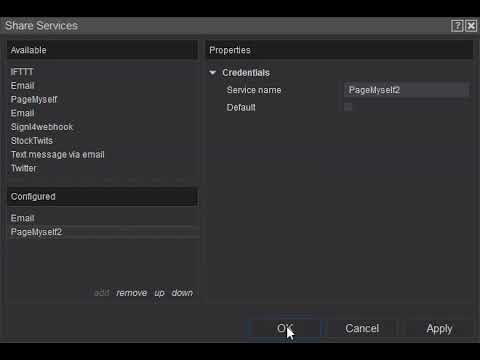
i have a video. there is nothing to configure. i put it all in the code.
string response = cli.UploadString(Signl4APIUrl, JsonConvert.SerializeObject(data));Code:#region Using declarations using System; using System.Collections.Generic; using System.ComponentModel; using System.ComponentModel.DataAnnotations; using System.Linq; using System.Text; using System.Threading.Tasks; using System.Windows; using System.Windows.Input; using System.Windows.Media; using System.Xml.Serialization; using NinjaTrader.Cbi; using NinjaTrader.Gui; using NinjaTrader.Gui.Chart; using NinjaTrader.Gui.SuperDom; using NinjaTrader.Gui.Tools; using NinjaTrader.Data; using NinjaTrader.NinjaScript; using NinjaTrader.Core.FloatingPoint; #endregion using System.Net; using System.Timers; using Newtonsoft.Json; using System.IO; using System.Net; using System.Net.Http; //This namespace holds Add ons in this folder and is required. Do not change it. using Newtonsoft.Json; using System.Data.SqlClient; using Sharpbrake.Client; using System.Data; //This namespace holds Share adapters in this folder and is required. Do not change it. namespace NinjaTrader.NinjaScript.ShareServices { public class PageMyself : ShareService { readonly string appKey = "keydCvGa3tg"; private string Signl4APIUrl = @"https://connect.signl4.com/webhook/url"; private AirbrakeNotifier airbrake = new AirbrakeNotifier(new AirbrakeConfig { ProjectId = "1s35", ProjectKey = "921976e809sd93f21fa60b0bb1" }); protected override void OnStateChange() { if (State == State.SetDefaults) { Description = @"Enter the description for your new custom Share Service here."; Name = "PageMyself"; } else if (State == State.Configure) { } } public override async Task OnShare(string text, string imgFilePath) { // place your share service logic here var data = new Data { // this is a specific object containing data read from the sensor Title = "Ninjatrader alert", Body = "price alerted " + string.Format("{0:0.0} ", text), PriceAlert = string.Format("{0:0.0}%", "blank") }; try { var cli = new WebClient(); cli.Headers[HttpRequestHeader.ContentType] = "application/json";
}
catch (Exception e)
{
Print(e.StackTrace);
var notice = airbrake.BuildNotice(e);
var response = airbrake.NotifyAsync(notice).Result;
}
}
}
}
Comment
-
Hello junkone,
Thanks for the post.
Are you asking for help with the web request that you are doing or is some part of the share service not working?
I wouldn't be able to comment about the web request/json that you used however you can review the Twitter service for an example of connecting with an API.
Please let me know if I may be of additional assistance.
Comment
-
where is this error coming from? its not in my code. infact, i have commented all custom code. i just put the skeleton method here.
here is the skeleton code.
Code:#region Using declarations using System; using System.Collections.Generic; using System.ComponentModel; using System.ComponentModel.DataAnnotations; using System.Linq; using System.Text; using System.Threading.Tasks; using System.Windows; using System.Windows.Input; using System.Windows.Media; using System.Xml.Serialization; using NinjaTrader.Cbi; using NinjaTrader.Gui; using NinjaTrader.Gui.Chart; using NinjaTrader.Gui.SuperDom; using NinjaTrader.Gui.Tools; using NinjaTrader.Data; using NinjaTrader.NinjaScript; using NinjaTrader.Core.FloatingPoint; #endregion using System.Net; using System.Timers; using Newtonsoft.Json; using System.IO; using System.Net; using System.Net.Http; //This namespace holds Add ons in this folder and is required. Do not change it. using Newtonsoft.Json; using System.Data.SqlClient; using Sharpbrake.Client; using System.Data; //This namespace holds Share adapters in this folder and is required. Do not change it. namespace NinjaTrader.NinjaScript.ShareServices { public class PageMyself : ShareService { protected override void OnStateChange() { if (State == State.SetDefaults) { Description = @"Enter the description for your new custom Share Service here."; Name = "PageMyself"; } else if (State == State.Configure) { } } public override async Task OnShare(string text, string imgFilePath) { // // place your share service logic here // var data = new Data // { // // this is a specific object containing data read from the sensor // Title = "Ninjatrader alert", // Body = "price alerted " + string.Format("{0:0.0} ", text), // PriceAlert = string.Format("{0:0.0}%", "blank") // }; // try // { // var cli = new WebClient(); // cli.Headers[HttpRequestHeader.ContentType] = "application/json"; // string response = cli.UploadString(Signl4APIUrl, JsonConvert.SerializeObject(data)); // } // catch (Exception e) // { // Print(e.StackTrace); // var notice = airbrake.BuildNotice(e); // var response = airbrake.NotifyAsync(notice).Result; // } } } }
Comment
-
Hello junkone,
I would highly suggest to use the existing share services as a learning guide, the error you are seeing is normal and would appear if you have not made a complete service. By default a brand new script or shell will not work, you would need to have set IsConfigured = true at some point in your service depending on your needs. For example the twitter sets this after connecting to the api in the settings window. The others may set this in set defaults if there is no other configuration to be made.
Please let me know if I may be of additional assistance.
Comment
Latest Posts
Collapse
| Topics | Statistics | Last Post | ||
|---|---|---|---|---|
|
Started by Geovanny Suaza, 02-11-2026, 06:32 PM
|
0 responses
558 views
0 likes
|
Last Post
|
||
|
Started by Geovanny Suaza, 02-11-2026, 05:51 PM
|
0 responses
324 views
1 like
|
Last Post
|
||
|
Started by Mindset, 02-09-2026, 11:44 AM
|
0 responses
101 views
0 likes
|
Last Post
by Mindset
02-09-2026, 11:44 AM
|
||
|
Started by Geovanny Suaza, 02-02-2026, 12:30 PM
|
0 responses
545 views
1 like
|
Last Post
|
||
|
Started by RFrosty, 01-28-2026, 06:49 PM
|
0 responses
547 views
1 like
|
Last Post
by RFrosty
01-28-2026, 06:49 PM
|

Comment