
Announcement

Collapse
No announcement yet.

Partner 728x90

Collapse

RSqueeze AutoTrade

Collapse
X
 
  • Filter
  • Time
  • Show
Clear All
new posts

    RSqueeze AutoTrade

    Hello,

    I'm developing a strategy that will A) Look to see if there is a squeeze in play, B) Look at the direction of the squeeze, and C) Go long or short depending on conditions A and B. Is there something like that?

    Currently my code looks as such:

    protected override void OnBarUpdate()
    {
    // Condiiton set 1
    if (Oscillator_RSqueeze(SqueezeStyleB.PBFSqueeze).PMo mentumUp[0] < 0 && Oscillator_RSqueeze(SqueezeStyleB.PBFSqueeze).PMom entumUp[1] < Oscillator_RSqueeze(SqueezeStyleB.PBFSqueeze).PMom entumUp[0])
    {
    EnterLong(Size, "Long");
    }

    Essentially I have it first looking to see if Momentum is below 0 and to buy at the nadir of negative momentum to try to catch any uptrend. It looks back 1 bar (on a range chart). Alternatively, I could do Squeeze.StyleB.PBFSqueeze.SqueezeOn == 1, but I do not know where to go from there to look at my aforementioned conditions. Help is very much appreciated.

    Thanks
    #2
    Hello rdavido,

    What do you use to determine that a squeeze is in play?

    How do you determine the direction of the squeeze?

    (Think about how you determine this visually and I can help you write that into code. Try to write this out as explicitly as you can.)
    Chelsea B.NinjaTrader Customer Service

    Comment


      #3
      Hello, I'm using a modified TTM_Squeeze indicator (https://www.bigmiketrading.com/ninja...eeze-work.html) called the Oscillator, R Squeeze. It has the traditional BBSqueeze and a PFSqueeze:

      BBSqueeze

      This is the classical Bollinger Bands Squeeze. The squeeze is on when the Bollinger Bands are inside the Keltner Bands. The Bollinger/Keltner thing is more of a visualization. The logic behind is a comparison of standard deviation and average true range.

      - The standard deviation measures directional volatility on the base of the variance, which is the squared distance between the last value of a N-period moving average and the preceding N closes.
      - The average true range basically measures intra-bar volatility.

      If the standard deviation (directional volatility) is smaller than the average true range (non-directional volatility), then you are in a squeeze, as price did not move a lot over the last N bars, all data points are still close to the current value of the moving average.

      The squeeze is shown as dots.

      Then there is a histogram. This is a bit of voodoo. The indicator calculates an average of the midline of a Donchian Channel and an EMA, then substracts it from the last value of price and applies a linear regression calculation to the resulting DataSeries. The result is something similar as a raw MACD, smoother but with more lag. Honestly, I do not understand what it is good for - which of course does not mean that the author of the indicator had some serious ideas how to use it.


      PFSqueeze

      This is a nice oscillator based on Gaussian Filters. The oscillator is based on the concept of the MACD. It uses Gaussian Filters instead of the EMAs to calculate the difference between two of them. Remember that the raw MACD is a difference between two EMAs. Here the raw histogram is calculated as the arithmetic average of 4 such differences, each of the differences being calculated from two Gaussian filters. The Guassian filters used have different periods, so the resulting oscillator is a bit of a multiperiod MACD modification

      ====

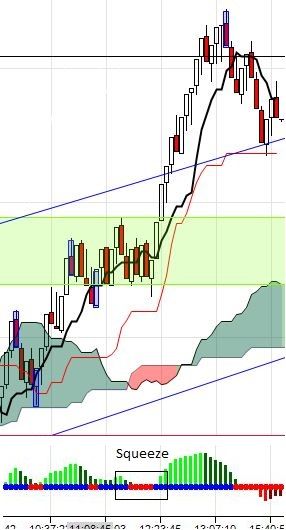
      Now, when a squeeze occurs, traditionally, you wait until the next bar to determine momentum. In my picture below, the squared off area enumared "Squeeze" indicates that the condition is met, now we must decide if there is positive or negative momentum. We see at interface between the red dot and the blue dot on the Zero line that there is positive momentum. I would need the condition to see this (Momentum >0 when Squeeze = true) and EnterLong. Conversely so, when momo <0 EnterShort. Then, for my exit strategy, do you see in the picture where the momentum bar changes from light to dark green? I would like my position to be closed upon seeing that (Momo 1 bar ago > Momo now) so to speak. I have additional ideas, but this is a good foundation. Thank you.

      Comment


        #4
        Hi rdavido,

        Now that you have an outline, take it one step at a time.

        The squeeze is on when the Bollinger Bands are inside the Keltner Bands.
        psuedo code
        if bollinger upper < keltner channel upper && bollinger lower > keltner lower

        actual code
        if (Bollinger(2, 14).Upper[0] < KeltnerChannel(1.5, 10).Upper[0] && Bollinger(2, 14).Lower[0] > KeltnerChannel(1.5, 10).Lower[0])

        Try adding this to a script and print a drawing object when this is true.

        {
        DrawDot("dot"+CurrentBar, true, 0, High[0]+3*TickSize, Color.Blue);
        }

        Does the dot draw in the correct places?

        Are you wanting to code the actual math?

        If the standard deviation (directional volatility) is smaller than the average true range (non-directional volatility), then you are in a squeeze
        Chelsea B.NinjaTrader Customer Service

        Comment


          #5
          Yes, the math would be nice and then based on that volatility and direction, enter long or short. Thank you very much for your code help! Could it be expanded to go long/short?

          Comment


            #6
            Hi rdavido,

            I'm not able to assist in creating a formula for you.

            However, if you have a formula (in math notation) please post this and we can include this in the code.
            Chelsea B.NinjaTrader Customer Service

            Comment

            Latest Posts

            Collapse

            Topics Statistics Last Post
            Started by Geovanny Suaza, 02-11-2026, 06:32 PM
            0 responses
            646 views
            0 likes
            Last Post Geovanny Suaza  
            Started by Geovanny Suaza, 02-11-2026, 05:51 PM
            0 responses
            367 views
            1 like
            Last Post Geovanny Suaza  
            Started by Mindset, 02-09-2026, 11:44 AM
            0 responses
            107 views
            0 likes
            Last Post Mindset
            by Mindset
             
            Started by Geovanny Suaza, 02-02-2026, 12:30 PM
            0 responses
            569 views
            1 like
            Last Post Geovanny Suaza  
            Started by RFrosty, 01-28-2026, 06:49 PM
            0 responses
            573 views
            1 like
            Last Post RFrosty
            by RFrosty
             
            Working...
            X