
Announcement

Collapse
No announcement yet.

Partner 728x90

Collapse

Unfilled orders problem

Collapse
X
 
  • Filter
  • Time
  • Show
Clear All
new posts

    Unfilled orders problem

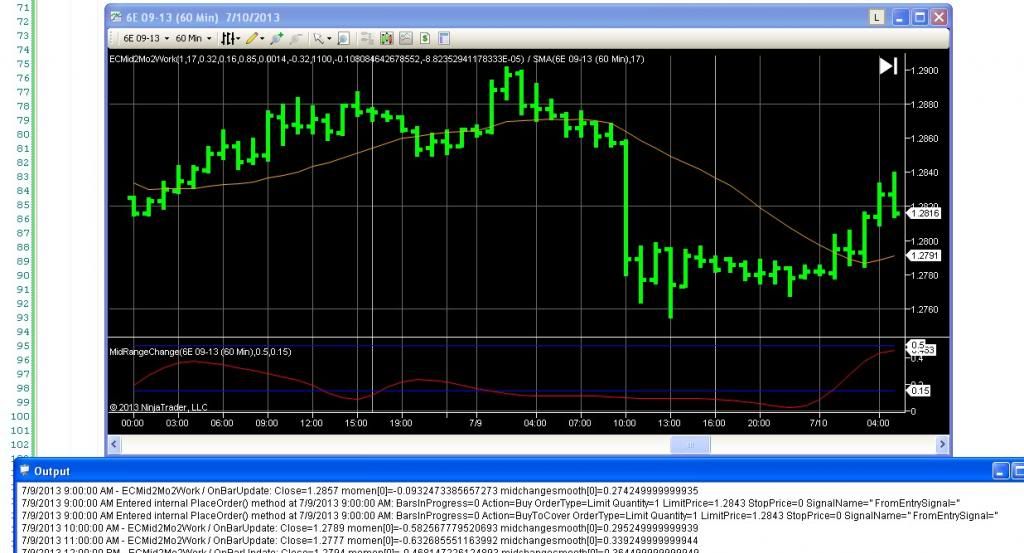
    I am trying to figure out why orders are not filling in NT. Below is a screen shot from my computer. As you can see in the shot, on July 9th my strategy generated limit orders to reverse a short position (BuyToCover and Buy limit orders).

    As you can also see, NT trader did not fill the buy orders even though the 10am bar closes much below limit price.

    Can anyone suggest why the orders were not filled?

    #2
    If you look further down in your output window do you see another message perhaps saying the placed orders were ignored?

    If it does refer to the bottom section here for details as to why the order was ignored: http://www.ninjatrader.com/support/h...d_approach.htm

    Is this a script you have created or obtained from someone else?
    LanceNinjaTrader Customer Service

    Comment


      #3
      No indication of the order being ignored. I wrote this strategy myself - I'm just learning Ninjascript but I am an experienced Tradestation user.. I should mention this is simulated trading.

      When looking back to the previous filled order, I see an output entry of "Amended open order......... following the filled position entry order. The unfilled order mentioned above is not followed by an amended order. I don't know if that is relevant.

      Comment


        #4
        In this case I would need to test a simplified script that replicates the error.

        If you can create a simple script for me to test I would be happy to take a look
        .cs file located in (MY)Documents\NinjaTrader 7\bin\Custom\Strategy

        One other question I do have, is was this a real-time simulated trade or a historical trade?
        LanceNinjaTrader Customer Service

        Comment


          #5
          Historical. I applied the strategy onto a Mirus trial data chart. Trades are not executing as expected to. I am trying to understand why. In this case the strategy generated the correct order - exit short and enter long but NT did not show the order filled despite the next bar penetrating the limit price (as displayed in my original post).

          Comment


            #6
            Your NinjaScript / C# Code will always be logically processed and evaluate according to your set logic – this can of course lead to unexpected results at times, thus we would suggest to simplify and debug your code to better understand the event sequence it would go through

            For our debugging guide: http://www.ninjatrader.com/support/f...ead.php?t=3418

            If the script is simple I'd be happy to take a look at it
            .cs file located in (MY)Documents\NinjaTrader 7\bin\Custom\Strategy
            LanceNinjaTrader Customer Service

            Comment


              #7
              Doesn't the fact that the Output screen correctly shows the order generated mean the code is processing correctly? It seems like that order should stand until filled or the next "on update" processes at the end of the 10am bar.

              I'm using "Trace Orders" to confirm order validity. Is there another print command that displays fills and/or rejections?

              Comment


                #8
                In Tradestation, if a strategy is long and a short order is generated, TS knows to both exit the long and enter the short. In NT do I need to test for open positions and write two orders (exit and entry in other direction) into the code (and give them unique signal names) to prevent order rejection ?

                Comment


                  #9
                  I missed this earlier but I noticed that you're placing limit orders.

                  By default a limit order by default will expire at the close of the bar if the condition that created it is no longer true.

                  If you want the limit to stay active you will need to specify it in the overload and set live until cancelled to true.

                  EnterLongLimit(int barsInProgressIndex, bool liveUntilCancelled, int quantity, double limitPrice, string signalName)
                  LanceNinjaTrader Customer Service

                  Comment


                    #10
                    I only want the order active for the following bar (hour). i.e. the order generated by the 9am bar should remain open until the end of the 10am bar (in 60 minute charts).

                    Comment


                      #11
                      In this case you would want it to be set to false if using a 60 minute chart.

                      There isn't anything further I can provide on this without debugging the script.
                      LanceNinjaTrader Customer Service

                      Comment

                      Latest Posts

                      Collapse

                      Topics Statistics Last Post
                      Started by Geovanny Suaza, 02-11-2026, 06:32 PM
                      0 responses
                      648 views
                      0 likes
                      Last Post Geovanny Suaza  
                      Started by Geovanny Suaza, 02-11-2026, 05:51 PM
                      0 responses
                      369 views
                      1 like
                      Last Post Geovanny Suaza  
                      Started by Mindset, 02-09-2026, 11:44 AM
                      0 responses
                      108 views
                      0 likes
                      Last Post Mindset
                      by Mindset
                       
                      Started by Geovanny Suaza, 02-02-2026, 12:30 PM
                      0 responses
                      572 views
                      1 like
                      Last Post Geovanny Suaza  
                      Started by RFrosty, 01-28-2026, 06:49 PM
                      0 responses
                      574 views
                      1 like
                      Last Post RFrosty
                      by RFrosty
                       
                      Working...
                      X