
Announcement

Collapse
No announcement yet.

Partner 728x90

Collapse

Finding previous time at present price

Collapse
X
 
  • Filter
  • Time
  • Show
Clear All
new posts

    Finding previous time at present price

    Hi guys

    I can't figure out how to do this and I wonder if there's a way to achieve this using NinjaScript:

    Let's say AAPL is now at $650 on, say, a five minute time frame. Is there a way using code to find out how many bars ago AAPL moved up thru this same price (if, indeed, it has done so within the history of the chart)?

    Any help with this greatly appreciated.

    #2
    Hello arbuthnot,

    Yes, it would be possible to achieve this using NinjaScript.

    You could use the Most Recent Occurrence (MRO) to be able to find the how many bars ago a certain condition has been met like the price, but you do have to define a lookBackPeriod or number of back to look back for this test condition. See the following link to our Help Guide for more information on MRO.

    http://www.ninjatrader.com/support/h...urence_mro.htm
    JCNinjaTrader Customer Service

    Comment


      #3
      Originally posted by arbuthnot View Post
      Hi guys

      I can't figure out how to do this and I wonder if there's a way to achieve this using NinjaScript:

      Let's say AAPL is now at $650 on, say, a five minute time frame. Is there a way using code to find out how many bars ago AAPL moved up thru this same price (if, indeed, it has done so within the history of the chart)?

      Any help with this greatly appreciated.
      Use MRO() with a lookback period of CurrentBar, if you want to check from the start of the chart.

      Comment


        #4
        Thanks again for these replies.

        I've been studying MRO in Help and wondering how I could adapt it to my purposes. This is the example given in Help:

        Code:
        int barsAgo = MRO(delegate {return Close[0] > Open[0];}, 1, 9)
        Here, "Close[0] > Open[0]" obviously doesn't refer to the usual "Close[0]" (the latest closing price) but forms part of the MRO conditions, when searching (as in this example) for the last UP bar.

        To avoid any confusion, let's define the present Close price as Closenow.

        I wish to find the last bar that:

        a) closed higher than Closenow

        b) opened lower than Closenow.

        so would the following code do the trick - or come close:

        Code:
        int barsAgo = MRO(delegate {return Close[0] > Closenow && Open[0] < Closenow;}, [I]m, n)[/I]
        I'm assuming here that && can be used here. If not, how can I get round this?

        If this coding is just about right, how and where should I define the variable "Closenow"?

        I hope I've made myself clear and any assistance with this will be much appreciated.

        Thanks.

        Comment


          #5
          Hello arbuthnot,

          Close[0] is referring to the Close[] price of the current bar which is going to be the close price of the present bar. Please view the following link for a detailed explanation on using brackets [].

          http://www.ninjatrader.com/support/f...ad.php?t=19346

          Yes, you can use the "&&" operand inside that condition.

          Could you clarify what the difference between Close[0] and Closenow you are referring to?

          Happy to be of further assistance.
          JCNinjaTrader Customer Service

          Comment


            #6
            Thanks as always, JC. My fault - I didn't make myself clear enough.

            I fully understand (I hope!) the conventional meaning of Close[0] and Closenow is indeed the same as Close[0] outside the conditions used inside MRO.

            The reason why I think it's necessary to bring in another variable Closenow, is because I think there may be a conflict when using Close[0] (and Open[0]) inside MRO.

            To repeat (and slightly reword) what I said in my last post: I wish to find the last bar that:

            a) closed higher than the present close

            b) opened lower than the present close.

            In Help about MRO, there's this example:

            Code:
            int barsAgo = MRO(delegate {return Close[0] > Open[0];}, 1, 9)
            As used in this MRO condition, Close[0] doesn't - unless I'm very much mistaken - mean exactly the same as Close[0] in the conventional sense, because it's a condition: a way of defining an UP bar.

            As I stated above, I wish to find the last bar that closed higher than the present close (and opened lower than the present close). The question is: how to code it?

            But it would seem unlikely that I can code the MRO condition as

            Code:
            MRO(delegate {return [I][B][COLOR=Red]Close[0][/COLOR] > [COLOR=Blue]Close[0][/COLOR][/B][/I]...
            because the first Close[0] refers to the close of the MRO bar and the second Close[0] refers to the current bar. This is why I think it's necessary to introduce a variable Closenow to refer to the close of the present bar.

            Basically, given my MRO conditions, could you suggest the best may to code and get round this "Close[0]" problem as I've outlined?

            Again, much obliged for any assistance.

            Comment


              #7
              Originally posted by arbuthnot View Post
              Thanks again for these replies.

              I've been studying MRO in Help and wondering how I could adapt it to my purposes. This is the example given in Help:

              Code:
              int barsAgo = MRO(delegate {return Close[0] > Open[0];}, 1, 9)
              Here, "Close[0] > Open[0]" obviously doesn't refer to the usual "Close[0]" (the latest closing price) but forms part of the MRO conditions, when searching (as in this example) for the last UP bar.

              To avoid any confusion, let's define the present Close price as Closenow.

              I wish to find the last bar that:

              a) closed higher than Closenow

              b) opened lower than Closenow.

              so would the following code do the trick - or come close:

              Code:
              int barsAgo = MRO(delegate {return Close[0] > Closenow && Open[0] < Closenow;}, [I]m, n)[/I]
              I'm assuming here that && can be used here. If not, how can I get round this?

              If this coding is just about right, how and where should I define the variable "Closenow"?

              I hope I've made myself clear and any assistance with this will be much appreciated.

              Thanks.
              Closenow would be Close[0], placed before the MRO() function thus:
              Code:
              double Closenow = Close[0];
              int barsAgo = MRO(delegate {return Close[0] > Closenow && Open[0] < Closenow;}, [I]m, n)[/I]

              Comment


                #8
                Hi again

                I’m coming back to this problem, having started the thread and having had the very kind assistance of NinjaTrader_JC and koganam.

                Firstly, I’ll restate the problem, which is to calculate the number of bars ago since a down bar passed through the same price level as the close of the current up bar (and vice versa). (Please see the graphic illustrating what I’m aiming for.)

                Now I think I’ve followed koganam’s below suggestion correctly. Prior to using the code in a strategy, I’ve initially created an indicator: if the indicator works for this, then all is fine. The trouble, the indicator, which compiles OK, just returns a zero line, so something’s still not working.

                This is the code I’ve used:

                Code:
                   private double closeNow…
                   
                  …
                   
                  protected override void Initialize()
                   
                  {
                  Add(new Plot(…, "MROa"));
                   
                  …
                   
                  protected override void OnBarUpdate()
                   
                  { 
                   
                  if(CurrentBar < 50 || Close[0] < Open[0])
                  {return;}
                                                             
                  else
                                                             
                  CloseNow = Close[0];
                                                             
                  MROa.Set(MRO(delegate {return CloseNow <= High[0] && CloseNow >= Low[0] ;}, 1, 50));
                I think the problem must be, unless I’ve made a huge blunder, as I stated before, the mismatch between “Close[0]” (as it usually means, i.e. the current bar) and the “Close[0]” (inside MRO, referring to the bar being tested).

                I’ll quote again what I said below:

                I fully understand (I hope!) the conventional meaning of Close[0] and Closenow is indeed the same as Close[0] outside the conditions used inside MRO.

                The reason why I think it's necessary to bring in another variable Closenow is because I think there may be a conflict when using Close[0] (and Open[0]) inside MRO.
                But now it would appear that using the variable

                Code:
                Closenow = Close[0]
                doesn't, after all, help the situation.

                Can anyone think of a way round this?

                A loop of some kind will probably do the trick, but I want to cut down processing as much as possible. (Unless of course, C# may well use loops anyway to calculate MRO, in which case, a loop will indeed be the ideal solution.) This would be new territory for me as I haven’t tried coding one of these in NinjaScript before.

                Any further ideas on this problem will be greatly welcomed.
                Attached Files

                Comment


                  #9
                  Hello,

                  This is Brett following up for JC.

                  Wanted to take a quick step back after rereading the thread so we can get on the same page.

                  The MRO function will automatically pull in the data for the bars it needs you are correct in that you are only associating a condition to MRO

                  The MRO for you checks the condition with data known only on that bar, such as price points fo the bar and any indicator values at that bar.

                  There is no way to reference a high or low from another bar you want to reference from without creating an indicator that holds this high or low value for the MRO function to have access to it. This however really would be a workaround as you would have to change the indicator values in the past based on what is happening in the future and is not the best thing to do.

                  With the following said I believe you are on the right track, a loop is the best way to process this. The key is however you want to structure your loop similar to how the MRO method we supply works.

                  It takes in a number of bars back to run on and then returns back the bar number where the condition is triggered. You would want to break out of the loop when an occurance happens so you do not waste processing power.

                  You will want to look up info on what is called a for loop to take care of this for you.

                  -Brett

                  .
                  BrettNinjaTrader Product Management

                  Comment


                    #10
                    Thanks very much, Brett. I now know how to proceed.

                    I knew the time was fast approaching when I was going to have to find out about routines in C# (I've done many of these in Excel VBA but that's very different program) and the moment has now come.

                    Back to the drawing board...

                    Much obliged, Brett.

                    Comment


                      #11
                      Hello,

                      No problem. This is a good resource I like to use as well:


                      Furthermore to jump start your understanding:

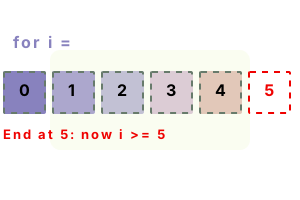
                      The variable you use in the for loop you would use in the Close[] to allow you to loop back.

                      Example:

                      //Loops back through the last 30 bars and outputs its close
                      for(int i = 0; i < 30; i++)
                      {
                      Print(i.ToString() + " Bar Back the value of close is " + Close[i].ToString());
                      }
                      BrettNinjaTrader Product Management

                      Comment


                        #12
                        Originally posted by arbuthnot View Post
                        Hi again

                        I’m coming back to this problem, having started the thread and having had the very kind assistance of NinjaTrader_JC and koganam.

                        Firstly, I’ll restate the problem, which is to calculate the number of bars ago since a down bar passed through the same price level as the close of the current up bar (and vice versa). (Please see the graphic illustrating what I’m aiming for.)

                        Now I think I’ve followed koganam’s below suggestion correctly. Prior to using the code in a strategy, I’ve initially created an indicator: if the indicator works for this, then all is fine. The trouble, the indicator, which compiles OK, just returns a zero line, so something’s still not working.

                        This is the code I’ve used:

                        Code:
                           private double closeNow…
                         
                          …
                         
                          protected override void Initialize()
                         
                          {
                          Add(new Plot(…, "MROa"));
                         
                          …
                         
                          protected override void OnBarUpdate()
                         
                          { 
                         
                          if(CurrentBar < 50 || Close[0] < Open[0])
                          {return;}
                         
                          else
                         
                          CloseNow = Close[0];
                         
                          MROa.Set(MRO(delegate {return CloseNow <= High[0] && CloseNow >= Low[0] ;}, 1, 50));
                        I think the problem must be, unless I’ve made a huge blunder, as I stated before, the mismatch between “Close[0]” (as it usually means, i.e. the current bar) and the “Close[0]” (inside MRO, referring to the bar being tested).

                        I’ll quote again what I said below:

                        But now it would appear that using the variable

                        Code:
                        Closenow = Close[0]
                        doesn't, after all, help the situation.

                        Can anyone think of a way round this?

                        A loop of some kind will probably do the trick, but I want to cut down processing as much as possible. (Unless of course, C# may well use loops anyway to calculate MRO, in which case, a loop will indeed be the ideal solution.) This would be new territory for me as I haven’t tried coding one of these in NinjaScript before.

                        Any further ideas on this problem will be greatly welcomed.
                        That is hard to fathom. Based on your original code that you requested, here is what I have in OBU:

                        Code:
                        [FONT=Courier New][COLOR=#0000ff][FONT=Courier New][COLOR=#0000ff]double[/COLOR][/FONT][/COLOR][/FONT][FONT=Courier New] CloseNow = Close[[/FONT][FONT=Courier New][COLOR=#800080][FONT=Courier New][COLOR=#800080]0[/COLOR][/FONT][/COLOR][/FONT][FONT=Courier New]];[/FONT]
                        [FONT=Courier New][COLOR=#0000ff][FONT=Courier New][COLOR=#0000ff]int[/COLOR][/FONT][/COLOR][/FONT][FONT=Courier New] barsAgo = MRO([/FONT][FONT=Courier New][COLOR=#0000ff][FONT=Courier New][COLOR=#0000ff]delegate[/COLOR][/FONT][/COLOR][/FONT][FONT=Courier New] {[/FONT][FONT=Courier New][COLOR=#0000ff][FONT=Courier New][COLOR=#0000ff]return[/COLOR][/FONT][/COLOR][/FONT][FONT=Courier New] Close[[/FONT][FONT=Courier New][COLOR=#800080][FONT=Courier New][COLOR=#800080]0[/COLOR][/FONT][/COLOR][/FONT][FONT=Courier New]] > CloseNow && Open[[/FONT][FONT=Courier New][COLOR=#800080][FONT=Courier New][COLOR=#800080]0[/COLOR][/FONT][/COLOR][/FONT][FONT=Courier New]] < CloseNow;}, [/FONT][FONT=Courier New][COLOR=#800080][FONT=Courier New][COLOR=#800080]1[/COLOR][/FONT][/COLOR][/FONT][FONT=Courier New], CurrentBar);[/FONT]
                        [FONT=Courier New][COLOR=#0000ff][FONT=Courier New][COLOR=#0000ff]if[/COLOR][/FONT][/COLOR][/FONT][FONT=Courier New] (barsAgo > -[/FONT][FONT=Courier New][COLOR=#800080][FONT=Courier New][COLOR=#800080]1[/COLOR][/FONT][/COLOR][/FONT][FONT=Courier New]) [/FONT]
                        [FONT=Courier New]{[/FONT]
                        [FONT=Courier New]DrawDot([/FONT][FONT=Courier New][COLOR=#800000][FONT=Courier New][COLOR=#800000]"MRO_Required"[/COLOR][/FONT][/COLOR][/FONT][FONT=Courier New], [/FONT][FONT=Courier New][COLOR=#0000ff][FONT=Courier New][COLOR=#0000ff]false[/COLOR][/FONT][/COLOR][/FONT][FONT=Courier New], barsAgo, High[[/FONT][FONT=Courier New][COLOR=#800080][FONT=Courier New][COLOR=#800080]0[/COLOR][/FONT][/COLOR][/FONT][FONT=Courier New]] + [/FONT][FONT=Courier New][COLOR=#800080][FONT=Courier New][COLOR=#800080]10[/COLOR][/FONT][/COLOR][/FONT][FONT=Courier New] * TickSize, Color.Red);[/FONT]
                        [FONT=Courier New]Print([/FONT][FONT=Courier New][COLOR=#800000][FONT=Courier New][COLOR=#800000]"Condition was satisfied "[/COLOR][/FONT][/COLOR][/FONT][FONT=Courier New] + barsAgo + [/FONT][FONT=Courier New][COLOR=#800000][FONT=Courier New][COLOR=#800000]" bars ago."[/COLOR][/FONT][/COLOR][/FONT][FONT=Courier New]);[/FONT]
                        [FONT=Courier New]}[/FONT]
                        The result is shown in the pictures below, where you can clearly see the dot drawn. Look in the Output Window to see the text. Actually, when COBC is false, you can see the dot jumping around in real time as the current bar modifies the happening.

                        Change High[0] to High[barsAgo] and there will be no vertical movement of the dot if COBC is false.

                        Your new statement of the requirement is different from your original request, but even your current request can be coded. You just need to check that the current bar is up and the found bar is down (or vice-versa). As you are looking for the MRO of when both occurred, yes, you will still need a loop to find the valid MRO, as MRO1 may not quite satisfy the up/down condition.
                        Attached Files
                        Last edited by koganam; 11-30-2012, 10:44 AM.

                        Comment


                          #13
                          That's really helpful, koganam, and, as always, I appreciate your assistance.

                          Just to add that I think this technique (which is effectively an indication of when a period of chop has come to an end) is most effective with range bars.

                          (I did of course mention minute bars in my first post for those who may post to point this out!)

                          Comment


                            #14
                            Originally posted by arbuthnot View Post
                            That's really helpful, koganam, and, as always, I appreciate your assistance.

                            Just to add that I think this technique (which is effectively an indication of when a period of chop has come to an end) is most effective with range bars.

                            (I did of course mention minute bars in my first post for those who may post to point this out!)
                            I know what you mean. I trade on ONLY RangeBars. They make the most sense. After all, I do not make money from the passage of time; I make it from the price moving through a range.

                            Comment


                              #15
                              I know what you mean. I trade on ONLY RangeBars. They make the most sense. After all, I do not make money from the passage of time; I make it from the price moving through a range.
                              You put it extremely well.

                              Time bars have little or no logical relation to price action - and are far too erratic.

                              I've found that Renko bars are 'too good to be true', or, better still, 'too smooth to be true'. On an 4 Renko is the ES, price can retrace 7 ticks without there being a blip on the chart. For me, that's not reality.

                              Range bars I've found, are the 'happy medium'. OK, during fast market action, say, at the Open, they can print very rapidly. Traders could consider using longer bars, up to 8 Range in the ES. Really smooth...

                              Comment

                              Latest Posts

                              Collapse

                              Topics Statistics Last Post
                              Started by Geovanny Suaza, 02-11-2026, 06:32 PM
                              0 responses
                              651 views
                              0 likes
                              Last Post Geovanny Suaza  
                              Started by Geovanny Suaza, 02-11-2026, 05:51 PM
                              0 responses
                              370 views
                              1 like
                              Last Post Geovanny Suaza  
                              Started by Mindset, 02-09-2026, 11:44 AM
                              0 responses
                              109 views
                              0 likes
                              Last Post Mindset
                              by Mindset
                               
                              Started by Geovanny Suaza, 02-02-2026, 12:30 PM
                              0 responses
                              574 views
                              1 like
                              Last Post Geovanny Suaza  
                              Started by RFrosty, 01-28-2026, 06:49 PM
                              0 responses
                              577 views
                              1 like
                              Last Post RFrosty
                              by RFrosty
                               
                              Working...
                              X