Announcement

Collapse
No announcement yet.

Partner 728x90

Collapse

Autotrade Strategy Not Doing That Thing I want It To. You Know, That Thing.

Collapse
X
 
  • Filter
  • Time
  • Show
Clear All
new posts

    Autotrade Strategy Not Doing That Thing I want It To. You Know, That Thing.

    The indicator under consideration is a variation of the Chandelier stop and reverse that works off of high/low rather than close (thus allowing use of stop limit orders instead of cross-over triggered orders that are subject to large amounts of slippage.)

    Let me repeat, using the "CrossAbove" or "CrossBelow" commands are a non-starter. I will not consider implementing them in the strategy due to slippage, so don't even go there.

    The problem:

    The trade is active long (due to the same problem but for the purpose of visual illustration let us concentrate on the exit).
    The indicator has calculated the value of 1103.13 for the exit long stop limit value.

    The market dropped to 1103.25 and triggered the stop and exited the trade despite never touching 1103.13, thus kicking me out of a trade that would have made a decent amount of money.

    Yes I know that NQ (the financial instrument) trades only in quarter points, but since it never touched 1103.13, let alone 1103.00 the order should not have occured.
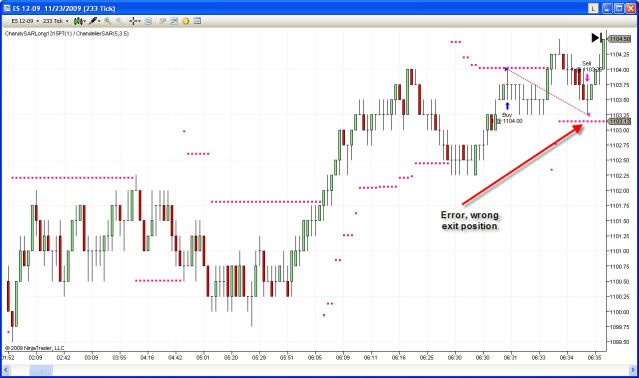


    How can I adjust the strategy to not execute such trade until it physically touches the order level? Is this a question of setting an offset of .0125 (assuming a Ninjatrader half tick rounding)? I never really understood how "offset" was supposed to work.
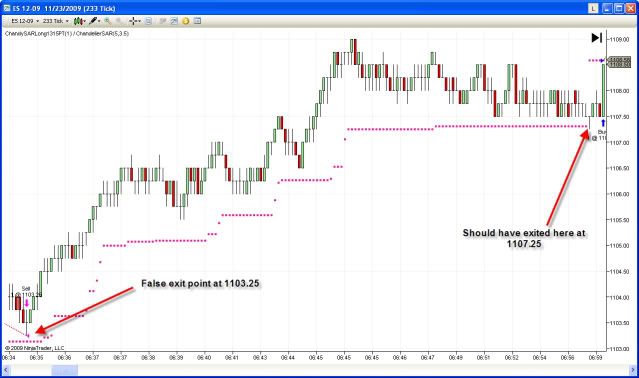


    This problem is not unique to this indicator or strategy. The same issue arises from the Parabolic SAR.

    Any thoughts or suggestions on how to address this in the strategy?

    #2
    I suspect your stop was rounded to the closest tick to make a valid stop:

    i.e. an NQ stop could only be .00 or .25

    .13 is closer to .25 than .00, and so likely became .25

    You'll probably need to have some code to handle your calculated stop and turn it into the valid stop you want (i.e. .24 and lower should be set to .00)

    This line might be a starting test at least:

    double myActualStop =
    Bars.Instrument.MasterInstrument.Round2TickSize (calculated_stop)


    Comment


      #3
      Thanks SIFTrader, I would suggest debugging with TraceOrders and Prints to see at exactly which level the stop was placed - if the rounding is the issue, which seems logical - Round2TickSize would be the way to go to make the order valid -

      Comment


        #4
        Question, would that rounding be taking place at the indicator or strategy level? If it is taking place at the indicator level, wouldn't it inadvertently cause a miscalculation of the indicator?

        Comment


          #5
          Timelord,

          Rounding is done wherever that line of code is placed. On the chart visually, the numbers may be rounded, but if you actually print out the number it would be unrounded unless explicitly rounded via code.
          Josh P.NinjaTrader Customer Service

          Comment


            #6
            If rounding is done wherever it was placed, then couldn't that induce an error in the indicator?

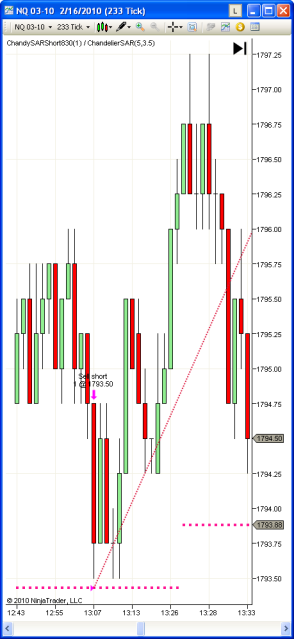
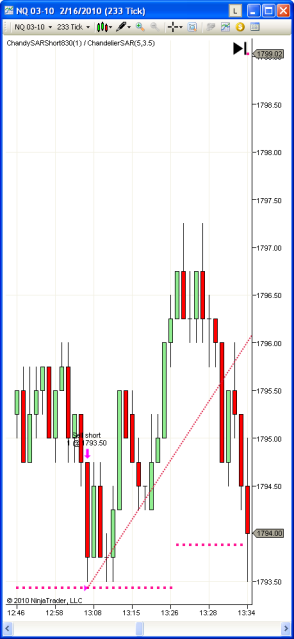
            Say it is a short strategy on the NQ.

            The indicator calculated value is 1793.43.

            Rounding would place the indicator (and strategy) at 1793.5. The market data dips exactly to 1793.50 triggering an entry.


            But wait, the indicator should not reverse because the raw 1793.43 threshold has not been passed.

            The market price moves away and the indicator again moves to follow it reaching. 1793.88. The market data then moves past that level and should trigger the trade.


            It may only be half a point but that adds up fast. I don't see how a pure rounding at the indicator will help give correct trades.

            Is there a way to ensure something is rounded DOWN to the nearest tick value?

            Comment


              #7
              Rounding is done in the code. If you want to round you can round. If you don't want to round then don't round it. Whether that causes you issues is something you have to decide for yourself in how you want to use it.

              We provide you with function to round to the nearest tick size. If you want to round down to nearest, then you need to program it yourself. Run your own logic and check it against tick size. Then bring the value down if need be. Just do simple math. Something like absolute value of (0.30 - 0.25) = 0.05 is significantly less than the absolute value of (0.30 - 0.50) so you should round to 0.25.
              Josh P.NinjaTrader Customer Service

              Comment


                #8
                latest attempt still not working at all

                It does compile which is a miracle in and of itself for me....

                I have placed in bold the code that I have added.

                For Condition Set 1 (Entry) the rounding must be down.
                For Condition Set 2 (Exit) the rounding must be up

                Code:
                // This namespace holds all strategies and is required. Do not change it.
                namespace NinjaTrader.Strategy
                {
                    /// <summary>
                    /// Enter the description of your strategy here
                    /// </summary>
                    [Description("Enter the description of your strategy here")]
                    public class ChandyShort830EXP : Strategy
                    {
                        #region Variables
                        // Wizard generated variables
                        private double chandyRounded = 1; // Default setting for ChandyRounded
                        private double chandyRemainder = 1; // Default setting for ChandyRemainder
                        private double roundUp = 1; // Default setting for RoundUp
                        private double roundDown = 1; // Default setting for RoundDown
                        // User defined variables (add any user defined variables below)
                        #endregion
                
                        /// <summary>
                        /// This method is used to configure the strategy and is called once before any strategy method is called.
                        /// </summary>
                        protected override void Initialize()
                        {
                
                            CalculateOnBarClose = true;
                        }
                
                        /// <summary>
                        /// Called on each bar update event (incoming tick)
                        /// </summary>
                        protected override void OnBarUpdate()
                        {
                            [B]chandyRounded = Math.Round( CustomIndicator(5, 3.5).CustomInd[0], 0 );
                            chandyRemainder = CustomIndicator(5, 3.5).CustonIndChandelier[0] - chandyRounded;[/B]
                            // Condition set 1
                            if (DefaultInput[0] > CustomIndicator(5, 3.5).CustomInd[0]
                                && ToTime(Time[0]) > ToTime(8, 30, 0)
                                && ToTime(Time[0]) < ToTime(15, 0, 0))
                            {
                                [B]roundDown = chandyRemainder >= 0.75 ? chandyRounded + 0.75 : 
                                    chandyRemainder >= 0.5 ? chandyRounded + 0.5 :
                                    chandyRemainder >= 0.25 ? chandyRounded + 0.25 :
                                    chandyRemainder;[/B]
                                EnterShortStopLimit(DefaultQuantity, [B]roundDown, roundDown[/B], "");
                                Alert("MyAlert0", Priority.High, "", "", 1, Color.White, Color.Black);
                            }
                
                            // Condition set 2
                            if (DefaultInput[0] < CustomIndicator(5, 3.5).CustomInd[0]
                                && ToTime(Time[0]) > ToTime(8, 30, 0)
                                && ToTime(Time[0]) < ToTime(15, 0, 0))
                            {
                                [B]roundUp = chandyRemainder <= 0.25 ? chandyRounded + 0.25 : 
                                    chandyRemainder <= 0.5 ? chandyRounded + 0.5 :
                                    chandyRemainder <= 0.75 ? chandyRounded + 0.75 :
                                    chandyRemainder;[/B]
                                ExitShortStopLimit([B]roundUp, roundUp[/B], "", "");
                                PlaySound(@"C:\Program Files\NinjaTrader 6.5\sounds\Alert3.wav");
                            }
                
                            // Condition set 3
                            if (ToTime(Time[0]) > ToTime(8, 30, 0)
                                && DefaultInput[0] < CustomIndicator(5, 3.5).CustomInd[0]
                                && ToTime(Time[0]) < ToTime(8, 31, 0))
                            {
                                EnterShort(DefaultQuantity, "");
                            }
                
                            // Condition set 4
                            if (ToTime(Time[0]) >= ToTime(15, 0, 0))
                            {
                                ExitShort("", "");
                            }
                        }
                Suggestions?
                Last edited by kocmodpom; 02-23-2010, 03:01 PM.

                Comment


                  #9
                  kocmodpom, what exactly is 'not working'?

                  Do you run into errors? Or does it take the trades you think it should?

                  For this please consider working with TraceOrders to debug your order placement behavior -


                  For the rounding, please print out the calculated values to check if they round to what you expect them to, you might need to include the Math Round overload with the MidPoint mode parameter...

                  Comment


                    #10
                    No error messages, and no orders are being placed or filled. Will I have to do that printing and testing using recorded data or something else?

                    Is something amazing supposed to happen when I add:
                    Code:
                    protected override void Initialize() 
                    { 
                        TraceOrders        = true; 
                    }
                    ?


                    Nothing magical happened when I compiled. No pop-up or anything that I can tell when rerunning the strat on NQ. What should I be looking for?
                    Last edited by kocmodpom; 02-18-2010, 02:21 PM.

                    Comment


                      #11
                      Using the TraceOrders feature enables valuabe debugging info from each Order method to be listed in your output window when running the strategy either in Market Replay, live trading or backtesting. Thus you can then check what happens 'under the hood' to see which issues needed to be addressed.

                      I would also add a visual check (an arrow, dot...) to your conditions so it's easier to see if your conditions trigger as expected.

                      Comment


                        #12
                        That is the thing, no orders are being executed now. Absolutely nothing.

                        Comment


                          #13
                          Ok, did you add the visual check to your conditions to see if they trigger at all? If not you would need to rework those...

                          Comment


                            #14
                            I did figure out the problem. It was a programming issue. Apparently one cannot use the code:

                            Code:
                            Math.Round(Variable, 0);
                            One must instead use

                            Math.Truncate


                            Comment


                              #15
                              SIFTrader, you are the man! I figured it all out after your very generous starting point to the code.

                              I am stoked! Just got the license and start trading tomorrow!

                              Comment

                              Latest Posts

                              Collapse

                              Topics Statistics Last Post
                              Started by Geovanny Suaza, 02-11-2026, 06:32 PM
                              0 responses
                              649 views
                              0 likes
                              Last Post Geovanny Suaza  
                              Started by Geovanny Suaza, 02-11-2026, 05:51 PM
                              0 responses
                              370 views
                              1 like
                              Last Post Geovanny Suaza  
                              Started by Mindset, 02-09-2026, 11:44 AM
                              0 responses
                              109 views
                              0 likes
                              Last Post Mindset
                              by Mindset
                               
                              Started by Geovanny Suaza, 02-02-2026, 12:30 PM
                              0 responses
                              574 views
                              1 like
                              Last Post Geovanny Suaza  
                              Started by RFrosty, 01-28-2026, 06:49 PM
                              0 responses
                              576 views
                              1 like
                              Last Post RFrosty
                              by RFrosty
                               
                              Working...
                              X