
Announcement

Collapse
No announcement yet.

Partner 728x90

Collapse

No available Data Server

Collapse
X
 
  • Filter
  • Time
  • Show
Clear All
new posts

    No available Data Server

    Hello all!
    Having trouble to connect on CQG demo account.
    I'm using AMP as a brocker.

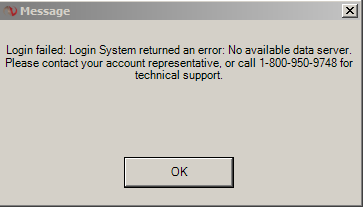
    When trying to connect have an error:

    Login failed: Login System returned an error: No available data server.
    Tried to re-run NinjaTrader, re-boot PC. Nothing helps.
    What can be the problem?

    #2
    Having same issue!! Please help!

    Hello,

    Just this morning I am now having the same issue!! I did some cleanup on my PC last night and now this morning cannot connect to Continuum! Any suggestions?

    Comment


      #3
      Hi! I have the same error message while connecting to demo account today

      Comment


        #4
        Just tried to connect and finally got connected!! Let's hope whatever issue they had is now fixed and that we all can stay connected!

        Comment


          #5
          sirpippin2015, I got connected too but when I tried to reload historical data the chart was cleared. I think the problem is still there

          Comment


            #6
            same here,,, not loading right at all,, I have volume showing for one instrument and no others, along with other issues, hopefully all will be worked out extremely soon!! some news coming out on CHF overnight that i'd really like to be in a trade for,, but not blindly!

            Comment


              #7
              Hello and thank you for writing in,

              It appears CQG= connections did experience temporary downtown earlier today, but has since been restored. This may have been due to server maintenance.

              If you're still unable to connect, please restart your PC, modem and router.
              In addition, please add NinjaTrader as an exception to any firewall or virus protection software on your PC. If you're given an option to allow a file path, please allow the following:

              * My Documents > NinjaTrader 7
              * My Computer > Local Disk (C > Program Files (x86) > NinjaTrader 7.

              Let me know if you're still unable to connect after taking these steps.

              Comment


                #8
                Hi, it works now, thanks!

                Comment

                Latest Posts

                Collapse

                Topics Statistics Last Post
                Started by CarlTrading, 03-31-2026, 09:41 PM
                1 response
                30 views
                0 likes
                Last Post NinjaTrader_ChelseaB  
                Started by CarlTrading, Yesterday, 02:41 AM
                0 responses
                13 views
                0 likes
                Last Post CarlTrading  
                Started by CaptainJack, 03-31-2026, 11:44 PM
                0 responses
                22 views
                1 like
                Last Post CaptainJack  
                Started by CarlTrading, 03-30-2026, 11:51 AM
                0 responses
                40 views
                0 likes
                Last Post CarlTrading  
                Started by CarlTrading, 03-30-2026, 11:48 AM
                0 responses
                34 views
                0 likes
                Last Post CarlTrading  
                Working...
                X