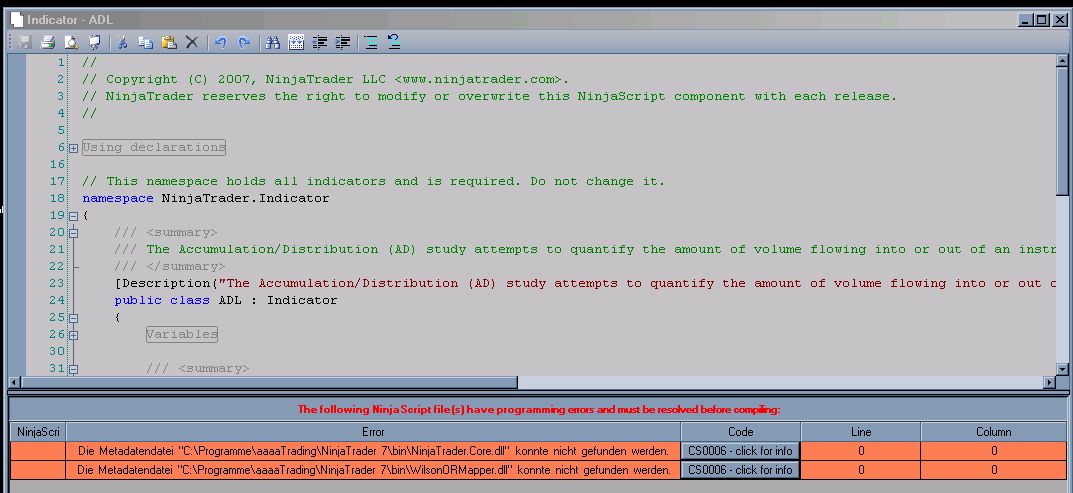
ANY scripts stopp compiling.
Announcement
Collapse
No announcement yet.
Partner 728x90
Collapse
NinjaTrader
todays update desaster
Collapse
X
-
Hello makra081,
Can you please go to Control Center-->Tools-->Edit NinjaScript-->Indicator and double click any indicator. A new window will appear with the indicator code. Please right click in the window and select 'References'.
Make sure it contains the .dll references listed in your screenshot.
If not, please add them by clicking the Add button. They are located at the file path listed in the error message.
Once you added the .dll references, please compile your NinjaScript files once more and check if the errors remains.
If the .dll references are listed in the 'References' window, please remove them first. Subsequently, click Add to re-add the .dll references and compile your indicators.
Latest Posts
Collapse
| Topics | Statistics | Last Post | ||
|---|---|---|---|---|
|
Started by argusthome, 03-08-2026, 10:06 AM
|
0 responses
65 views
0 likes
|
Last Post
by argusthome
03-08-2026, 10:06 AM
|
||
|
Started by NabilKhattabi, 03-06-2026, 11:18 AM
|
0 responses
41 views
0 likes
|
Last Post
|
||
|
Started by Deep42, 03-06-2026, 12:28 AM
|
0 responses
23 views
0 likes
|
Last Post
by Deep42
03-06-2026, 12:28 AM
|
||
|
Started by TheRealMorford, 03-05-2026, 06:15 PM
|
0 responses
26 views
0 likes
|
Last Post
|
||
|
Started by Mindset, 02-28-2026, 06:16 AM
|
0 responses
52 views
0 likes
|
Last Post
by Mindset
02-28-2026, 06:16 AM
|

Comment