
whats the best way to backup all my settings and charts?
-
Hello,
Thanks for the forum post.
Creating a Backup:

Let me know if I can be of further assistance.BrettNinjaTrader Product Management -
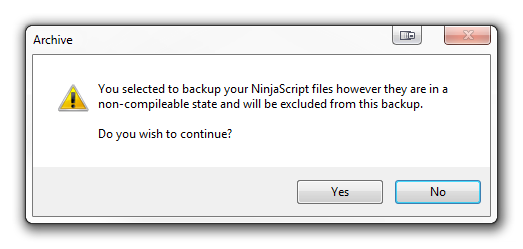
im am not connected to any data service but when i click backup with every option selected i get this:Originally posted by NinjaTrader_Brett View Post
Comment
-
Hello,
This tells me you have indicator compile error on the PC.
Please follow the instructions below to see where the errors are coming from after compiling the indicator. This will allow you to debug the indicator/strategy or remove it from your PC. If you are wondering why you receive an error when compiling only one indicator, it is because NinjaTrader compiles all indicators and strategies- not just one.
Open NinjaTrader
From the Control Center select the Tools menu--> select the Edit NinjaScript menu item--> select Indicator
Select an indicator and double click on it.
A new window will appear and you will need to right click in the window and select Compile to compile the indicators.
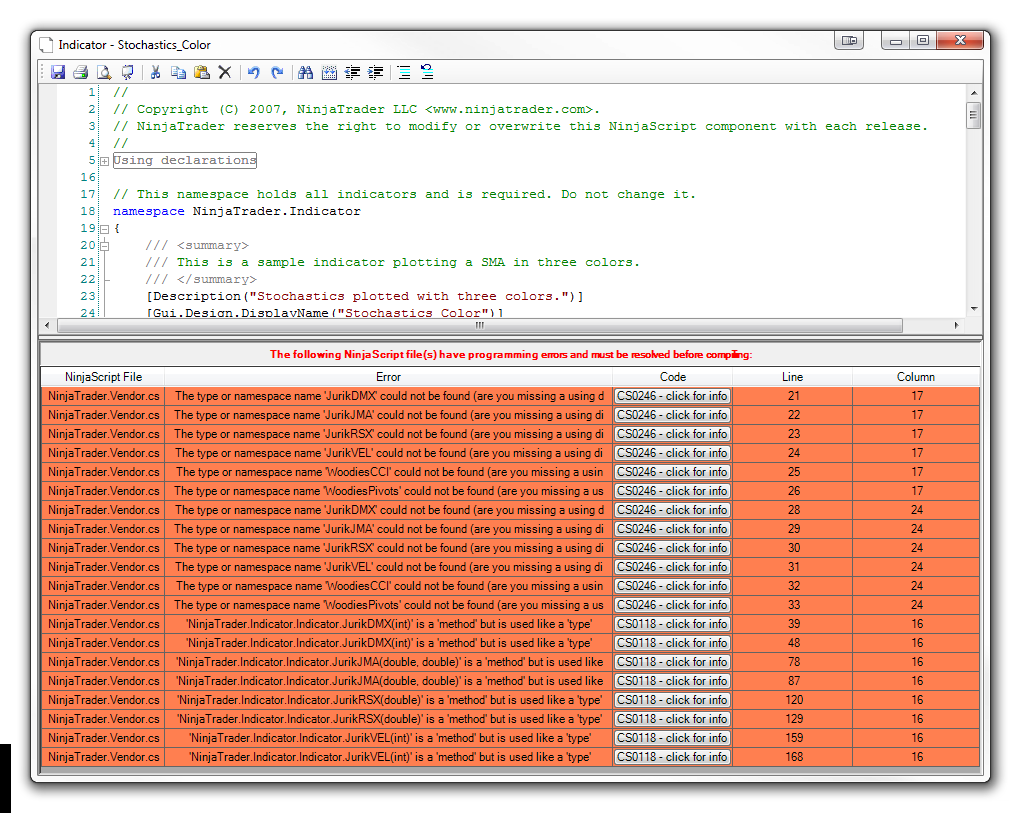
At the bottom of the window a new section will appear were you can find the error locations.
From there you have the option to remove the indicator or debug it.
Let me know what errors are listed here or take a screenshot. To send a screenshot press Alt + PRINT SCREEN to take a screen shot of the selected window. Then go to Start--> Accessories--> Paint, and press CRTL + V to paste the image. Lastly, save as a jpeg file and send the file as an attachment.BrettNinjaTrader Product ManagementComment
-
-
Hello,
Thanks for that information.
Now go to the window you took the screenshot of, and right click it. Then select references. Now click the add button and then select NinjaTrader.Vendor should be listed right there as soon as you click the add button.
Then right click again and select compile. Does it compile without error now? Or are there more errors? If more errors please post another screenshot.
I look forward to assisting you further.BrettNinjaTrader Product ManagementComment
-
Hello,
Glad to hear that worked.
Unfortunately there is no work around for that.
Let me know if I can be of further assistance.BrettNinjaTrader Product ManagementComment
-
Hi madLyfe,
We've added that request to the list. It has been assigned number 84 in our internal tracking system.KyleNinjaTrader Customer ServiceComment
| Topics | Statistics | Last Post | ||
|---|---|---|---|---|
|
0 responses
339 views
0 likes
|

by CaptainJack
05-29-2026, 05:09 AM
|
|||
|
0 responses
212 views
0 likes
|
by CaptainJack
05-29-2026, 12:02 AM
|
|||
|
0 responses
196 views
1 like
|
by charlesugo_1
05-26-2026, 05:03 PM
|
|||
|
1 response
288 views
0 likes
|
|
|||
|
0 responses
245 views
0 likes
|
by CarlTrading
05-11-2026, 05:56 AM
|
Comment