Announcement

Collapse
No announcement yet.

Partner 728x90

Collapse

NT Autotrade is canceling stop loss orders leaving positions active

Collapse
X
 
  • Filter
  • Time
  • Show
Clear All
new posts

    #16
    RDPoS, I'm not sure which bug you're referring to here

    - the order expired because you did not resubmit it - this is expected
    - thus you would need to ensure the strategy resubmits your order if needed to achieve the desired fill.

    You would unfortunately not know exactly without debugging your strategy.
    Comment


      #17
      I guess what I am saying is, that it can't expire or be canceled until a new bar is created from what you have told me. So how is it being canceled or not filled on the SIM before the new bar? That is what doesn't make sense.

      Comment


        #18
        Even if I used liveUntilCanceled = true as you suggested, I fail to see how that will resolve the problem because the price will still have moved in the next bar and thus a cancel order issued to replace the existing GTC order, that was missed. Sorry if I am not understanding this.

        It can't be a rounding error because the order is executed when I reload at one tick above the lower bound of the range bar. I have never experienced a problem on a live trade with this strategy which is why I am confused by the behavior on NT SIM.


        On a live trade, I can maybe see what you are saying, but in SIM????
        How can I debug the order sequence?

        Thanks,
        Last edited by RDPoS; 11-12-2010, 06:43 AM.

        Comment


          #19
          You would need to print debug info for all bars in sequence in your OnBarUpdate(), include CurrentBar, Timestamp and stopValue - I think you will find that the stop value you used on the bar that breached the stop was already flipped above the range bars, thus the submitted stop value from the previous bar did for sure not fill and thus the stop expired on next bar as you did not resubmit, that's how it would look to me from the screen shots you provided.

          Comment


            #20
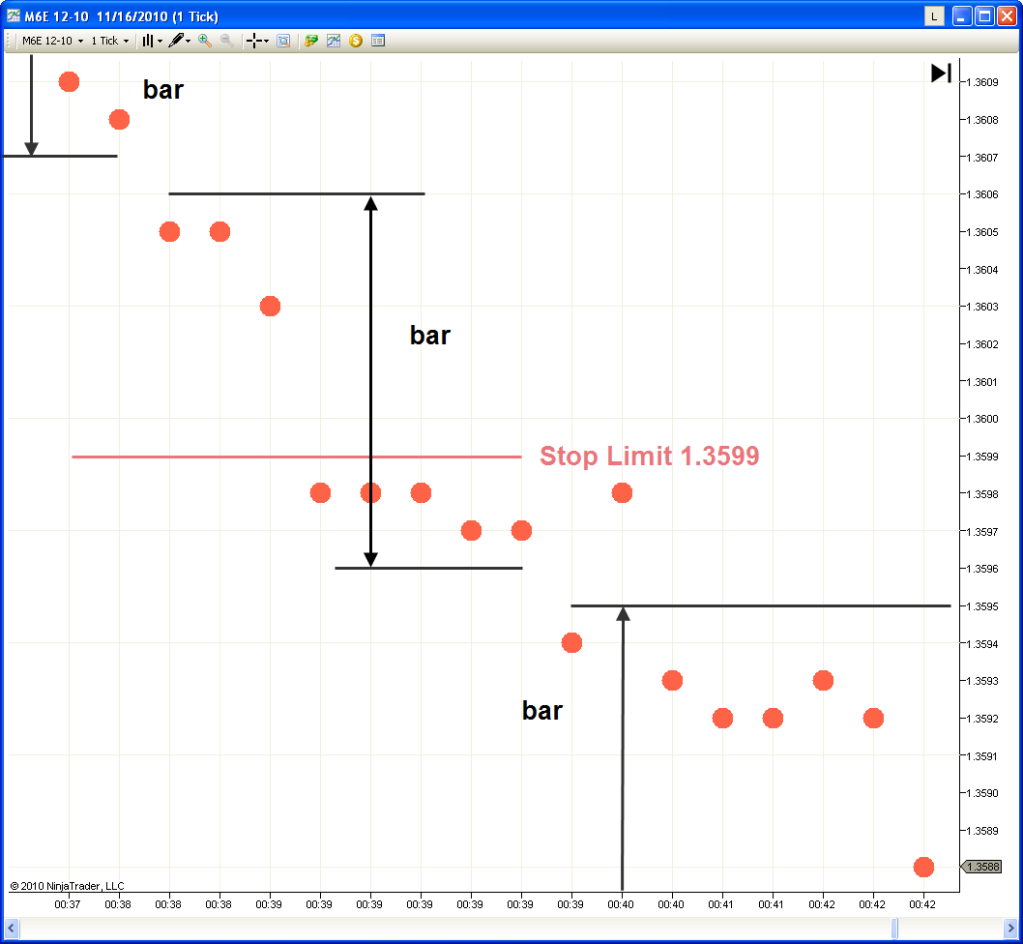
            Problem rears its ugly head again

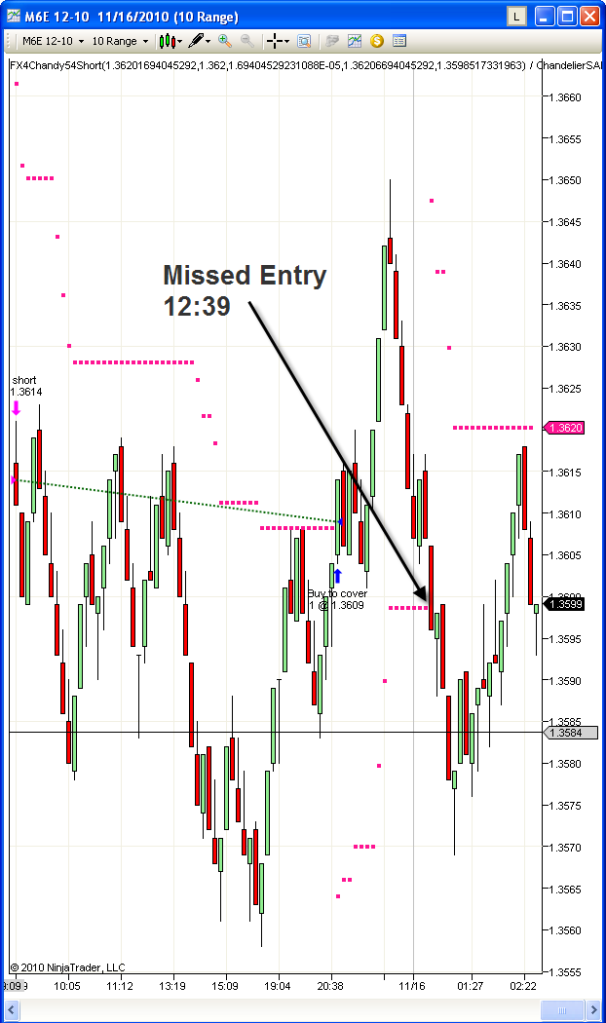
            This time it missed an entry. Again, When a stop is hit, the strat/indicator does not flip up for one bar, so there is inherent lag in the NT system. Contrast that with a platform like ProTrader which immediately flips the indicator when the stop line is crossed.


            11/16/2010 12:38:08 AM Entered internal PlaceOrder() method at 11/16/2010 12:38:08 AM: Action=SellShort OrderType=StopLimit Quantity=1 LimitPrice=1.3599 StopPrice=1.3599 SignalName='' FromEntrySignal=''
            11/16/2010 12:38:08 AM Ignored PlaceOrder() method: Action=SellShort OrderType=StopLimit Quantity=1 LimitPrice=1.3599 StopPrice=1.3599 SignalName=Sell short' FromEntrySignal='' Reason='There already is a matching order with same prices and quantity'
            11/16/2010 12:39:01 AM Entered internal PlaceOrder() method at 11/16/2010 12:39:01 AM: Action=BuyToCover OrderType=StopLimit Quantity=0 LimitPrice=1.3648 StopPrice=1.3648 SignalName='' FromEntrySignal=''
            11/16/2010 12:39:01 AM Ignored PlaceOrder() method: Action=BuyToCover OrderType=StopLimit Quantity=0 LimitPrice=1.3648 StopPrice=1.3648 SignalName='' FromEntrySignal='' Reason='This was an exit order but no position exists to exit'
            11/16/2010 12:39:01 AM Cancelled expired order: BarsInProgress=0: Order='a15026b6853a4c2ea6e36f5f283b2221/Sim101' Name='Sell short' State=Working Instrument='M6E 12-10' Action=SellShort Limit price=1.3599 Stop price=1.3599 Quantity=1 Strategy='FX4Chandy54Short' Type=StopLimit Tif=Gtc Oco='' Filled=0 Fill price=0 Token='a15026b6853a4c2ea6e36f5f283b2221' Gtd='12/1/2099 12:00:00 AM'
            11/16/2010 12:43:40 AM Entered internal PlaceOrder() method at 11/16/2010 12:43:40 AM: Action=BuyToCover OrderType=StopLimit Quantity=0 LimitPrice=1.3639 StopPrice=1.3639 SignalName='' FromEntrySignal=''
            11/16/2010 12:43:40 AM Ignored PlaceOrder() method: Action=BuyToCover OrderType=StopLimit Quantity=0 LimitPrice=1.3639 StopPrice=1.3639 SignalName='' FromEntrySignal='' Reason='This was an exit order but no position exists to exit'
            11/16/2010 12:57:07 AM Entered internal PlaceOrder() method at 11/16/2010 12:57:07 AM: Action=BuyToCover OrderType=StopLimit Quantity=0 LimitPrice=1.3639 StopPrice=1.3639 SignalName='' FromEntrySignal=''
            11/16/2010 12:57:07 AM Ignored PlaceOrder() method: Action=BuyToCover OrderType=StopLimit Quantity=0 LimitPrice=1.3639 StopPrice=1.3639 SignalName='' FromEntrySignal='' Reason='This was an exit order but no position exists to exit'
            11/16/2010 12:59:35 AM Entered internal PlaceOrder() method at 11/16/2010 12:59:35 AM: Action=BuyToCover OrderType=StopLimit Quantity=0 LimitPrice=1.3630 StopPrice=1.3630 SignalName='' FromEntrySignal=''


            Rather irritating, so I pulled up the tick by tick chart to see what is going on.


            As you can see, there appears to be zero reason why NT did not fill the order at 1.3599. There were 5 ticks below the stop limit price before the bar ended.

            It appears the error is not on the strategy, it is on NT6.5

            I do note that for some strange reason the timestamps do not exactly seem to match up.

            So why is it skipping orders?

            Comment


              #21
              Jason, my previous recommendation to debug your strategy would still apply - both the indicator and strategy order placement would do whatever you programmed them to, thus you would need to inspect what you need to change in order to see the trade outcomes you expect - for this a NinjaScript consultant can be helpful if you look to get this modified professionally for you -


              The indicator would 'flip over' at the next OnBarUpdate(), if you're running on CalculateOnBarClose = true = this would equal the next bar, correct.

              Your order does not fill as it would expire on the bar before the level breach - please try working with liveUntilCancelled as this would mean it does not need to be resubmitted to continue working past the bar it was issued on.

              Comment


                #22
                The indicator would 'flip over' at the next OnBarUpdate(), if you're running on CalculateOnBarClose = true = this would equal the next bar, correct.

                Your order does not fill as it would expire on the bar before the level breach
                I really appreciate your assistance but unless I am misunderstanding, if it was linked to what you are saying happens then the strategy would NEVER work, but alas 80% of the time it works under SIM. Same price situations for when it works as when it doesn't work.

                Let me try to re-summarize what we know.

                It has not occurred under live trading on a range chart for M6E.
                It has not occurred under SIM trading on a minute chart.
                It has not occurred under SIM trading on a range chart for E7, or 7E.

                Furthermore:
                The stop is showing up at the right price
                The indicator is indicating the right price
                The price action clearly shows the stop was penetrated and many more ticks existed in that bar before it closed!
                It has only occurred under SIM trading on a range chart for M6E.

                Thus is it not reasonable to conclude that the problem could possibly be in how NT handles orders on range charts for wide spread assets?

                M6E is frequently 3-4 pips wide between bid and ask. I have brought this up in another thread to no avail.

                It still doesn't make sense that it works 80% of the time under SIM and 100% of the time live.

                Doesn't that lead one to believe that the problem is implicit to how NT handles orders on range charts?

                Comment


                  #23
                  Originally posted by NinjaTrader_Bertrand View Post
                  You would need to print debug info for all bars in sequence in your OnBarUpdate(), include CurrentBar, Timestamp and stopValue
                  Are there examples of these in use anywhere? The search function didn't help as much as I would like it to.
                  Last edited by RDPoS; 11-17-2010, 01:26 PM. Reason: just because I can

                  Comment


                    #24
                    You can print these by calling them in your print function.

                    Print(CurrentBar + " " + Time[0] + " " + stopValue);
                    Josh P.NinjaTrader Customer Service

                    Comment


                      #25
                      Thank you sir. I will incorporate this into the testing.

                      Comment


                        #26
                        in which block would one place "liveUntilCanceled = true"?

                        Comment


                          #27
                          You would change the overload used for order submission to be able to set it -

                          EnterLongLimit(int barsInProgressIndex, bool liveUntilCancelled, int quantity, double limitPrice, string signalName)

                          Comment


                            #28
                            How would that differ for a stoplimit order?

                            The normal enterstoplimit follows the routine

                            EnterShortStopLimit(DefaultQuantity, stopValue, limitValue, "");

                            Comment


                              #29
                              Please use then EnterLongStopLimit(0, true, DefaultQuantity, limitValue, stopValue, "") -

                              Comment


                                #30
                                Ok, it seems there is no overload for an exit though. That is fine, I will deal with that in due time.

                                It seems as though this did not solve the problem.

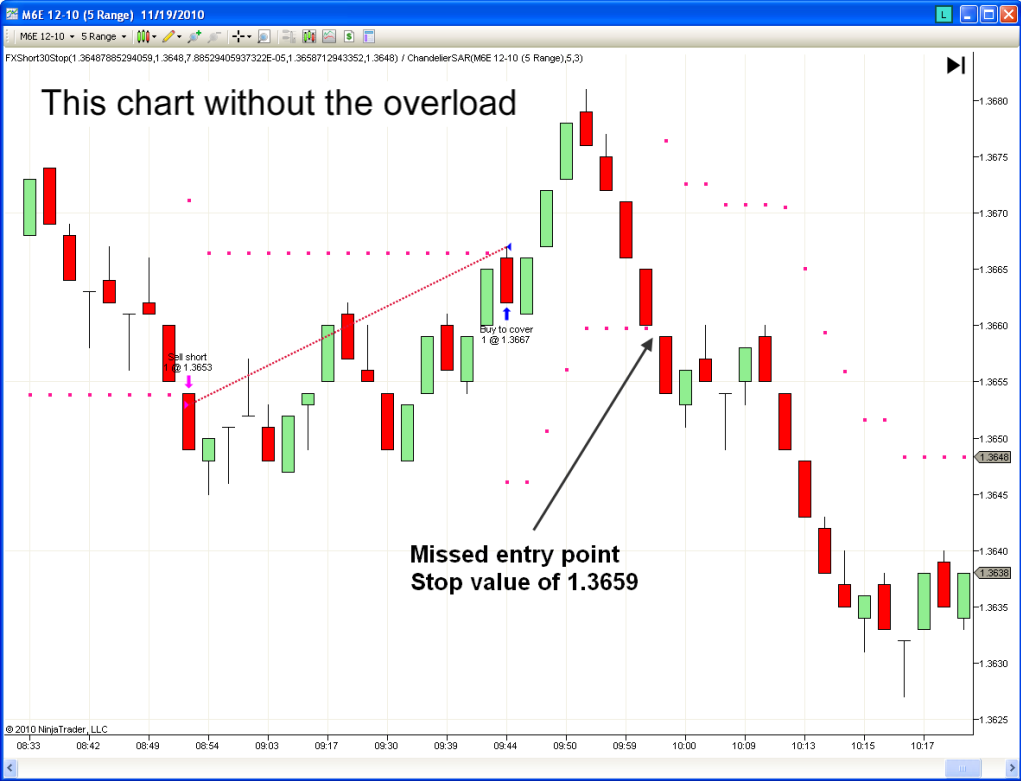
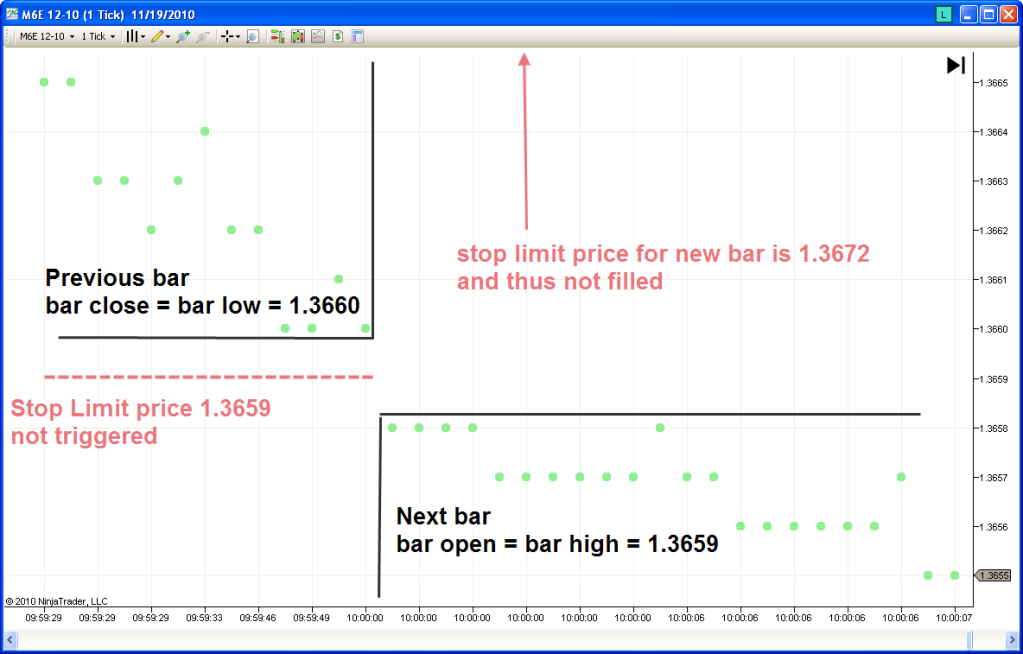
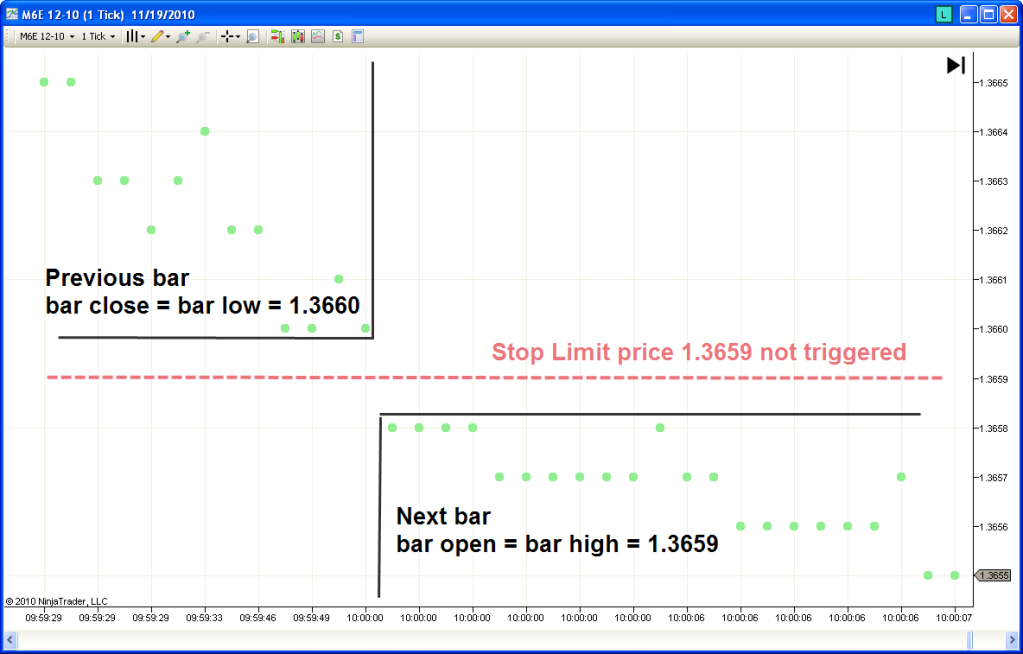
                                Exhibit A: This cart shows the stop limit at 1.3659 not being triggered when the previous bar closes at 1.3660 and the next bar opens at 1.3659 (actually a tick was skipped and it opened at 1.3658).


                                11/19/2010 9:59:29 AM Entered internal PlaceOrder() method at 11/19/2010 9:59:29 AM: BarsInProgress=0 Action=SellShort OrderType=StopLimit Quantity=1 LimitPrice=1.3659 StopPrice=1.3659 SignalName='' FromEntrySignal=''
                                11/19/2010 9:59:29 AM Ignore order amendment: Action=SellShort OrderType=StopLimit Quantity=1 LimitPrice=1.3659 StopPrice=1.3659 SignalName=Sell short' FromEntrySignal='' Reason='Order already has this stop price/limit price/quantity'
                                EffectiveStopValue (roundDown) = 1.3659
                                1227 11/19/2010 10:00:00 AM , orginal Chandy value = 1.36596940544097
                                ChandyRounded = 1.3659, ChandyRemainder + 6.94054409691169E-05
                                11/19/2010 10:00:00 AM Entered internal PlaceOrder() method at 11/19/2010 10:00:00 AM: BarsInProgress=0 Action=SellShort OrderType=StopLimit Quantity=1 LimitPrice=1.3659 StopPrice=1.3659 SignalName='' FromEntrySignal=''
                                11/19/2010 10:00:00 AM Ignore order amendment: Action=SellShort OrderType=StopLimit Quantity=1 LimitPrice=1.3659 StopPrice=1.3659 SignalName=Sell short' FromEntrySignal='' Reason='Order already has this stop price/limit price/quantity'
                                EffectiveStopValue (roundDown) = 1.3659
                                BAR CLOSES AND NOT TRIGGERED AS EXPECTED BECAUSE ORDER IS CANCELLED IN 1228

                                1228 11/19/2010 10:00:28 AM , orginal Chandy value = 1.36763690756722
                                ChandyRounded = 1.3676, ChandyRemainder + 3.69075672159713E-05
                                11/19/2010 10:00:28 AM Entered internal PlaceOrder() method at 11/19/2010 10:00:28 AM: BarsInProgress=0 Action=BuyToCover OrderType=StopLimit Quantity=0 LimitPrice=1.3677 StopPrice=1.3677 SignalName='' FromEntrySignal=''
                                11/19/2010 10:00:28 AM Ignored PlaceOrder() method: Action=BuyToCover OrderType=StopLimit Quantity=0 LimitPrice=1.3677 StopPrice=1.3677 SignalName='' FromEntrySignal='' Reason='This was an exit order but no position exists to exit'
                                EffectiveStopValue )roundUp = 1.36768690756722

                                11/19/2010 10:00:28 AM Cancelled expired order: BarsInProgress=0: Order='NT-00068/Sim101' Name='Sell short' State=Working Instrument='M6E 12-10' Action=SellShort Limit price=1.3659 Stop price=1.3659 Quantity=1 Strategy='FXShort30Stop' Type=StopLimit Tif=Gtc Oco='' Filled=0 Fill price=0 Token='411b0ee9a070452281d2ca156947764d' Gtd='12/1/2099 12:00:00 AM'
                                1229 11/19/2010 10:00:46 AM , orginal Chandy value = 1.36725793837814
                                ChandyRounded = 1.3672, ChandyRemainder + 5.79383781438292E-05


                                This tick by tick chart confirms this


                                Bertrand has explained this as the order being cancelled when the bar closes and I 100% agree with him in this case as the output screen shows the bar closing before the stop at 1.3659 being triggered due to being rounded down.

                                The suggested fix was the adding of "liveUntilCanceled = true" so that the order is carried over to the next bar unless explicitly cancelled

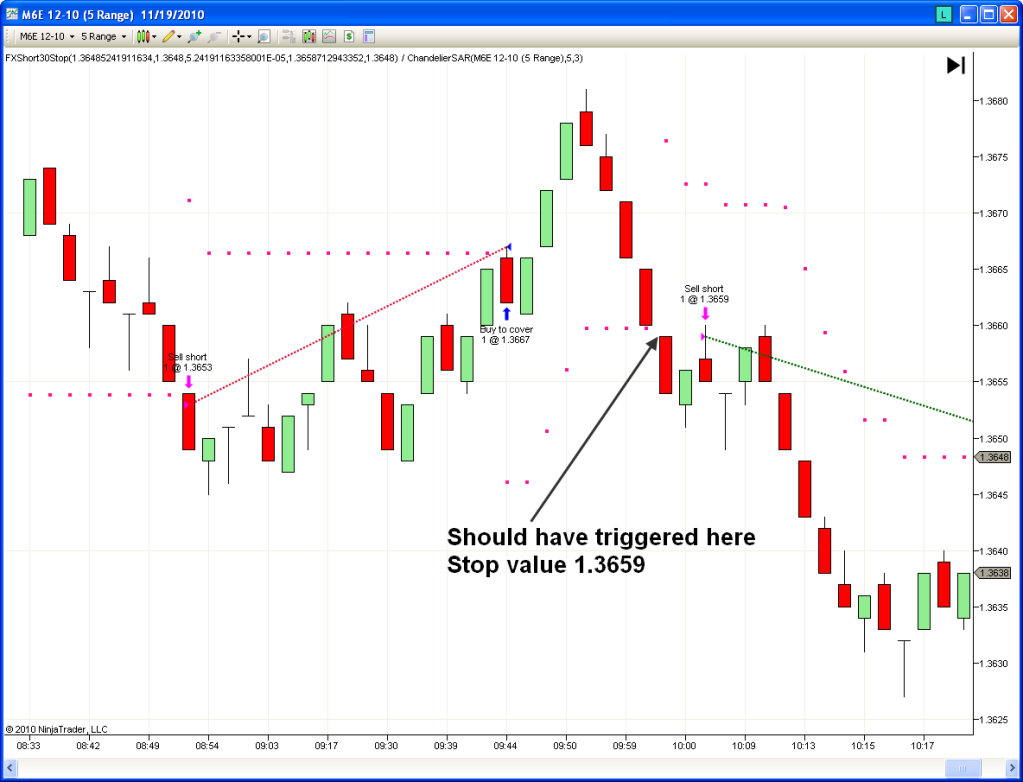
                                Thus the coding change was made resulting in the following chart:


                                The problem still exists!

                                The stop limit again fails to trigger. In fact if the market did not recover, THE ORDER STILL WOULD HAVE NEVER BEEN FILLED!

                                Again refer to the tick by tick movement chart


                                Thus can we conclude that the error occurs in the NT SIM itself?

                                The order was obviously still active at 1.3659, yet because there was no tick hitting that point (it split the between the bar) NT just decided not to trigger the order.

                                I think I have exhausted the possibilities of it being the indicator/strategy via the output windows. The error lies in ninja's treatment of range bars I am guessing.

                                Or did I miss something?
                                Last edited by RDPoS; 11-19-2010, 02:07 PM.

                                Comment

                                Latest Posts

                                Collapse

                                Topics Statistics Last Post
                                Started by NullPointStrategies, Today, 05:17 AM
                                0 responses
                                50 views
                                0 likes
                                Last Post NullPointStrategies  
                                Started by argusthome, 03-08-2026, 10:06 AM
                                0 responses
                                126 views
                                0 likes
                                Last Post argusthome  
                                Started by NabilKhattabi, 03-06-2026, 11:18 AM
                                0 responses
                                69 views
                                0 likes
                                Last Post NabilKhattabi  
                                Started by Deep42, 03-06-2026, 12:28 AM
                                0 responses
                                42 views
                                0 likes
                                Last Post Deep42
                                by Deep42
                                 
                                Started by TheRealMorford, 03-05-2026, 06:15 PM
                                0 responses
                                46 views
                                0 likes
                                Last Post TheRealMorford  
                                Working...
                                X