
Announcement

Collapse
No announcement yet.

Partner 728x90

Collapse

Altering default input dataseries producing dis-similar data values

Collapse
X
 
  • Filter
  • Time
  • Show
Clear All
new posts

    Altering default input dataseries producing dis-similar data values

    Hello,

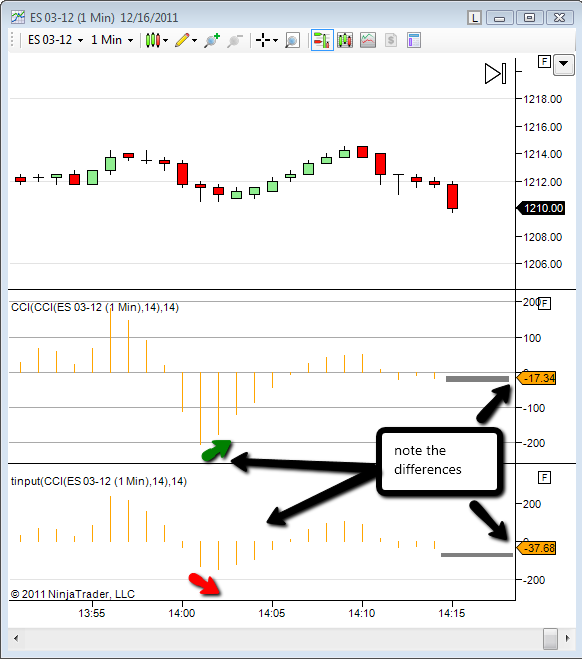
    If I change the input dataseries from Close to an indicator such as the CCI(14), I would think I should get the same data values to display as is displayed by a CCI(14) indicator attached to the same chart. But I do not.

    I created a very simple test indicator with a single bar type plot that draws in it a new pane and which is set to calculate on bar close. I have the following single statement in the onbarupdate method...


    Plot0.Set(Input[0]);


    With this indicator complied... I next

    1.) Added the default CCI(14) indicator to the chart
    2.) Added my test indicator
    3.) For the test indicator, changed input data series dialog from the default Close to the indicator CCI(14)

    I would think that the output of each indicator would produce identical values, but they do not. There are significant differences.

    What am I missing here?

    Note: I have even used Close[0] in the same example test indicator which produced the same results.
    Attached Files

    #2
    tulanch,

    I am happy to assist you.

    It looks like you are taking a CCI of a CCI in the first graph, whereas the other is just a CCI.

    If you could post the code you are using I could comment further.

    Please let me know if I may assist further.
    Adam P.NinjaTrader Customer Service

    Comment


      #3
      I thought that at first too but don't think that is the case.

      Here is the important aspects of the attached example code - there is no CCI call within, the CCI plotted comes from the changing of the default input dataseries:


      protected override void Initialize()
      {
      Add(new Plot(Color.FromKnownColor(KnownColor.Orange), PlotStyle.Bar, "Plot0"));
      Overlay = false;
      CalculateOnBarClose=true;
      }

      /// <summary>
      /// Called on each bar update event (incoming tick)
      /// </summary>
      protected override void OnBarUpdate()
      {
      // Use this method for calculating your indicator values. Assign a value to each
      // plot below by replacing 'Close[0]' with your own formula.

      Plot0.Set(Input[0]);

      }
      Attached Files

      Comment


        #4
        Code:
        protected override void OnBarUpdate()
        {
        // Use this method for calculating your indicator values. Assign a value to each
        // plot below by replacing 'Close[0]' with your own formula.
        
        Plot0.Set(Input[0]);
        
        }
        This Plot0.Set() is setting the plot to be the CCI, in the other indicator you are taking a CCI of a CCI, so its like a double CCI.

        Please let me know if I may assist further.
        Adam P.NinjaTrader Customer Service

        Comment


          #5
          I see what I did, I defined CCI as the input for both indicators instead of just the test indicator, sorry for the lame help request...

          Is there anyway to get the name of the base input series? So when a user changes it from the default Close to something like CCI, can I get at the CCI name somehow?

          Comment


            #6
            You can try:

            if (Indicators.Count != 0) input = Indicators[0].Name;

            It's an imperfect solution, but might get you what you want.

            VT

            edit: Sorry I originally put Indicators[0].Count in the if statement by mistake should be without the [0]
            Last edited by VTtrader; 12-18-2011, 12:56 PM.

            Comment


              #7
              perfect thanks...

              Comment

              Latest Posts

              Collapse

              Topics Statistics Last Post
              Started by Geovanny Suaza, 02-11-2026, 06:32 PM
              0 responses
              616 views
              0 likes
              Last Post Geovanny Suaza  
              Started by Geovanny Suaza, 02-11-2026, 05:51 PM
              0 responses
              357 views
              1 like
              Last Post Geovanny Suaza  
              Started by Mindset, 02-09-2026, 11:44 AM
              0 responses
              105 views
              0 likes
              Last Post Mindset
              by Mindset
               
              Started by Geovanny Suaza, 02-02-2026, 12:30 PM
              0 responses
              561 views
              1 like
              Last Post Geovanny Suaza  
              Started by RFrosty, 01-28-2026, 06:49 PM
              0 responses
              566 views
              1 like
              Last Post RFrosty
              by RFrosty
               
              Working...
              X