
Announcement

Collapse
No announcement yet.

Partner 728x90

Collapse

Draw Chart Market from an indicator plotting behind Candles

Collapse
X
 
  • Filter
  • Time
  • Show
Clear All
new posts

    Draw Chart Market from an indicator plotting behind Candles

    Hello,

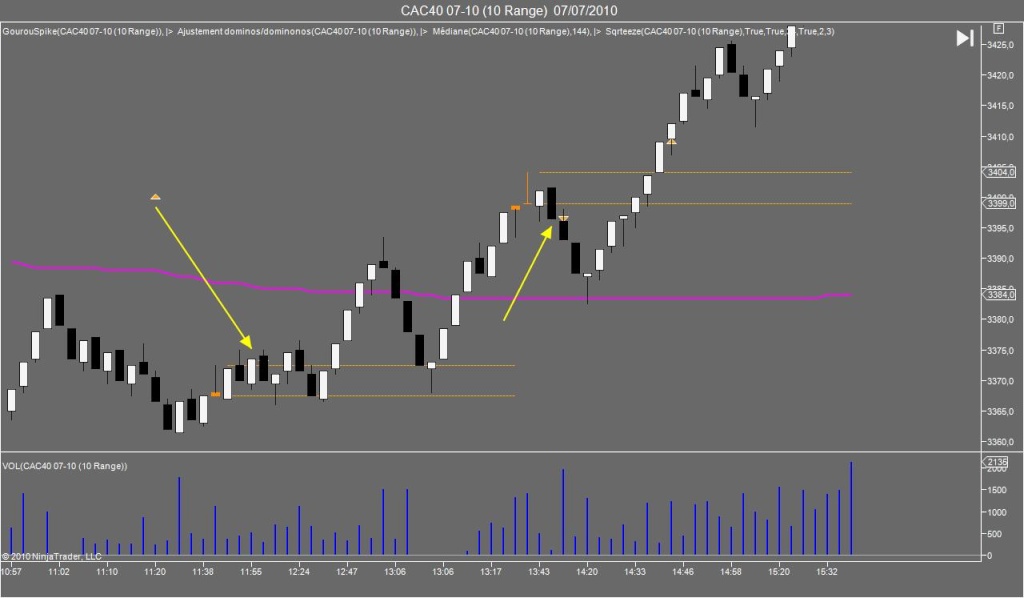
    I added Chart Markers within an indicator. In this case, TriangleUp.

    I used this line
    Code:
    DrawTriangleUp("Sqrteeze long"+CurrentBar.ToString(),true,0,Open[0],Color.Orange);
    Alas, when displaying on the chart, the diamonds appear behind the candles/bar types.
    Which means if the diamond is behind the wick, I can partially see it, but when it's behind the corpse of the candle, I don't see it anymore.

    Is there a way to correct this ? Because like this, it is useless.

    Thank you

    Last edited by SARdynamite; 07-09-2010, 12:24 PM.

    #2
    Needless to say, if Chart Markers are added manually (right click ==> Drawing Tools), they appear in front of candles, contrary to when coded within an indicator.

    Comment


      #3
      Hello,

      Are you using NinjaTrader 6.5 or NinjaTrader 7?

      I look forward to assisting you further.
      BrettNinjaTrader Product Management

      Comment


        #4
        Hello,

        I'm using NT7 beta 18

        Comment


          #5
          Hello,


          In this case, please left click on the indicator to select it then hold down shift and scroll your mouse wheel to bring this to the top of the candles. This is new to NT7 to allow you to choose the Z axis.


          I look forward to assisting you further.
          BrettNinjaTrader Product Management

          Comment


            #6
            Thanks for the tip.

            However, is there a way to code the Z-index inside the indicator.

            Because inside this indicator I also have lines which I want to plot normally (behind candles) but I see the whole indicator is linked to the same z-control feature.

            Comment


              #7
              Hello,

              There is no way to specify manually.

              However you can set it to be on a different Z order then the indicator. Thus providing the about the same functionality of NinjaTrader 6.5 in that regard. The parameter is
              SeparateZOrder set this to True.


              Let me know if I can be of further assistance.
              BrettNinjaTrader Product Management

              Comment


                #8
                Thank you

                It would be nice if you could forward this idea to the development team : set the Z-order individually for each itme inside a NinjaScript

                Comment


                  #9
                  Hello,

                  Thank you for your suggestion. I will forward to development.

                  Have a great weekend.
                  BrettNinjaTrader Product Management

                  Comment


                    #10
                    Sorry ! Just before the weekend

                    Code:
                    foreach (IDrawObject draw in DrawObjects) draw.SeparateZOrder=true;
                    is that line only to use different Zorders for DrawObjects only ?

                    my indicator has :
                    - one plot as a line
                    - one DrawObject as a TriangleUp

                    Can I separate their Zorder or is it not possible because one is a plot and the other one a drawObject ???

                    Comment


                      #11
                      Hello,


                      No problem.


                      The plot Z order will be the indicator Z order. The line of code you just submitted will only seperate the Z Order of the drawing objects on the chart and this looks correct.


                      Let me know if I can be of further assistance.
                      BrettNinjaTrader Product Management

                      Comment


                        #12
                        Hello !

                        So the code like that should allow me to set separatatly the ZOrder of the indicator on the chart (plot lines + draw object) and THEN, set a different ZOrder for the draw object ? (so that plot lines and draw Objects are separated)

                        How do I set the ZOrder for the whole indicator and after that for the Draw Objects only ?

                        For now, both are still linked to my eyes... can't make it work.

                        Thank you

                        Comment


                          #13
                          Hello,

                          I will have someone reply to you on Monday. Thank you for your patience.
                          DenNinjaTrader Customer Service

                          Comment


                            #14
                            SARdynamite, unfortunately there is not yet a way to set the Z-order by code. It is on our feedback list though, so it could appear in NinjaTrader at some point in the future.
                            AustinNinjaTrader Customer Service

                            Comment

                            Latest Posts

                            Collapse

                            Topics Statistics Last Post
                            Started by Geovanny Suaza, 02-11-2026, 06:32 PM
                            0 responses
                            599 views
                            0 likes
                            Last Post Geovanny Suaza  
                            Started by Geovanny Suaza, 02-11-2026, 05:51 PM
                            0 responses
                            345 views
                            1 like
                            Last Post Geovanny Suaza  
                            Started by Mindset, 02-09-2026, 11:44 AM
                            0 responses
                            103 views
                            0 likes
                            Last Post Mindset
                            by Mindset
                             
                            Started by Geovanny Suaza, 02-02-2026, 12:30 PM
                            0 responses
                            558 views
                            1 like
                            Last Post Geovanny Suaza  
                            Started by RFrosty, 01-28-2026, 06:49 PM
                            0 responses
                            558 views
                            1 like
                            Last Post RFrosty
                            by RFrosty
                             
                            Working...
                            X