Announcement

Collapse
No announcement yet.

Partner 728x90

Collapse

NTIFoceindex.cs to .dll

Collapse
X
 
  • Filter
  • Time
  • Show
Clear All
new posts

    NTIFoceindex.cs to .dll

    Hi there,

    My NT7 platform has an issue as it can't import any indicators. Every time I try to import the NTIForceindex, a Ninjascript error warning apprears once and again. So, I realized the following thing: when I place a .dll file in the folder Mydocuments>Ninjatrader 7>bin>custom, the indicator shows up in the chart. But I need this one and I only have it in .cs. Can you explain to me how to convert this file into .dll.

    PS. I tried everything to fix the import issue in the platform but in vain so far. I'll have to arrange an appointment with someone in Ninjatrader for him to access my PC remotely.
    Thanks.
    #2
    Hello,

    Thank you for the question.

    I wanted to check, do you get an error after NinjaTrader tries to Import the zip file, or are you getting an error while opening the Import menu?

    if you have a .cs file, this would be the source code generally and a .dll would be a protected file. You would not need to convert the file but instead first see what exactly is happening regarding the import error.

    You also should not need to manually place files into the custom folder, this can actually create problems.

    Could you answer the question about as this would help me provide better steps to find the answer. If you would instead like remote assistance, please email our platformsupport [at] ninjatrader dot com for further assistance.

    I look forward to being of further assistance.

    Comment


      #3
      Originally posted by NinjaTrader_Jesse View Post
      Hello,

      Thank you for the question.

      I wanted to check, do you get an error after NinjaTrader tries to Import the zip file, or are you getting an error while opening the Import menu?

      if you have a .cs file, this would be the source code generally and a .dll would be a protected file. You would not need to convert the file but instead first see what exactly is happening regarding the import error.

      You also should not need to manually place files into the custom folder, this can actually create problems.

      Could you answer the question about as this would help me provide better steps to find the answer. If you would instead like remote assistance, please email our platformsupport [at] ninjatrader dot com for further assistance.

      I look forward to being of further assistance.
      The error warning appears just after I click on "Import Ninjascript". Thank you.

      Comment


        #4
        Hello,

        Thank you for confirming that.

        In the case the error comes when you click on the menu item to Import NinjaScript, this would generally indicate there is a compile error preventing the platform from being able to import new items.

        To resolve this, please complete the following steps to display the error. Once the error is displayed we can have a better idea on the solution. Please provide an image of the errors after completing the steps.
        1. From the Control Center select the Tools menu--> select the Edit NinjaScript menu item--> select Indicator
        2. Select the ADL indicator and double click on it (we need only to open and compile one script to see all compile errors for all files).
        3. A new window will appear and you will need to right click in the window and select Compile to compile the indicators.
        4. At the bottom of the window a new section will appear where you can find the error locations.
        5. From there you have the option to comment out offending code sections, remove the complete indicator or debug it to be able to compile again.


        We have also collected more comprehensive steps for resolving NinjaScript programming errors in this tip on our forums - http://www.ninjatrader.com/support/f...ead.php?t=4678


        I look forward to being of further assistance.

        Comment


          #5
          Originally posted by NinjaTrader_Jesse View Post
          Hello,

          Thank you for confirming that.

          In the case the error comes when you click on the menu item to Import NinjaScript, this would generally indicate there is a compile error preventing the platform from being able to import new items.

          To resolve this, please complete the following steps to display the error. Once the error is displayed we can have a better idea on the solution. Please provide an image of the errors after completing the steps.
          1. From the Control Center select the Tools menu--> select the Edit NinjaScript menu item--> select Indicator
          2. Select the ADL indicator and double click on it (we need only to open and compile one script to see all compile errors for all files).
          3. A new window will appear and you will need to right click in the window and select Compile to compile the indicators.
          4. At the bottom of the window a new section will appear where you can find the error locations.
          5. From there you have the option to comment out offending code sections, remove the complete indicator or debug it to be able to compile again.


          We have also collected more comprehensive steps for resolving NinjaScript programming errors in this tip on our forums - http://www.ninjatrader.com/support/f...ead.php?t=4678


          I look forward to being of further assistance.
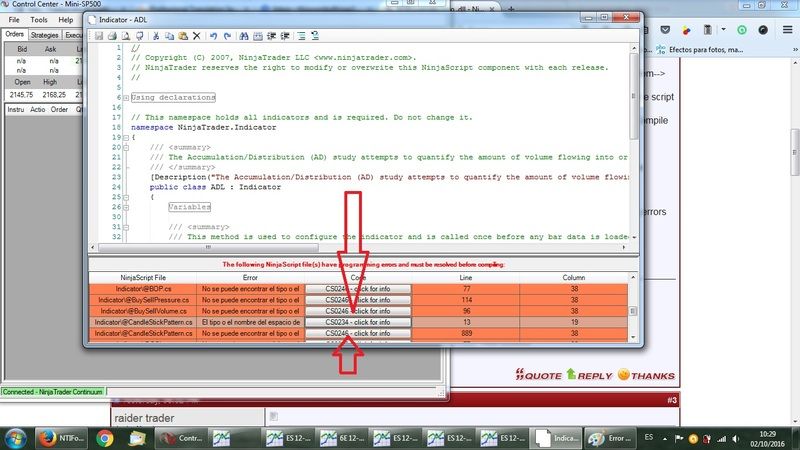
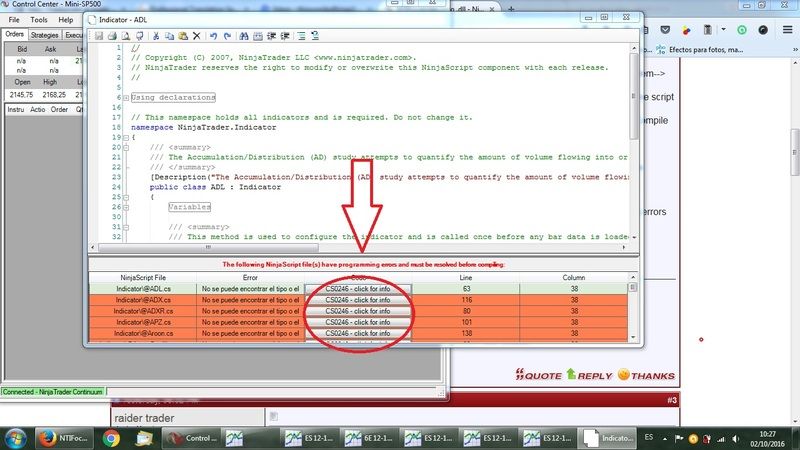
          Thank you for your help but I already followed those steps. I'll paste here the pictures of the errorsapearing after I click on "references".
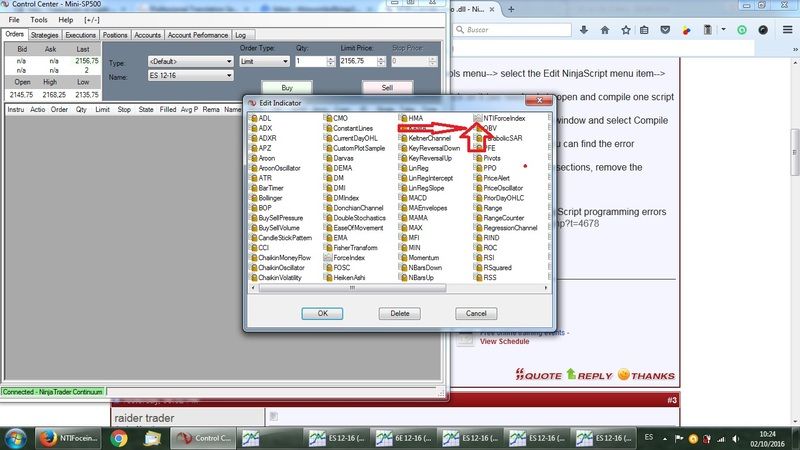
          I copied /paested the source code of the indicator in the custom folder in my PC, so I can see it here (see pic.) but not in the chart.

          Comment


            #6
            Originally posted by NinjaTrader_Jesse View Post
            Hello,

            Thank you for confirming that.

            In the case the error comes when you click on the menu item to Import NinjaScript, this would generally indicate there is a compile error preventing the platform from being able to import new items.

            To resolve this, please complete the following steps to display the error. Once the error is displayed we can have a better idea on the solution. Please provide an image of the errors after completing the steps.
            1. From the Control Center select the Tools menu--> select the Edit NinjaScript menu item--> select Indicator
            2. Select the ADL indicator and double click on it (we need only to open and compile one script to see all compile errors for all files).
            3. A new window will appear and you will need to right click in the window and select Compile to compile the indicators.
            4. At the bottom of the window a new section will appear where you can find the error locations.
            5. From there you have the option to comment out offending code sections, remove the complete indicator or debug it to be able to compile again.


            We have also collected more comprehensive steps for resolving NinjaScript programming errors in this tip on our forums - http://www.ninjatrader.com/support/f...ead.php?t=4678


            I look forward to being of further assistance.
            Once I followed all your instructions, the errors I can see are the following: (see both pictures)


            I don't know what to do after this.


            Comment


              #7
              Hello raider trader,

              Thank you for your reply,

              Because the errors we can see are referring to preinstalled indicators, please repair the NinjaTrader installation as this will be able to resolve these errros. To do this, close NinjaTrader and go to Start > Control Panel > Add/Remove Programs > Right click on NinjaTrader 7 > Repair.

              If you still see the same errors when attempting to import, please write in to PlatformSupport[AT]NinjaTrader[com] along with a screen shot of the errors and a good time we can look into this remotely, our support hours are 8:30 AM - 6:00 PM EST, Monday - Friday.

              We look forward to assisting further.

              Comment


                #8
                Originally posted by NinjaTrader_EricB View Post
                Hello raider trader,

                Thank you for your reply,

                Because the errors we can see are referring to preinstalled indicators, please repair the NinjaTrader installation as this will be able to resolve these errros. To do this, close NinjaTrader and go to Start > Control Panel > Add/Remove Programs > Right click on NinjaTrader 7 > Repair.

                If you still see the same errors when attempting to import, please write in to PlatformSupport[AT]NinjaTrader[com] along with a screen shot of the errors and a good time we can look into this remotely, our support hours are 8:30 AM - 6:00 PM EST, Monday - Friday.

                We look forward to assisting further.
                OK, I already sent an email to Brandon. In half an hour any of you can access my PC.
                Thanks.

                Comment


                  #9
                  Had the same issue , but fixed now

                  Comment

                  Latest Posts

                  Collapse

                  Topics Statistics Last Post
                  Started by Geovanny Suaza, 02-11-2026, 06:32 PM
                  0 responses
                  576 views
                  0 likes
                  Last Post Geovanny Suaza  
                  Started by Geovanny Suaza, 02-11-2026, 05:51 PM
                  0 responses
                  334 views
                  1 like
                  Last Post Geovanny Suaza  
                  Started by Mindset, 02-09-2026, 11:44 AM
                  0 responses
                  101 views
                  0 likes
                  Last Post Mindset
                  by Mindset
                   
                  Started by Geovanny Suaza, 02-02-2026, 12:30 PM
                  0 responses
                  553 views
                  1 like
                  Last Post Geovanny Suaza  
                  Started by RFrosty, 01-28-2026, 06:49 PM
                  0 responses
                  551 views
                  1 like
                  Last Post RFrosty
                  by RFrosty
                   
                  Working...
                  X