Announcement

Collapse
No announcement yet.

Partner 728x90

Collapse

Problem plot

Collapse
X
 
  • Filter
  • Time
  • Show
Clear All
new posts

    Problem plot

    hi guy,

    in my code ..(i do an stupid example)


    int t;
    double s;

    Protected override void OnStateChange()
    {
    AddPlot(Brushes.Green, "Mt");

    AddPlot(Brushes.Green, "Flag");

    }

    protected override void OnBarUpdate()
    {

    t=CurrentBar;

    s=High[0]

    Value[0]=t; =====> this plot the first


    }

    How can i plot the second?

    if i plot : Values[1]=s; ===> is not corret...it accept a dataseries and the variable "s" is'n it
    Last edited by turbofib; 02-26-2016, 04:03 AM.

    #2
    Hello turbofib,

    Thanks for your post.

    As this is an NT8 question, please post future NT8 questions in the NT8 beta forums.

    There are multiple answers to your question.
    Value refers to the first plot
    Value[0] refers to the Current bar on the first plot
    Value[1] refers to the previous bar in the first plot

    Values allows you to refer to multiple plots but you must put both the plot number as well as the bar index so you can use:
    Values[0][0] - First plot, current bar
    Values[1][0] - 2nd plot, current bar
    Values[0][1] - First plot, previous bar

    An alternative way, that I think reads better in the script, is to use the names of the plots (using your examples):

    Mt[0]
    Flag[0]

    So here Mt is the same as saying as Values[0] and Mt[0] is the same as saying Values[0]0]. Flag is the same as saying Values[1] and Flag[0] is the same as saying Values[1][0].

    To finish with your examples:

    Mt[0] = t;
    Flag[0] = s;

    or you can use:

    Values[0][0] = t;
    Values[1][0] = s;

    or you can use:

    Value[0] = t;
    Values[1][0] = s;


    Value: http://ninjatrader.com/support/helpG...-us/?value.htm
    Values: http://ninjatrader.com/support/helpG...us/?values.htm

    Comment


      #3
      [QUOTE=NinjaTrader_Paul;450171]Hello turbofib,

      Thanks for your post.

      As this is an NT8 question, please post future NT8 questions in the NT8 beta forums.

      Excuse me
      I was wrong to post


      An alternative way, that I think reads better in the script, is to use the names of the plots (using your examples):

      Mt[0]
      Flag[0]

      So here Mt is the same as saying as Values[0] and Mt[0] is the same as saying Values[0]0]. Flag is the same as saying Values[1] and Flag[0] is the same as saying Values[1][0].

      To finish with your examples:

      Mt[0] = t;
      Flag[0] = s;

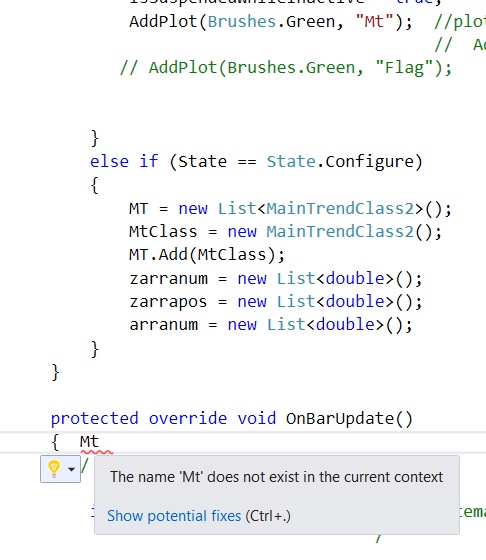
      I can't write Mt[0] ...it will not let me
      It don't recognizes Mt

      Last edited by turbofib; 02-26-2016, 07:48 AM.

      Comment


        #4
        Hello turbofib,

        Thanks for your reply.

        Can you show what you have for properties that would relate to the plot Mt?

        This is what I would be looking for(assuming Mt is the first plot):

        Code:
        		
        		#region Properties
                        [Browsable(false)]
        		[XmlIgnore]
        		public Series<double> Mt
        		{
        			get { return Values[0]; }
        		}

        Comment


          #5
          [QUOTE=NinjaTrader_Paul;450200]Hello turbofib,


          Can you show what you have for properties that would relate to the plot Mt?

          None.....i don't write properties...because if i write : value[0] it work the same

          Comment


            #6
            Hello turbofib,

            Thanks for your reply.

            So if you want to use Mt[0] you would have to add the properties, otherwise continue to use Value[0] which is automatically associated with the first plot.

            Comment


              #7
              This is possible only with 1 plots ( Use Value[0] direct) ?

              Comment


                #8
                Hello turbofib,

                Thanks for your reply.

                Yes, that is correct.

                Comment

                Latest Posts

                Collapse

                Topics Statistics Last Post
                Started by Geovanny Suaza, 02-11-2026, 06:32 PM
                0 responses
                571 views
                0 likes
                Last Post Geovanny Suaza  
                Started by Geovanny Suaza, 02-11-2026, 05:51 PM
                0 responses
                330 views
                1 like
                Last Post Geovanny Suaza  
                Started by Mindset, 02-09-2026, 11:44 AM
                0 responses
                101 views
                0 likes
                Last Post Mindset
                by Mindset
                 
                Started by Geovanny Suaza, 02-02-2026, 12:30 PM
                0 responses
                549 views
                1 like
                Last Post Geovanny Suaza  
                Started by RFrosty, 01-28-2026, 06:49 PM
                0 responses
                549 views
                1 like
                Last Post RFrosty
                by RFrosty
                 
                Working...
                X