
I am very interested in the functionality this tool will provide. I don't understand how it can calcuate the number of contracts without me specifing $ I am willing to risk. In properties, Contracts seems to be dynamic, and RiskPercent & Account Size are grayed out. Can anyone tell me why they are grayed out and how I can input the $$$ I am willing to risk on entry. Is there any other instructions / tutorial / video related to onboard some in using this tool?
-
Hello HFJ555,
Welcome to the NinjaTrader forums!
To confirm, you are referring to the Advanced Risk Reward Indicator originally coded by bassam for NinjaTrader 7 and ported to NinjaTrader 8 by NinjaTrader_Jim?
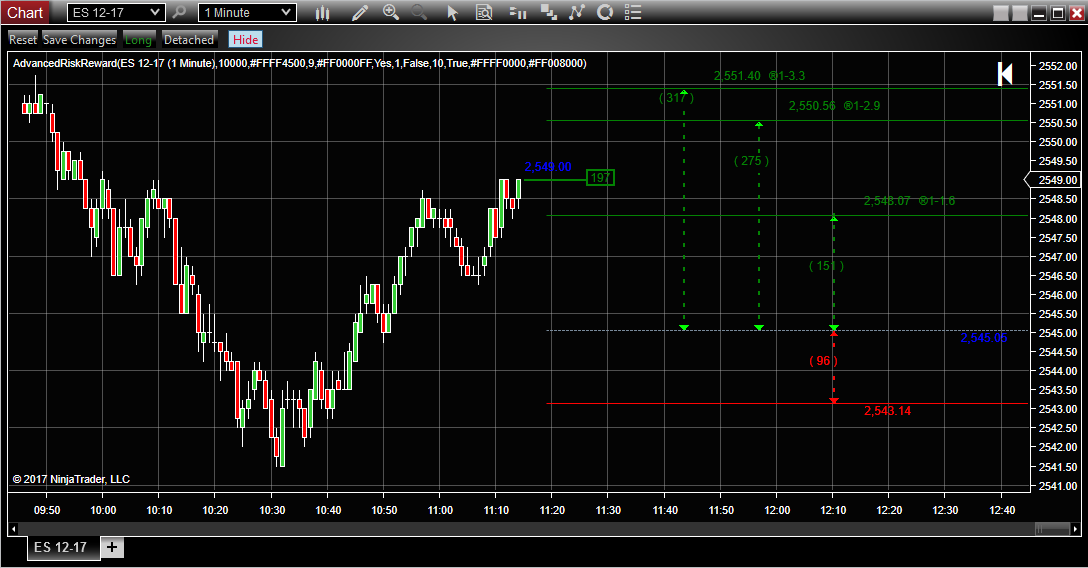

The 'RiskPercent' property is set in the Indicators window controls how much you are willing to risk.
The 'Contracts' is dynamic and calculated by the script.
if(PotentialLoss < 1)
Contracts = 1;
else
Contracts = (int)( ((AccountSize * RiskPercent)/100) /PotentialProfit);
if(Contracts < 1)
Contracts = 1;
The 'RiskPercent' and 'AccountSize' are grayed out unless Interactive is set to 'No'.
bool ContNewValue = (value == Interactive.Yes? false:true );
PropertyDescriptor ContDescriptor = TypeDescriptor.GetProperties(this.GetType())["Contracts"];
PropertyDescriptor AccountDescriptor = TypeDescriptor.GetProperties(this.GetType())["AccountSize"];
PropertyDescriptor RiskDescriptor = TypeDescriptor.GetProperties(this.GetType())["RiskPercent"];
ReadOnlyAttribute ContAttrib = (ReadOnlyAttribute)ContDescriptor.Attributes[typeof(ReadOnlyAttribute)];
ReadOnlyAttribute AccountAttrib = (ReadOnlyAttribute)AccountDescriptor.Attributes[typeof(ReadOnlyAttribute)];
ReadOnlyAttribute RiskAttrib = (ReadOnlyAttribute)RiskDescriptor.Attributes[typeof(ReadOnlyAttribute)];
FieldInfo ContisReadOnly = ContAttrib.GetType().GetField("isReadOnly", BindingFlags.NonPublic | BindingFlags.Instance);
FieldInfo AccountisReadOnly = AccountAttrib.GetType().GetField("isReadOnly", BindingFlags.NonPublic | BindingFlags.Instance);
FieldInfo RiskisReadOnly = RiskAttrib.GetType().GetField("isReadOnly", BindingFlags.NonPublic | BindingFlags.Instance);
ContisReadOnly.SetValue(ContAttrib, ContNewValue);
AccountisReadOnly.SetValue(AccountAttrib, !ContNewValue);
RiskisReadOnly.SetValue(RiskAttrib, !ContNewValue);
NinjaTrader does not create tutorial videos for specific indicators.
However, this thread will remain open if any community member knows of a community created video on this indicator and would like to share.Chelsea B.NinjaTrader Customer Service -
Hello Steve,
"What could be preventing the tool from automatically updating the NT quantity so NT is ready to apply the calculated qty to my order?"
I don't see any code in the script to modify the quantity field in chart trader.
You will want to ask this question of the original author Bassam what they had in mind for the script.
"When in Interactive mode, next to price is a is a blue number (current price?) and a small number in a box. What does the number in the box represent (ticks from position line?)"
The code rendering that text is on lines 1371 through 1375:
Code:string [B]InteractivePLTxt[/B] =" "+([B]PL[/B]*Instrument.MasterInstrument.[B]PointValue[/B] *((CalcBasedOnUser)? [B]userscontracts[/B]:[B]1[/B])).ToString("N0")+" "; DrawString(InteractivePLTxt, textFont, "InteractivePLColor", ChartPanel.X +LastBarX+PLShift, CloseY - 9);
This might be a profit or loss expected amount. I would recommend asking Bassam the author of the script what this is representing.Chelsea B.NinjaTrader Customer ServiceComment
| Topics | Statistics | Last Post | ||
|---|---|---|---|---|
|
0 responses
131 views
0 likes
|

by kinfxhk
07-14-2026, 09:39 AM
|
|||
|
0 responses
106 views
0 likes
|
by kinfxhk
07-13-2026, 10:18 AM
|
|||
|
0 responses
87 views
0 likes
|
by kinfxhk
07-13-2026, 09:50 AM
|
|||
|
0 responses
107 views
0 likes
|
by kinfxhk
07-13-2026, 07:21 AM
|
|||
|
0 responses
87 views
0 likes
|
by kinfxhk
07-11-2026, 02:11 AM
|
Comment