
Announcement

Collapse
No announcement yet.

Partner 728x90

Collapse

ICT Fair Value Gap

Collapse
X
 
  • Filter
  • Time
  • Show
Clear All
new posts

  • tickets2themoon
    replied
    gemify Love the addition of the additional data series via code. Much better that fiddling with the secondary data series on the chart.

    I am experiencing an issue where the redraw code in CheckFilledFVGs() reuses tags if two FVGs are closed by same candle. I modified the code to this to solve:

    Code:
                        if (!HideFilledGaps)
                        {
                            Brush BorderBrush = fvg.type == FVGType.R ? DownBrush : UpBrush;
                            rect = Draw.Rectangle(this, "FILLED" + fvg.tag, false, fvg.gapStartTime, fvg.lowerPrice, Times[1][0], fvg.upperPrice, BorderBrush, FillBrush, FilledAreaOpacity, true);
                            rect.OutlineStroke.Opacity = Math.Min(100, FilledAreaOpacity * 4);
                        }​
    dj22522 Can you enable debug and modify the debug code to show the value of the "future" DateTime variable?

    Set
    private bool IsDebug = true;

    and modify the debug statement to:


    Code:
    ​
    Debug("Drawing Up FVG [" + fvg.gapStartTime + ", " + fvg.upperPrice + ", " + future + ", " + fvg.lowerPrice + "]");
    I'm not sure I like having the FVG rectangles extended to year 9999 but the change from using endBarsAgo value of -10000 to a DateTime value was required because of the second data series.
    Might be worth changing to future to FVG bar plus number of days loaded on the chart. We could modify future before Drawing Recs:

    Code:
    Debug("Impulse move detected.");
    
    future = Times[1][2].AddDays(ChartBars.Properties.DaysBack);
    
    // Fair value gap while going UP
    // Low[0] > High[2]
    if (Lows[1][0] > Highs[1][2] && (Math.Abs(Lows[1][0] - Highs[1][2]) >= MinimumFVGSize))
    Leave a comment:


  • dj22522
    replied
    gemify Thanks for the updated V0.02.

    Don't know if it's just me but the active FVG rectangles don't project all the way to the right of the chart. Also they don't update as each new bar closes ?
    I have to refresh via F5.

    These are 5min FVG's on a 1min chart but the issue is the same regardless of what time frame the FVG's are.


    Click image for larger version  Name:	FVGs not updating to each new bar -a .jpg Views:	0 Size:	34.6 KB ID:	1237256


    After an F5 refresh the active FVG rectangles then move to the latest closed bar:-

    Click image for larger version  Name:	FVGs not updating to each new bar -b .jpg Views:	0 Size:	30.4 KB ID:	1237257
    Last edited by dj22522; 02-28-2023, 11:41 AM.

    Leave a comment:


  • gemify
    replied
    New update v0.0.2 available on the Ninjatrader ecosystem:
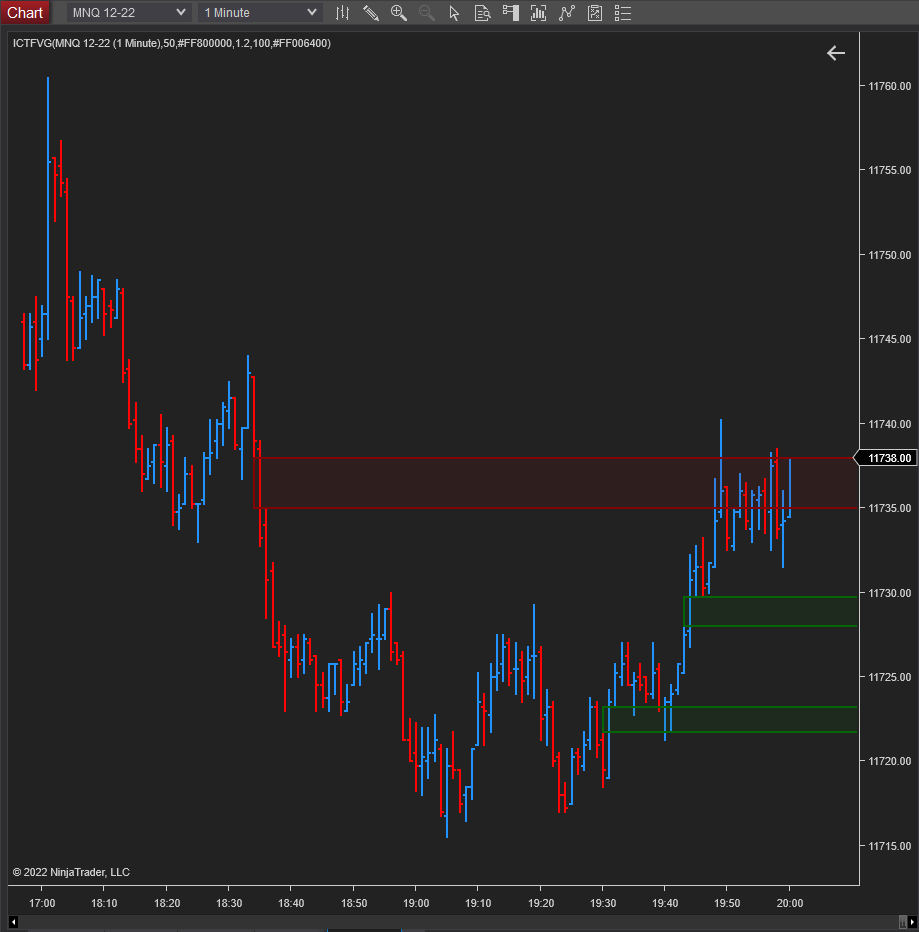
    Simple implementation of The Inner Circle Trader’s (ICT – http://theinnercircletrader.com) Fair Value Gap (FVG). I couldn’t find an NT8 implementation and so figured I’d share. The indicator has the following parameters: Max Lookback Bars This is the maximum number of prior bars to use for FVG detection. Defaults to 500. ATR Period The indicator uses […]


    With this version, it is now possible to detect FVGs in an underlying data series (ex. 5 min FVGs) and display them on any chart (ex. 1-min chart). FVGs can now also be detected on other series types, such as Tick, Volume etc. See the screenshots for other possibilities.
    • Added support for FVG detection in the following data series types (as a configurable parameter):
      • Tick
      • Volume
      • Second
      • Minute
      • Day
      • Week
      • Month
      • Year
    • Optional display of CE (consequent encroachment) line
    • Filter FVGs by gap size (points)
    ​Sample screenshots:
    Click image for larger version  Name:	image.png Views:	0 Size:	32.8 KB ID:	1237199
    Click image for larger version  Name:	image.png Views:	0 Size:	30.8 KB ID:	1237200
    Click image for larger version  Name:	image.png Views:	0 Size:	36.0 KB ID:	1237201​​​
    Last edited by gemify; 02-28-2023, 10:42 AM.

    Leave a comment:


  • mazpat_3
    replied
    Thanks gemify!! I was wondering if you could create plots on top of - or in replacement of - the rectangles "drawing objects". From plots one can generate tradeable signals towards automation like 1 filled, 0 unfilled, etc.

    I'm thinking of that the Markers Plus systems signals generator can generate signals from drawing objects, but I think plots are easier to make signals from.

    Anyway, I hope you or someone can code an automatable version of your indicator towards compatibility with Strategy builder and Strategy Analyzer...

    Cheers

    Leave a comment:


  • Neeraj838
    replied
    Hi,

    Thanks for the indicator. Works perfectly. Is it possible to add a line showing mid point i.e CE of FVG’s

    Leave a comment:


  • gemify
    replied
    Originally posted by boomlux View Post
    Hello ,

    I was wondering if this indicator can be enabled with SharkIndicator Bloodhound to do backtesting on? thanks
    boomlux, I'm not a Bloodhound user and so have no idea if it's compatible. If anyone else in the community has experience with it, they might be a better bet to help, imho.

    Leave a comment:


  • boomlux
    replied
    Hello ,

    I was wondering if this indicator can be enabled with SharkIndicator Bloodhound to do backtesting on? thanks

    Leave a comment:


  • gemify
    replied
    Since there's some interest in this indicator, I've created a public repo for it on github for anyone to fork off of / create new indicators and so on ( dj22522​'s VG indicator, for example). There are quite a few requests on this thread - if you already have an implementation, please let me know or feel free to update it directly on the repo.

    Here's the github repo: https://github.com/OrderFlowTools/ICTFVG

    Leave a comment:


  • Robertoxgiam
    replied
    Does anyone have CHoCH and BOS indicators?

    Leave a comment:


  • Robertoxgiam
    replied
    Thank you.
    I'm not a developer and don't know how to script, but do you have the full code so i can copy and paste it to make your indicator?

    Leave a comment:


  • dj22522
    replied
    Originally posted by Robertoxgiam View Post
    Good idea. thank you
    Once the Indicator is adjusted, can you please post the file?
    Hi Robertoxgiam

    I'm hesitant to post another version of gemify indicator. I wouldn't want it to interfere with the original.


    In my post above I was trying to incorporate the VG in to the FVG indicator but you can created a separate Volume Gap (VG) only version.

    Create a copy of the original - open the original in Editor and right click in Editor and chose "SaveAs " and give it a different name.


    Then replace the the OnBarUpdate section with this which gives the conditions to draw the VG's:-

    Code:
    protected override void OnBarUpdate()
    {
    if (CurrentBar < (Bars.Count - MaxBars)) return;
    
    CheckFilledFVGs();
    
    if (ShowVolGap)
    
    
    {
    //Volume gap while going UP
    if (Open[0] > Close[1] && Close[0] > Open[0] && Close[1] > Open[1])
    {
    string tag = "VGUP" + CurrentBar;
    Draw.Rectangle(this, tag, false, 1, Close[1], -100000, Open[0], UpBrush, UpBrush, ActiveAreaOpacity, true);
    fvgList.Add(new FVG(tag, FVGType.S, Open[0], Close[1], Time[2]));
    }
    // Volume gap while going DOWN
    if (Open[0] < Close[1] && Close[0] < Open[0] && Close[1] < Open[1])
    {
    string tag = "VGDOWN" + CurrentBar;
    Draw.Rectangle(this, "VGDOWN" + CurrentBar, false, 1, Close[1], -100000, Open[0], DownBrush, DownBrush, ActiveAreaOpacity, true);
    fvgList.Add(new FVG(tag, FVGType.R, Open[0], Close[1], Time[2]));
    }
    
    }
    }
    
    private void CheckFilledFVGs()
    {
    List<FVG> filled = new List<FVG>();
    
    foreach (FVG fvg in fvgList)
    {
    if (fvg.filled) continue;
    
    if (fvg.type == FVGType.R && (FillType == FVGFillType.CLOSE_THROUGH ? (Close[0] >= fvg.upperPrice) : (High[0] >= fvg.upperPrice)))
    {
    if (DrawObjects[fvg.tag] != null)
    {
    fvg.filled = true;
    fvg.fillTime = Time[0];
    filled.Add(fvg);
    }
    }
    else if (fvg.type == FVGType.S && (FillType == FVGFillType.CLOSE_THROUGH ? (Close[0] <= fvg.lowerPrice) : (Low[0] <= fvg.lowerPrice)))
    {
    if (DrawObjects[fvg.tag] != null)
    {
    fvg.filled = true;
    fvg.fillTime = Time[0];
    filled.Add(fvg);
    }
    }
    
    }
    
    foreach (FVG fvg in filled)
    {
    
    if (DrawObjects[fvg.tag] != null)
    {
    var drawObject = DrawObjects[fvg.tag];
    Rectangle rect = (Rectangle)drawObject;
    
    RemoveDrawObject(fvg.tag);
    
    if (!HideFilledFVGaps)
    {
    int startBarsAgo = CurrentBar - Bars.GetBar(fvg.gapStartTime);
    Brush BorderBrush = fvg.type == FVGType.R ? DownBrush : UpBrush;
    rect = Draw.Rectangle(this, "FILLEDVG" + CurrentBar, false, startBarsAgo, fvg.lowerPrice, 0, fvg.upperPrice, BorderBrush, FillBrush, FilledAreaOpacity, true);
    rect.OutlineStroke.Opacity = Math.Min(100, FilledAreaOpacity * 4);
    }
    }
    if (HideFilledFVGaps)
    {
    fvgList.Remove(fvg);
    }
    }
    }


    ​​
    In OnStateChange section add this line any where between lines 77 and 100 for example:-

    Code:
    ShowVolGap = true;
    Also in OnSTateChange to not have the ATR multiplier in indicator settings (which isn't needed to plot the VG) comment out these two lines:-

    Code:
    //ATRPeriod = 10;
    //ImpulseFactor = 1.1;


    and in State Configure comment out this line:- atr = ATR(ATRPeriod);

    Code:
    else if (State == State.Configure)
    {
    // atr = ATR(ATRPeriod);
    }


    Then replace the Properties section with this which will change the display names in Settings from FGV to VG and I added ability to show VG's "Show VolG":-

    Code:
     #region Properties
            [NinjaScriptProperty]
            [Range(3, int.MaxValue)]
            [Display(Name="Max Lookback Bars", Order=100, GroupName="Parameters")]
            public int MaxBars
            { get; set; }
    
            [NinjaScriptProperty]
            [Display(Name = "Gap Fill Condition", Order = 325, GroupName = "Parameters")]
            public FVGFillType FillType
            { get; set; }
    
            [NinjaScriptProperty]
            [Display(Name = "Hide Filled VG", Order = 4, GroupName = "Display")]
            public bool HideFilledFVGaps
            { get; set; }
    
            [NinjaScriptProperty]
            [XmlIgnore]
            [Display(Name="Bearish VG Color", Order=100, GroupName="Colors FVG")]
            public Brush DownBrush
            { get; set; }
    
            [Browsable(false)]
            public string DownBrushSerializable
            {
                get { return Serialize.BrushToString(DownBrush); }
                set { DownBrush = Serialize.StringToBrush(value); }
            }
    
            [NinjaScriptProperty]
            [XmlIgnore]
            [Display(Name="Bullish VG Color", Order=200, GroupName = "Colors FVG")]
            public Brush UpBrush
            { get; set; }
    
            [Browsable(false)]
            public string UpBrushSerializable
            {
                get { return Serialize.BrushToString(UpBrush); }
                set { UpBrush = Serialize.StringToBrush(value); }
            }
    
            [NinjaScriptProperty]
            [Range(1, 100)]
            [Display(Name = "Active Volume Gap Opacity", Order = 300, GroupName = "Colors FVG")]
            public int ActiveAreaOpacity
            { get; set; }
    
            [NinjaScriptProperty]
            [Range(1, 100)]
            [Display(Name = "Filled Volume Gap Opacity", Order = 400, GroupName = "Colors FVG")]
            public int FilledAreaOpacity
            { get; set; }
    
    
    ///added Show Vol Gap
    
            [NinjaScriptProperty]
            [Display(Name="Show VolG", Description="", Order=3, GroupName="Display")]
            public bool ShowVolGap
            { get; set; }
    
     #endregion
    ​
    It should look like this with only the VG version of the indicator on the chart.
    You could then add the gemify original to also get the FVG's.

    Click image for larger version  Name:	Volume Gaps_d.jpg Views:	0 Size:	137.3 KB ID:	1235540


    Hope that helps
    Last edited by dj22522; 02-16-2023, 03:54 AM.

    Leave a comment:


  • Robertoxgiam
    replied
    Good idea. thank you
    Once the Indicator is adjusted, can you please post the file?

    Leave a comment:


  • dj22522
    replied
    gemify

    I'm only just looking in to ICT and wanted to thank you for the FVG indicator you've created.

    I came across Volume Gap (VG) as an addition to the Fair Value Gap (FVG) .
    It's a gap between the Close[1] and Open[0].

    I've created a myversion copy of your indicator and added the attached code that draws the VG's (see attached image Black and White lines)

    I was interested in seeing how price reacted to past VG's. The attached code does plot the filled VG's but in the same colour as the FVG's and not in the Black and White active VG colours. Also I can't change filled VG opacity or get only the filled VG's to plot without filled FVG's also plotting when "Hide Filled FVG" is ticked and "Hide Filled VG" is unticked.

    If you have the time and the inclination to add the filled VG's to colour as the active colour I would be most grateful, or any other readers that's able to. Hopefully the code I've so far added can help in that.

    On the attached image the Black and White lines are the active VG's. They are rectangles in the same manner as the FVG but look like a line because the chart isn't expanded enough. I've also added the ability to Hide Filled VG, change VG colours and active VG opacity in Settings but I'm unable, as mentioned to display the filled VG's with active VG colour or get filled VG opacity to work or only display VG's when Hide Filled VG is unticked.


    Click image for larger version  Name:	Volume Gaps_b.jpg Views:	0 Size:	137.7 KB ID:	1235514

    Here are some examples of filled VG's and the colour is still as a down FVG (red) instead of Black. Also the start bar for my filled VG's is incorrect being one bar back at Close[2] instead of at Close[1] bar. The active Black and White VG's do plot from the correct Close[1] bar. Help appreciated.


    Click image for larger version  Name:	Volume Gaps_c.jpg Views:	0 Size:	137.6 KB ID:	1235529


    Here's the code I've added so far to OnBarUpdate for the VG's :-


    Code:
    ///added for Volume Gap
    if (ShowVolG)
    {
    //Volume gap while going UP
    if (Open[0] > Close[1] && Close[0] > Open[0] && Close[1] > Open[1])
    {
    string tag = "VGUP" + CurrentBar;
    Draw.Rectangle(this, tag, false, 1, Open[0], -100000, Close[1], VGUpBrush, VGUpBrush, VGActiveAreaOpacity, true);
    fvgList.Add(new FVG(tag, FVGType.S, Close[1], Open[0], Time[2]));
    }
    // volume gap while going DOWN
    if (Open[0] < Close[1] && Close[0] < Open[0] && Close[1] < Open[1])
    {
    string tag = "VGDOWN" + CurrentBar;
    Draw.Rectangle(this, "VGDOWN" + CurrentBar, false, 1, Close[1], -100000, Open[0], VGDownBrush, VGDownBrush, VGActiveAreaOpacity, true);
    fvgList.Add(new FVG(tag, FVGType.R, Close[1], Open[0], Time[2]));
    
    //
    }
    }
    }


    Ps: Thanks also to @ticketstothemoon for the idea of adding a 2nd data series.
    Last edited by dj22522; 02-15-2023, 05:59 PM.

    Leave a comment:


  • tickets2themoon
    replied
    gemify Can you add an option to switch between ATR and a minimum GAP value so if all gaps are desired we can switch to minimum gap value and enter .25 (for example as min gap value)? I'm happy to create mods and upload it here for your submittal if that helps.

    I have been adding a second, higher timeframe Data Series to the same chart windows, setting all the candle options to transparent to make it hidden. For example add a 5 min data series for ES on a 1 min chart. Then you are able to get the 5 min FVGs but watch 1 min price action. You can add this indicator to both data series (and use different colors) but that gets a little busy. I like to watch micro-Nasdaq (MNQ) with a 95 tick chart with 5 min FVG overlay.

    If you want to see different FVG timeframes (i.e. 15min or 30min) you open dataseries and modify the time period of the second/hidden series.

    The timeframe of candles (closing time) drives me crazy when I compare to other platforms or listen to ICT point out candles so I submitted a MinuteOpen BarType that shifts the timeframe to match all other platforms.
    Last edited by tickets2themoon; 02-14-2023, 01:53 PM.

    Leave a comment:


  • St1trader
    replied
    Originally posted by gemify View Post

    Hey Milton Menendez, since this indicator depends on ATR to determine if a move is an impulse move or not, you may need to adjust the "ATR Period" and the "ATRs in Impulse Move" parameters to better detect FVGs in your desired timeframe. Hope this helps.

    Click image for larger version

Name:	image.png
Views:	2234
Size:	7.3 KB
ID:	1227434
    Hi Gemify, thank you very much for your work and creating this great indicator. Do you have an example of parameter for the ATR period and ATRs in Impulse Move that will make the ICTFVG appear on a daily chart. I know that i can try to extend the period on the ATR but i dont know what parameter to try on the ATRs in Impulse Move.

    Thanks again

    Leave a comment:

Latest Posts

Collapse

Topics Statistics Last Post
Started by CaptainJack, 05-29-2026, 05:09 AM
0 responses
414 views
0 likes
Last Post CaptainJack  
Started by CaptainJack, 05-29-2026, 12:02 AM
0 responses
275 views
0 likes
Last Post CaptainJack  
Started by charlesugo_1, 05-26-2026, 05:03 PM
0 responses
235 views
1 like
Last Post charlesugo_1  
Started by DannyP96, 05-18-2026, 02:38 PM
1 response
322 views
0 likes
Last Post NinjaTrader_ChelseaB  
Started by CarlTrading, 05-11-2026, 05:56 AM
0 responses
280 views
0 likes
Last Post CarlTrading  
Working...
X