Announcement

Collapse
No announcement yet.

Partner 728x90

Collapse

Show PnL next to Active Trade markers in Chart Trader

Collapse
X
 
  • Filter
  • Time
  • Show
Clear All
new posts

  • NinjaTrader_ChelseaB
    replied
    Hello dj22522,

    The point of the indicator was to identify the atm that the stop is part of and label it.

    I highly welcome you to create your own indicator with the changes you desire and upload this to the User App Share.

    Upload tools and add-ons that you build to share through the NinjaTrader Ecosystem User App Share.


    Please let me know if you stuck making any of the changes.

    Leave a comment:


  • dj22522
    replied
    NinjaTrader_ChelseaB and Adnoker

    Thank you both for getting this done.

    Two requests if I may:

    1) Can there be an option to remove the ATM name. It interferes with the chart especially when additional ATM's are added.
    (Or can you provide what script to alter in the code)

    2) Can the PnL at each profit target and Stop be repositioned to be underneath the trade marker as per Adnokers chart example in post 13.


    Again many thanks

    Click image for larger version  Name:	Reposition PnL and delete ATM Name.jpg Views:	0 Size:	104.1 KB ID:	1234857
    Last edited by dj22522; 02-12-2023, 06:45 PM.

    Leave a comment:


  • NinjaTrader_ChelseaB
    replied
    Hello Community,

    I've made these modifications to show the PnL Sum for all quantities on stacked orders.

    Uploaded to the User App Share.
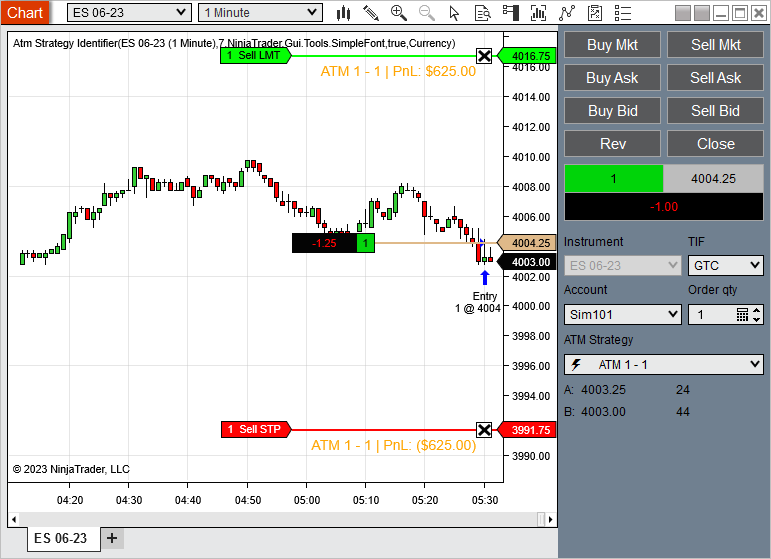
    This indicator serves to provide labels for Atm strategies that are present on your chart. Each new Atm strategy will rotate through the colors defined in your Brush Collection. Simply add to a chart, select the data series you want to have labels added to, choose your font and add all the brushes/colors you want […]

    Leave a comment:


  • Adnoker
    replied
    Here is the code for stops that calculates for each distinct stop, and appends PnL correctly (even if stacked). You can replicate the same for Targets.
    entry price is the avg price from the Positions instead of Orders.
    ticksize is the pointvalue - order.Instrument.MasterInstrument.PointValue;

    ----------------------------- code -------------------------
    List<double> stopsList = new List<double>();
    foreach (Order order in atmDictionary.ElementAt(i).Value.stops){
    stopsList.AddRange(Enumerable.Repeat(order.StopPri ce, order.Quantity));

    }

    stopsList.ForEach(a => {possiblePnL = (a-entryPrice) * ticksize * stopsList.Where(b => b.Equals(a)).Count();

    SharpDX.DirectWrite.TextLayout textLayout = new SharpDX.DirectWrite.TextLayout(NinjaTrader.Core.Gl obals.DirectWriteFactory,
    possiblePnL.ToString("C"), textFormat, ChartPanel.X + ChartPanel.W,
    textFormat.FontSize);
    float x = (float)(ChartPanel.X + ChartPanel.W - offset);
    float y = chartScale.GetYByValue(a) + textLayout.Metrics.Height/2;
    SharpDX.Vector2 textPoint = new SharpDX.Vector2(x, y);
    RenderTarget.DrawTextLayout(textPoint, textLayout, textBrushDx, SharpDX.Direct2D1.DrawTextOptions.NoSnap);
    textLayout.Dispose();
    });​
    Click image for larger version  Name:	image.png Views:	0 Size:	54.6 KB ID:	1234652​​
    Last edited by Adnoker; 02-08-2023, 04:01 PM.

    Leave a comment:


  • SuperDriveGuy
    replied
    Hi NinjaTrader_ChelseaB,
    This seems like a very good indicator!

    Please add my vote to updating it to display the correct stoploss values.
    Thanks

    Leave a comment:


  • NinjaTrader_ChelseaB
    replied
    Hello Dejavu7629,

    Welcome to the NinjaTrader forums!

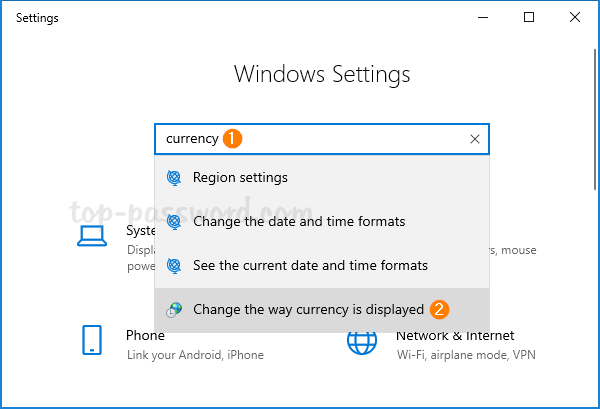
    The string currently uses "C" for currency.

    atmDictionary.ElementAt(i).Value.Name + " PnL: " + possiblePnL.ToString("C")

    You would need to change your windows regional settings to use a different currency symbol.
    How can I change the default currency in Excel? In this tutorial we'll show you how to change the default currency format in Windows 10.


    Or you could use a different string and just type in the symbol you want.

    Leave a comment:


  • Dejavu7629
    replied
    How do I change the currency symbol in the indicator? NinjaTrader_ChelseaB

    Leave a comment:


  • GBF_PAT
    replied
    Thank you support team!

    Leave a comment:


  • NinjaTrader_ChelseaB
    replied
    Hello GBF_PAT,

    The script is an indicator. Download, import, then add the indicator to a chart in the Indicators window.

    To import a NinjaScript into NinjaTrader 8 do the following:
    1. Download the script to your desktop, keep it in the compressed .zip file.
    2. From the Control Center window select Tools -> Import -> NinjaScript...
    3. Click the Desktop icon on the left to navigate to the desktop
    4. Select the downloaded .zip file -> then click Open
    5. NinjaTrader will then confirm if the import has been successful.
    Critical *Note that on any files that say "File already exists on your PC" that start with an "@" symbol are the ones that came preloaded inside of NinjaTrader so you would say "No" so that you do not override those files.

    Below is a link to the help guide on importing NinjaScripts.
    https://ninjatrader.com/support/help...-us/import.htm

    Leave a comment:


  • GBF_PAT
    replied
    @NinjaTrader_Kate

    Greetings! Please how can i add that to my chart trader??​
    Last edited by GBF_PAT; 01-04-2023, 02:01 PM.

    Leave a comment:


  • NinjaTrader_Kate
    replied
    Hello dj22522,

    Thank you for your reply.

    At the current time it's not designed to handle that. While we may make further improvements to the indicator available at some point, I cannot give any kind of ETA on when we may have the bandwidth to accomplish your request. I will note this for future improvements and will work on that as time allows.

    Please let us know if we may be of further assistance to you.

    Leave a comment:


  • dj22522
    replied
    Hello NinjaTrader_Kate

    Can the indicator you posted above at #2 be improved on to correctly total orders when they're moved to the same price re: my post #3.

    Many thanks
    Last edited by dj22522; 05-26-2022, 12:53 AM.

    Leave a comment:


  • Vulgoth_t_Destroyer
    replied
    NinjaTrader_Kate thanks for the response! I'll check that out. and dj22522 thanks for adding on the note about that PnL issue on moving the stops!

    Leave a comment:


  • dj22522
    replied

    The PnL is correct at each price level:


    Click image for larger version

Name:	Unreadable ATM Strategy identifier_1.jpg
Views:	7845
Size:	25.4 KB
ID:	1201259


    But the PnL is incorrect if moving all orders to the same price:

    Click image for larger version

Name:	Incorrect total ATM Strategy identifier_2.jpg
Views:	7523
Size:	14.5 KB
ID:	1201260

    If I may ask:


    Can the ATMStrategyIdentifire indicator be made to show the correct total PnL for all orders at that price ?


    Many thanks
    Last edited by dj22522; 05-13-2022, 10:24 AM.

    Leave a comment:


  • NinjaTrader_Kate
    replied
    Hello,

    Thank you for your note.

    I suspect this version of our publicly available ATM Strategy identifier script may be of use. I've attached it below. fi you submit an ATM strategy order, when the entry fills the stop loss and profit target will display the current PnL that would be taken at those levels.

    Please let us know if we may be of further assistance to you.
    Attached Files

    Leave a comment:

Latest Posts

Collapse

Topics Statistics Last Post
Started by kinfxhk, 07-14-2026, 09:39 AM
0 responses
131 views
0 likes
Last Post kinfxhk
by kinfxhk
 
Started by kinfxhk, 07-13-2026, 10:18 AM
0 responses
106 views
0 likes
Last Post kinfxhk
by kinfxhk
 
Started by kinfxhk, 07-13-2026, 09:50 AM
0 responses
87 views
0 likes
Last Post kinfxhk
by kinfxhk
 
Started by kinfxhk, 07-13-2026, 07:21 AM
0 responses
107 views
0 likes
Last Post kinfxhk
by kinfxhk
 
Started by kinfxhk, 07-11-2026, 02:11 AM
0 responses
87 views
0 likes
Last Post kinfxhk
by kinfxhk
 
Working...
X