Announcement

Collapse
No announcement yet.

Partner 728x90

Collapse

Problem Print

Collapse
X
 
  • Filter
  • Time
  • Show
Clear All
new posts

    #16
    I understand.

    I pushed my computer harder than you are pushing yours. Mine will also not crash with these settings.

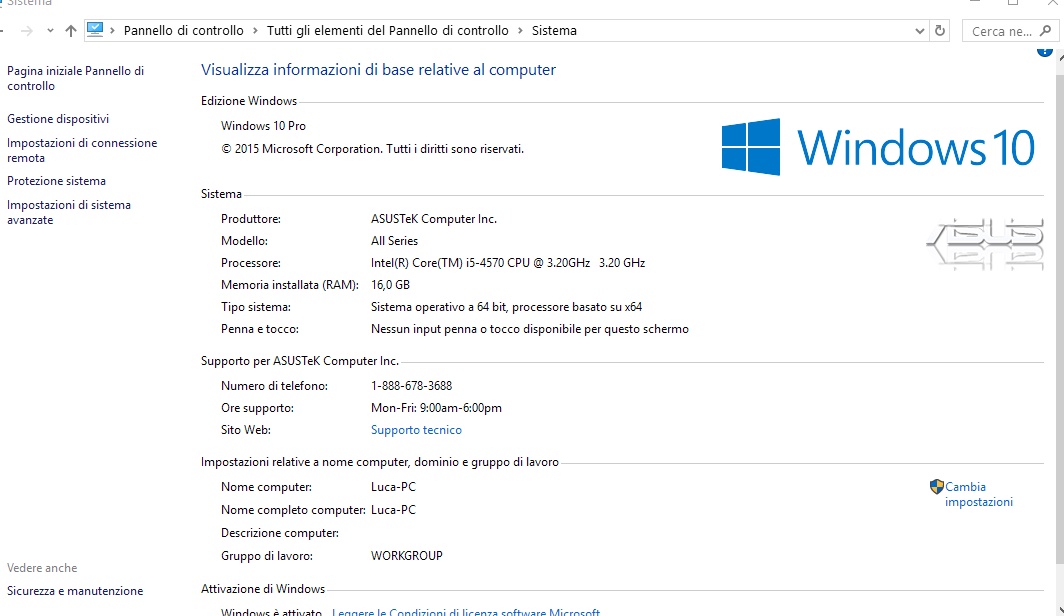
    I need to know what your computer's

    • processor speed
    • ram
    • number of processor cores

    are in order to make a system that works like yours
    Jessica P.NinjaTrader Customer Service

    Comment


      #17


      number of processor cores : 4


      i see the problem is not to call method Print to another indicator...but the problem is Print..

      if i have to print something...sometimes get me mistake ..sometimes no..

      I 've uninstall ninjatrader and reinstall but the problem go on...
      Last edited by esignal; 08-23-2016, 04:29 PM.

      Comment


        #18
        Do you have see my problem?

        Comment


          #19
          Hello esignal,

          It appears, even with the information you have provided, that what you observed is likely to be unique to your system or NinjaScript, as we were unable to discover anything on our end with the Print method under testing.

          I strongly suspect that the string you are passing in to Print is uninitialized.

          There is a work-around, which will also tell us more about what is unique to your system that is causing this. While less convenient, you may use

          Log("message", LogLevel.Information)

          everywhere you would use

          Print("message")

          This will send information to your logs instead of to the Output Window.

          If this, too, causes Ninja to crash, it means that the source of of the crash is the argument you are passing into Print. You will then have all the pieces you need to resolve your query. Please let us know if any specific questions come up past this point.

          If this prevents Ninja from crashing, please let us know at platformsupport[at]ninjatrader[dot]com , and please include Attn:NinjaTrader_JessicaP and 1561207 in the subject line of your e-mail . Please if at all possible also set aside some time between the hours of 08:30 AM and 18:00 PM EDT on a system you would be comfortable using for a remote desktop session, with NinjaTrader and your scripts on it.
          Jessica P.NinjaTrader Customer Service

          Comment


            #20
            You say :" I strongly suspect that the string you are passing in to Print is uninitialized. "

            But Print is a command of ninjatrader...and programmers of this platform know how they created it ...is correct ?then they are also wrong thing

            Comment


              #21
              While Print is a NinjaTrader method, the parameter you pass into Print is not. If you pass the same parameter into Log, and this too causes ninja to crash, then you know to look at the parameter you pass in.
              Jessica P.NinjaTrader Customer Service

              Comment


                #22
                excuse me....but in the Prova2 the string is : "Test"

                gg.printFromOutside("Test ");
                i know that parameter...is definited

                Comment


                  #23
                  You are correct, it looks like the parameter is not the thing we need to check, it looks like your instance variable, gg, may be what is causing this.

                  I may have misunderstood earlier though, I thought neither one of us could reproduce this behavior with prova.cs and prova2.cs ? And I thought you were using a different indicator of your own?

                  My suspicion based on everything you have mentioned is that you used a static singleton instance that was not thread safe, and did not set up gg the same way as we were doing, as a property attached to a running instance.

                  If you can send us code that does cause errors, please let us know, that will help a lot.
                  Jessica P.NinjaTrader Customer Service

                  Comment


                    #24
                    my code in Post #1....i resolve it.....
                    Now it's correct...(there was a problem in the code ..)

                    Now it Print and not give me error

                    I'm interesting to undersand in your example what is the error because i'll need to use this structure

                    In your example you ask me to do what you said :


                    There is a work-around, which will also tell us more about what is unique to your system that is causing this. While less convenient, you may use

                    Log("message", LogLevel.Information)

                    everywhere you would use

                    Print("message")

                    This will send information to your logs instead of to the Output Window.
                    i try and i look run ok....(no error)

                    Code:
                    		public void printFromOutside(string message)
                    {
                    
                    	Log("message", LogLevel.Information);
                    }


                    Since i'm interesting to pass variable as examples (see strategy ecc..) i ask you
                    if a problem is Print? Do you understand what is a problem is?
                    Last edited by esignal; 08-28-2016, 04:00 AM.

                    Comment


                      #25
                      i made other try..

                      i've a old pc very slow pc with intel core 2...2 Giga ram....., with win7...
                      it' all ok....run perfectly with my strategy (load 500 days with 1 minute..) and run perfectly with your try
                      (prova2)..

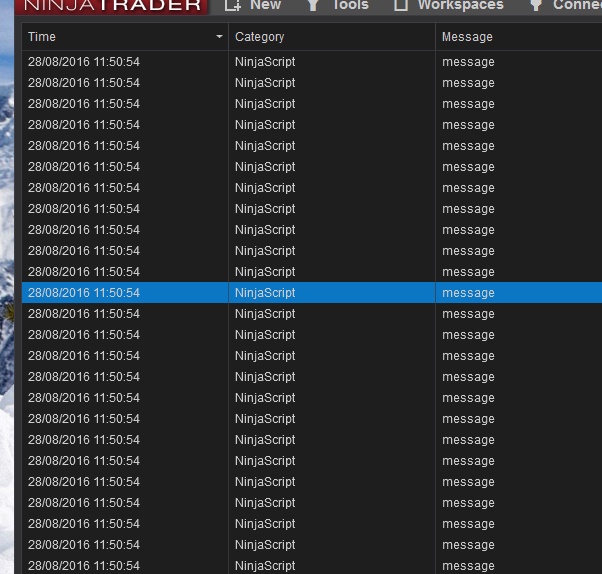
                      in this pc (this is pc fast..with 16 Giga ram....and window10)
                      sometimes work and sometime no..(when it don't work,my indicator it also blocks without using print)


                      May be there are conflict software? (antivurus..)
                      (see pics..with program resident in memory)
                      Attached Files
                      Last edited by esignal; 08-29-2016, 02:42 AM.

                      Comment


                        #26
                        Hello eSignal,

                        I believe I am developing a clearer picture of what is happening on your end, thank you for your explanations and your patience.

                        Just so I am on the same page, is all of the following true?

                        • We are using the prova.cs and prova2.cs files, and no other indicators, to test with
                        • We are testing these indicators on 2 machines
                          • One machine is Windows 10 64 bit, 16 GiB ram, 4 cores, 3.2GiHz
                          • One machine is Windows 7 64 bit, 2 GiB ram, (1, 2, or 4 cores?), (1.06, 2.20, or 3.33 GiHz ?)
                        • On your Windows 10 machine you are seeing error messages occasionally
                          • These are related to your Windows Event Viewer event ID 9912

                        If all of this is true, then I believe we can narrow this down to something with your windows 10 configuration. To find out exactly what it is, would it be possible to use the freely and publicly available screen capture software Jing, https://www.techsmith.com/jing.html , or a similar program which can record video of what is happening on your screen, so that you can show me what is occurring on your end? These quick instructions can get you started with Jing.


                        1. When you start Jing, a yellow half circle will appear near the top of your screen. Please hover over it with your mouse

                        2. A small + sign will extend out of this half circle. Please click on it

                        3. When your cursor becomes two intersecting lines, please click and drag your mouse over an area of your screen you would like to record

                        4. Please press the film strip button that appears to begin recording

                        5. When you are finished recording, please press the square stop button that appears

                        6. Please press the share button that appears. It consists of three vertical upward pointing arrows.


                        You will then have the option to view your video on screencast.com . This is the link which can help me diagnose what is happening on your end. It is possible you will need to set up a free account in order to share videos.


                        Thank you very much in advance for providing us with this information. If this procedure is not an option for you, or if there are any other questions we can answer, please let us know.
                        Jessica P.NinjaTrader Customer Service

                        Comment


                          #27
                          now it 's ok..prova2 run correctly..

                          i must wait when it'll give me the error and i check if EventRecordId is the same..

                          Comment


                            #28
                            [QUOTE=NinjaTrader_JessicaP;472608]Hello eSignal,

                            I believe I am developing a clearer picture of what is happening on your end, thank you for your explanations and your patience.

                            Just so I am on the same page, is all of the following true?

                            [LIST][*]We are using the prova.cs and prova2.cs files, and no other indicators, to test with[*]We are testing these indicators on 2 machines

                            YES
                            • One machine is Windows 10 64 bit, 16 GiB ram, 4 cores, 3.2GiHz
                            • One machine is Windows 7 64 bit, 2 GiB ram, (1, 2, or 4 cores?), (1.06, 2.20, or 3.33 GiHz ?)


                            YES
                            [*]On your Windows 10 machine you are seeing error messages occasionally
                            • YES
                            • These are related to your Windows Event Viewer event ID 9912


                            No...now i've get an error..but is different :

                            - <Event xmlns="http://schemas.microsoft.com/win/2004/08/events/event">
                            - <System>
                            <Provider Name="Application Error" />
                            <EventID Qualifiers="0">1000</EventID>
                            <Level>2</Level>
                            <Task>100</Task>
                            <Keywords>0x80000000000000</Keywords>
                            <TimeCreated SystemTime="2016-08-30T21:34:34.478174000Z" />
                            <EventRecordID>10715</EventRecordID>
                            <Channel>Application</Channel>
                            <Computer>Luca-PC</Computer>
                            <Security />
                            </System>
                            - <EventData>
                            <Data>NinjaTrader.exe</Data>
                            <Data>8.0.0.12</Data>
                            <Data>577d3093</Data>
                            <Data>KERNELBASE.dll</Data>
                            <Data>10.0.10586.494</Data>
                            <Data>5775e4c5</Data>
                            <Data>80000003</Data>
                            <Data>00000000000c2d52</Data>
                            <Data>3a28</Data>
                            <Data>01d203063e74d7ba</Data>
                            <Data>D:\NinjaTrader 8\bin64\NinjaTrader.exe</Data>
                            <Data>C:\WINDOWS\system32\KERNELBASE.dll</Data>
                            <Data>71a3f7df-60cd-4ec7-8893-cb0a78d78b68</Data>
                            <Data />
                            <Data />
                            </EventData>
                            </Event>

                            - <Event xmlns="http://schemas.microsoft.com/win/2004/08/events/event">
                            - <System>
                            <Provider Name="Application Error" />
                            <EventID Qualifiers="0">1000</EventID>
                            <Level>2</Level>
                            <Task>100</Task>
                            <Keywords>0x80000000000000</Keywords>
                            <TimeCreated SystemTime="2016-08-30T22:51:18.414692500Z" />
                            <EventRecordID>10731</EventRecordID>
                            <Channel>Application</Channel>
                            <Computer>Luca-PC</Computer>
                            <Security />
                            </System>
                            - <EventData>
                            <Data>NinjaTrader.exe</Data>
                            <Data>8.0.0.12</Data>
                            <Data>577d3093</Data>
                            <Data>KERNELBASE.dll</Data>
                            <Data>10.0.10586.494</Data>
                            <Data>5775e4c5</Data>
                            <Data>80000003</Data>
                            <Data>00000000000c2d52</Data>
                            <Data>30e0</Data>
                            <Data>01d20310ef709592</Data>
                            <Data>D:\NinjaTrader 8\bin64\NinjaTrader.exe</Data>
                            <Data>C:\WINDOWS\system32\KERNELBASE.dll</Data>
                            <Data>89c961d4-92fd-48d8-bc0d-12bfeb6c0324</Data>
                            <Data />
                            <Data />
                            </EventData>
                            </Event>

                            I SENT YOU VIDEO OF ERROR WITH JING

                            (Att : NinjaTrader_JessicaP and 1561207)
                            Last edited by esignal; 08-31-2016, 06:43 AM.

                            Comment


                              #29
                              Thank you for this additional information. The video unfortunately did not attach properly to your e-mail. Could you click the "share on screencast" button on your video and send us the web link url this gives you?

                              Breakpoint errors are usually errors that show up in our logs, so if you could send your most recent log and trace files that would be appreciated as well.
                              Jessica P.NinjaTrader Customer Service

                              Comment


                                #30
                                World's leading screen capture + recorder from Snagit + Screencast by Techsmith. Capture, edit and share professional-quality content seamlessly.
                                Attached Files

                                Comment

                                Latest Posts

                                Collapse

                                Topics Statistics Last Post
                                Started by Geovanny Suaza, 02-11-2026, 06:32 PM
                                0 responses
                                669 views
                                0 likes
                                Last Post Geovanny Suaza  
                                Started by Geovanny Suaza, 02-11-2026, 05:51 PM
                                0 responses
                                378 views
                                1 like
                                Last Post Geovanny Suaza  
                                Started by Mindset, 02-09-2026, 11:44 AM
                                0 responses
                                111 views
                                0 likes
                                Last Post Mindset
                                by Mindset
                                 
                                Started by Geovanny Suaza, 02-02-2026, 12:30 PM
                                0 responses
                                575 views
                                1 like
                                Last Post Geovanny Suaza  
                                Started by RFrosty, 01-28-2026, 06:49 PM
                                0 responses
                                580 views
                                1 like
                                Last Post RFrosty
                                by RFrosty
                                 
                                Working...
                                X