
This will become an issue for anyone who writes a leading indicator in NinjaScript. If this is a bug then please fix it. But if this is a current implementation then are there any ways of overcoming this inconvenience?
Announcement
Collapse
No announcement yet.
Partner 728x90
Collapse
NinjaTrader
IsAutoScale - unexpected behaviour in leading indicator
Collapse
X
-
IsAutoScale - unexpected behaviour in leading indicator
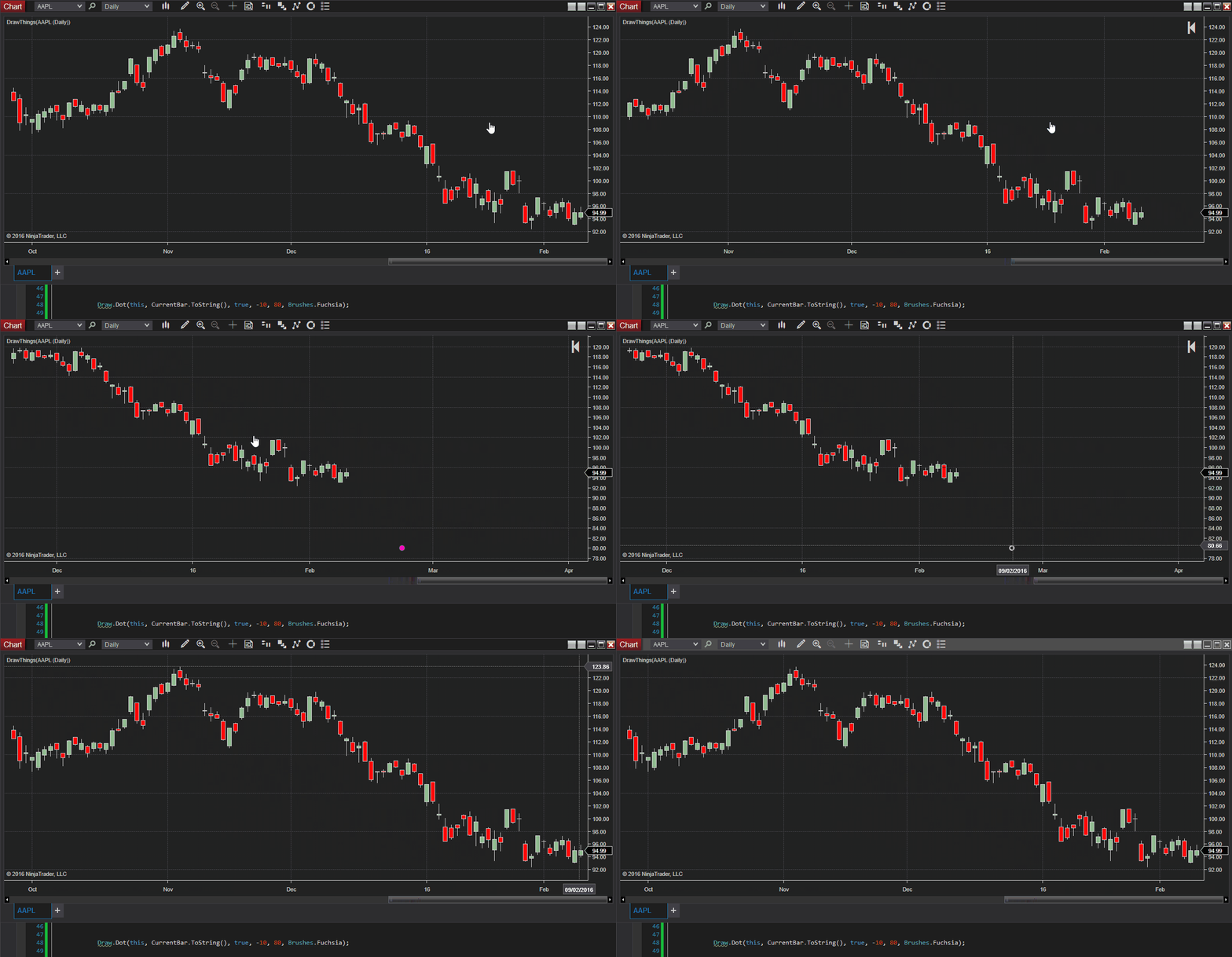
To keep this example as simple as possible I wrote a line of code, which you can see in the bottom part of the GIF animation below. This code draws a single dot 10 bars ahead of the last closed bar on X-axis at a level of 80 on Y-axis. IsAutoScale is set to true in the code and in the indicator properties window. Yet it is not visible (does not auto scale) unless I drag the bars to the left for a distance of about 30 bars.
This will become an issue for anyone who writes a leading indicator in NinjaScript. If this is a bug then please fix it. But if this is a current implementation then are there any ways of overcoming this inconvenience?
-
Hello roslja,
Thanks for your post (and gif showing the issue!)
I've recreated your code and applied it and what I observe is that when the dot appears (relative to time) the chart's autoscale does change to show the dot. I used the same -10 and when I advance 10 bars it autoscales and this would be expected. Please observed the linked video of 1 minute bars and placing the dot 10 bars in advance, at the end I use the ruler tool to show the distance (9:00 minutes = 9 bars). http://screencast.com/t/3OpKWscrf6
So it appears to be operating as expected.
-
Thanks Paul.
it is clear now that my NT8b8 installation is damaged and I am sure it is somehow related to Equidistant Bar Spacing setting which I had endless times switched on and off to test the charts behaviour. Even now, if I change it, the troubled dot gets shifted even further away. Please have a look at my latest screenshot below and pay attention to two rulers. You can see that the number of bars is way out of sync compared to number of days. This is why I need to scroll the chart that far before the dot appears. I tried to reset the charts and bars settings to default and use a new workspace but this did not help. What else can I do to reset things to default?
Comment
-
Hello roslja,
Thanks for your reply.
I more closely reproduced your set -up and was able to delay the appearance of the dot even further by expanding out the bars to show the days of the month. When I did that, a dot drawn two days in advance did not appear until several days after it were loaded on the chart.
I have submitted a bug report on this.
Thanks for your post and participation in the NinjaTrader 8 beta.
Comment
Latest Posts
Collapse
| Topics | Statistics | Last Post | ||
|---|---|---|---|---|
|
Started by argusthome, Yesterday, 10:06 AM
|
0 responses
20 views
0 likes
|
Last Post
by argusthome
Yesterday, 10:06 AM
|
||
|
Started by NabilKhattabi, 03-06-2026, 11:18 AM
|
0 responses
18 views
0 likes
|
Last Post
|
||
|
Started by Deep42, 03-06-2026, 12:28 AM
|
0 responses
14 views
0 likes
|
Last Post
by Deep42
03-06-2026, 12:28 AM
|
||
|
Started by TheRealMorford, 03-05-2026, 06:15 PM
|
0 responses
9 views
0 likes
|
Last Post
|
||
|
Started by Mindset, 02-28-2026, 06:16 AM
|
0 responses
40 views
0 likes
|
Last Post
by Mindset
02-28-2026, 06:16 AM
|

Comment