Announcement

Collapse
No announcement yet.

Partner 728x90

Collapse

SuperDOM Rows not static after save workspaces

Collapse
X
 
  • Filter
  • Time
  • Show
Clear All
new posts

    SuperDOM Rows not static after save workspaces

    the rows changed like picture
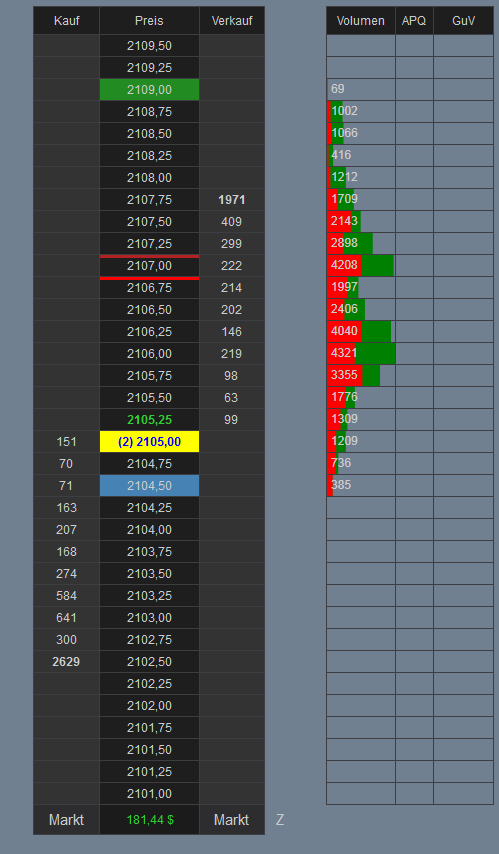

    than I save the workspace

    after restart NT8 the rows not saved
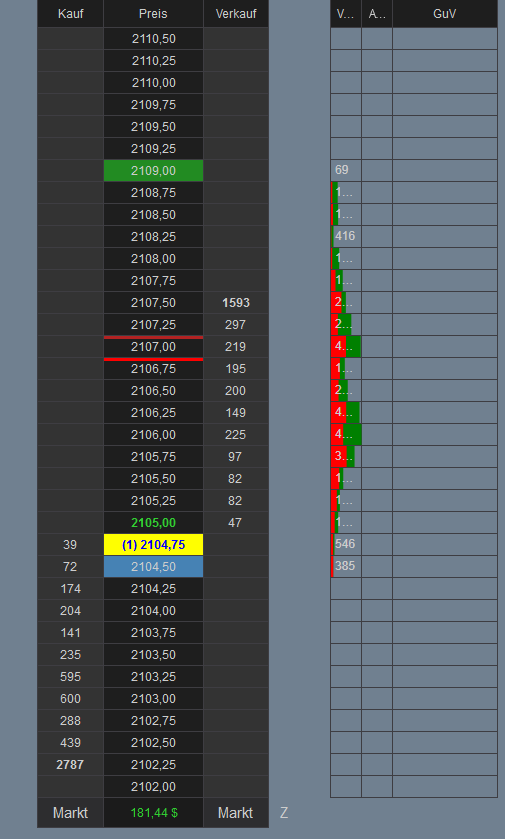
    Last edited by shilli1; 01-04-2016, 08:47 AM.

    #2
    Hello shilli1,

    I experience the same on my end. As far as I know this is as expected behavior. When saving the workspace, it does not save the price rows in the SuperDOM. It can change depending on the data that is received.

    Am I correct you like to save a fixed range of price rows in the SuperDOM?

    The Static SuperDOM is named "Static" because its price ladder remains static compared to the Dynamic SuperDOM.

    Comment


      #3
      No, I know that.

      look on right Volume, APQ and P%L

      Comment


        #4
        Thank you for clarifying.

        Please note that those are columns, not rows. I experience the same behavior on my end. I will forward a report to development. Thank you for reporting.

        Comment


          #5
          The issue has been fixed for the next beta release.

          Comment


            #6
            shilli1,

            I see you are using the German language version. How does the translation look? Please let us know if you see anything that may be incorrectly translated or could be improved.

            Thanks
            RayNinjaTrader Customer Service

            Comment


              #7
              I open a thread for this theme

              http://ninjatrader.com/support/forum...486#post442486

              Comment


                #8
                Just to verify, on startup the saved workspace SuperDOM columns (PnL, Volume etc) are squished to the left margin and need to be respaced each time... Is this the problem being fixed?

                Comment


                  #9
                  Hello TraderBliss,

                  This issue was fixed in beta release 8.0.0.4. When I test it on my end in the current beta release (8.0.0.11), I was not able to reproduce initially. However after restarting NinjaTrader a couple of times, I noticed the same issue. I tested both the Dynamic and Static SuperDOM. Do you experience with both or just with one?

                  Can you please go to Control Center-->Workspaces and click "new" in the lower right corner. Name the workspace as you like and click OK. Create a new SuperDOM and add the columns you like. Check if data is loaded as expected. Shut down NinjaTrader and save the workspace. Start NinjaTrader and connect again. Check if the columns have the same width as before. If so, please keep restarting NinjaTrader and tell me on what attempt you experience the issue again.

                  Comment

                  Latest Posts

                  Collapse

                  Topics Statistics Last Post
                  Started by Geovanny Suaza, 02-11-2026, 06:32 PM
                  0 responses
                  672 views
                  0 likes
                  Last Post Geovanny Suaza  
                  Started by Geovanny Suaza, 02-11-2026, 05:51 PM
                  0 responses
                  379 views
                  1 like
                  Last Post Geovanny Suaza  
                  Started by Mindset, 02-09-2026, 11:44 AM
                  0 responses
                  111 views
                  0 likes
                  Last Post Mindset
                  by Mindset
                   
                  Started by Geovanny Suaza, 02-02-2026, 12:30 PM
                  0 responses
                  575 views
                  1 like
                  Last Post Geovanny Suaza  
                  Started by RFrosty, 01-28-2026, 06:49 PM
                  0 responses
                  582 views
                  1 like
                  Last Post RFrosty
                  by RFrosty
                   
                  Working...
                  X
