
Announcement

Collapse
No announcement yet.

Partner 728x90

Collapse

Databox error

Collapse
X
 
  • Filter
  • Time
  • Show
Clear All
new posts

    Databox error

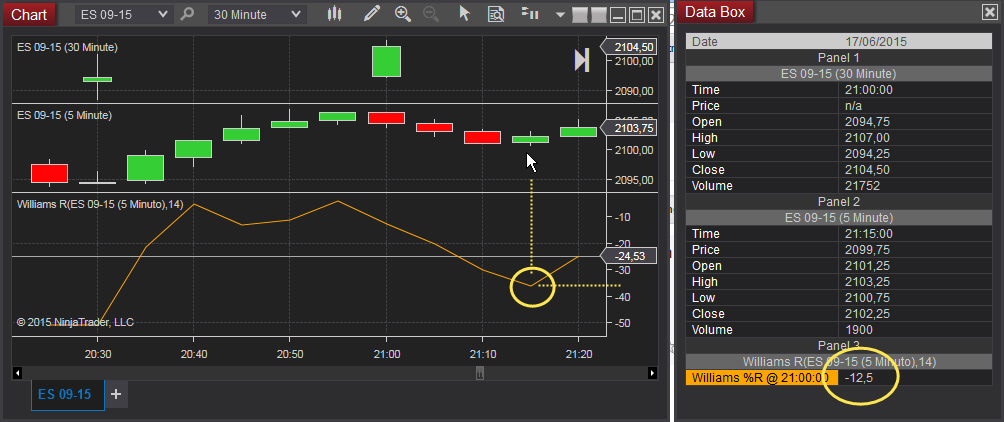
    In a chart with multiseries the Databox window is not updated correctly.

    In this example the bug occurs with groups of six bars ( 6 x 5min = 30min; it looks like is related with the multiseries).

    (Sorry if this issue has already been reported. I have searched but found nothing).
    Attached Files

    #2
    Right click on the 5 minute series and select "Set as Primary Series"

    OR

    Right click on the chart-> select "Properties"-> uncheck "Equidistant bar spacing".


    Otherwise, on an equidistant spaced bar chart, the time values (including indicator plots) are aligned based on the primary data series, therefore the values of the indicator plotted are not updated until the primary series has a new time slot (every 30 minutes in your case). If you switch the 5 minute to primary via the right click menu, the time axis and indicator plots are aligned to that 5 minute series, providing you the granularity you seek.

    Alternatively, disabling the equidistant bar spacing gives you a time slot for each series.
    MatthewNinjaTrader Product Management

    Comment

    Latest Posts

    Collapse

    Topics Statistics Last Post
    Started by Geovanny Suaza, 02-11-2026, 06:32 PM
    0 responses
    669 views
    0 likes
    Last Post Geovanny Suaza  
    Started by Geovanny Suaza, 02-11-2026, 05:51 PM
    0 responses
    378 views
    1 like
    Last Post Geovanny Suaza  
    Started by Mindset, 02-09-2026, 11:44 AM
    0 responses
    111 views
    0 likes
    Last Post Mindset
    by Mindset
     
    Started by Geovanny Suaza, 02-02-2026, 12:30 PM
    0 responses
    575 views
    1 like
    Last Post Geovanny Suaza  
    Started by RFrosty, 01-28-2026, 06:49 PM
    0 responses
    580 views
    1 like
    Last Post RFrosty
    by RFrosty
     
    Working...
    X