Announcement

Collapse
No announcement yet.

Partner 728x90

Collapse

Exporting Strategy Analyzer Grid to Excel

Collapse
X
 
  • Filter
  • Time
  • Show
Clear All
new posts

    Exporting Strategy Analyzer Grid to Excel

    Am I missing something does this program still export all parameters from a backtest into a single cell in Excel?

    If its still doing this now is it something I can expect to be changed?

    Any serious backtesting requires this change. (See TradeStation for an example of well implemented backtesting results handling.)

    From what I can tell the charting looks great so far but backtesting is something I do a lot of and it's EXTREMELY clumsy in NT in 6.5...I was hoping this would change in v7.

    Ron

    #2
    I agree - having all of the parameter values stuffed into a single cell isn't very convenient (both in the grid UI and the export). This is especially true for complex parameter strategies.

    Comment


      #3
      See the "Settings" tab after an optimization run, all optimized parameters are listed there per cell.
      RayNinjaTrader Customer Service

      Comment


        #4
        Originally posted by NinjaTrader_Ray View Post
        See the "Settings" tab after an optimization run, all optimized parameters are listed there per cell.
        OK, I should have said "optimization", not "backtesting". Backtesting is how we test a specific strategy with a specific set of input parameters. Ninja Trader does this just fine (including v6.5). But when one wants to study the effect of a particular input parameter on the profitability of a strategy it is very helpful chart the data. This means having the various values of a single input parameter in one column, and some measure of the profitability of the strategy in another. Then one can create a visualization of the effect that varying this parameter has on the outcome. Thus it is possible to quickly distinguish between a good outcome which is anomalous, and one which is likely to produce good results in the future.

        Would placing each input parameter in a separate column really be that difficult to code??? I'm able to work around this shortcoming using Excel, but I'm very surprised that this change has not been made.

        Furthermore if I try to look at the results of each different test it takes a very long time for the results to load after I click on a different row. In TradeStation for example the results of different parameter set load in a couple seconds after clicking on the next row. Apparently these results are gathered during the optimization and saved in memory for quick access when the results are being perused. It is quite well done.

        I think if every aspect of the charting works as advertised you will have a very powerful charting software. But I don't think you can advertise the new Ninja as a program which has anything but rudimentary optimization capabilities unless this and a few other things are fixed.

        Ron

        Comment


          #5
          Originally posted by NinjaTrader_Ray View Post
          See the "Settings" tab after an optimization run, all optimized parameters are listed there per cell.
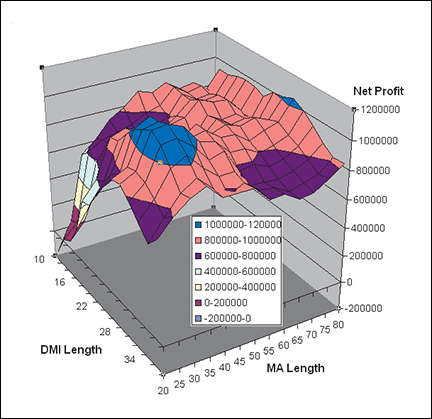
          As RSI said, we need these in the same grid as the performance numbers, so we can export the performance of various parameter permutations and their matching performance metrics. Graphing of this information is very helpful. But having the parameters in their own columns would allow sorting the performance results grid by a parameter. I understand having many parameters might clutter the grid UI, so they could be off by default (and selectable using the existing column chooser) or shown only with a certain option set.

          Many similar trading optimization tools allow selecting 1 or 2 arbitrary strategy parameters for 1 or 2 axes, and then allow selecting a performance metric for the next axis, and the results are either a 2D or 3D optimization graph, showing the changes in performance as the strategy parameters are changed, without having to export to Excel, etc. Examples:

          Comment


            #6
            Understood. I will add this feature request to our enhancement list.
            RayNinjaTrader Customer Service

            Comment

            Latest Posts

            Collapse

            Topics Statistics Last Post
            Started by Geovanny Suaza, 02-11-2026, 06:32 PM
            0 responses
            599 views
            0 likes
            Last Post Geovanny Suaza  
            Started by Geovanny Suaza, 02-11-2026, 05:51 PM
            0 responses
            345 views
            1 like
            Last Post Geovanny Suaza  
            Started by Mindset, 02-09-2026, 11:44 AM
            0 responses
            103 views
            0 likes
            Last Post Mindset
            by Mindset
             
            Started by Geovanny Suaza, 02-02-2026, 12:30 PM
            0 responses
            558 views
            1 like
            Last Post Geovanny Suaza  
            Started by RFrosty, 01-28-2026, 06:49 PM
            0 responses
            558 views
            1 like
            Last Post RFrosty
            by RFrosty
             
            Working...
            X